Dynamic segmentation is a smarter way to organize and target prospects for cold email campaigns. It uses real-time data like behavior, job changes, and engagement to automatically update contact groups. Unlike static lists, this method ensures your emails stay relevant and avoid spam filters. Here's why it matters:
To get started, you’ll need clean data, the right tools, and a clear segmentation strategy. Platforms like Infraforge offer features like dedicated IPs, automated DNS setup, and pre-warmed domains, making them ideal for scaling cold outreach. The key steps include:
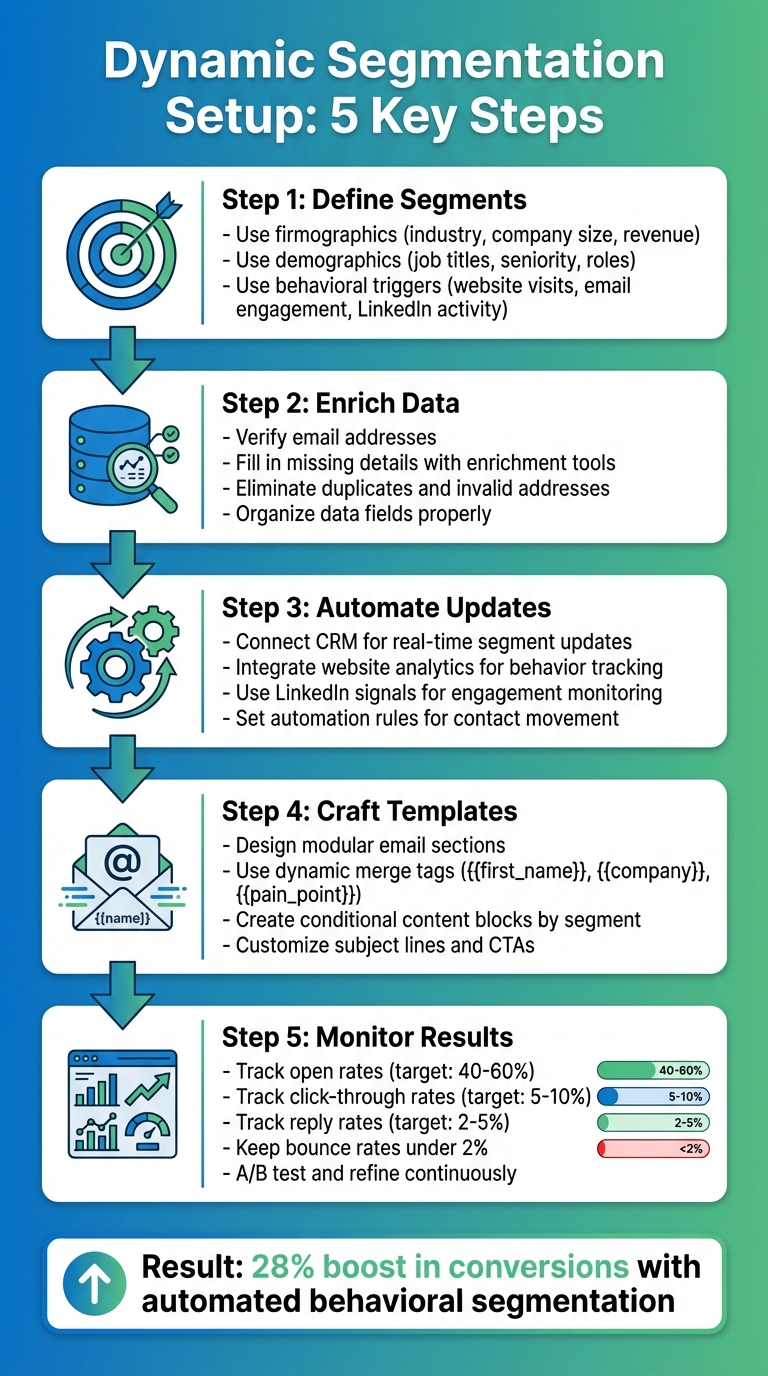
5-Step Dynamic Segmentation Setup Process for Cold Email Campaigns
Dynamic segmentation starts with having clean, detailed prospect data. This typically includes firmographic data (like industry, company size, and revenue), demographic data (such as job titles, seniority, and roles), and behavioral triggers (like website visits, email engagement, or LinkedIn activity). The process begins by identifying leads, enriching them with additional data points, and verifying email addresses to ensure accuracy.
Before diving into segmentation, it’s important to audit your data. This means eliminating duplicates, removing invalid or bounced email addresses, and ensuring your fields are well-organized. Common fields used for cold email segmentation include:
Each segment should align with specific pain points and tailored value propositions. Once your data is refined, the next step is selecting the right tools to enable smooth segmentation.
The tools you choose are key to making the most of your enriched data. Your email platform should support custom fields, tags, dynamic merge tags, saved segments, and automation rules to seamlessly move contacts between segments. For high-volume cold outreach, you’ll also need warmed domains, proper DNS setup (SPF, DKIM, DMARC), multiple sending inboxes, and strong deliverability management.
For example, Infraforge is a standout option for deliverability. It offers features like dedicated IPs, automated DNS setup, pre-warmed domains, SSL masking, multi-IP provisioning, and API integration - perfect for scaling large cold email campaigns. Woodpecker, on the other hand, focuses more on automation sequences and A/B testing but lacks advanced IP management. Smartlead provides tools for dynamic fields and tags, but its DNS and warm-up capabilities are more limited.
| Feature | Infraforge | Woodpecker | Smartlead |
|---|---|---|---|
| Dynamic Fields/Tags | Yes (API-driven) | Yes | Yes |
| Dedicated IPs | Yes (multi-IP) | Limited | Yes |
| Auto DNS/Warm-up | Yes | No | Partial |
| Cost (200 Mailboxes) | $651/month | Varies | Varies |
To keep your segments actionable and up-to-date, integrating data sources is crucial. This step builds on the enriched data and infrastructure you’ve already established.
Start by connecting your CRM to automate segment updates based on changes like deal status, lifecycle stage, or ownership. Add website analytics through tracking scripts to monitor visits to key pages - like pricing, features, and case studies - and trigger segment adjustments or follow-up sequences. Additionally, tap into LinkedIn signals (profile views, post engagement, ad clicks) using native integrations or third-party tools to identify active prospects and adjust their segmentation accordingly.
For example, an e-commerce retailer boosted conversions by 28% by automating segments based on purchase history and site visits. In the B2B space, tailoring messages to demo requesters by segmenting based on LinkedIn engagement and CRM stages significantly improved reply rates. Tools like Infraforge’s API can help scale these efforts by connecting your email infrastructure with the rest of your growth stack, ensuring real-time data flow and seamless outreach.
Start by identifying actionable criteria for segmenting your audience. This can include a mix of firmographic data (like industry, company size, revenue), demographic details (job titles, seniority, departments), and behavioral triggers (website visits, email engagement, LinkedIn activity). Each segment should align with a customized value proposition that directly addresses the challenges unique to that group.
For example, if you're targeting SaaS companies with 50–200 employees, your messaging might focus on helping sales teams book more demos without increasing headcount. On the other hand, for larger manufacturing firms, you might emphasize improving operational efficiency and reducing ticket backlogs.
Here’s a quick reference table to help you connect segment attributes to specific messaging angles:
| Segment Type | Example Attributes | Tailored Value Proposition |
|---|---|---|
| Firmographic | SaaS, 50–200 employees, $5M–$20M revenue | Scale demo bookings without hiring more SDRs |
| Demographic | VP Sales, Director-level, Sales Ops team | Cut SDR ramp time from 90 to 30 days |
| Behavioral | Visited pricing page 3+ times, opened emails | Start a pricing-focused conversation with {{company}} |
Once you’ve nailed down your segmentation criteria, the next step is to gather and enrich your prospect data.
Set up dynamic merge tags (like {{first_name}}, {{company}}, or {{pain_point}}) within your email platform to pull data directly from your CRM or spreadsheets. Use data enrichment tools to fill in missing details such as job titles, company size, or verified email addresses. Before importing leads, run an email verification process to protect your sender reputation and ensure high deliverability rates.
Whenever possible, automate this data collection process. AI-powered tools can identify leads, enrich their profiles, and verify email addresses in real time. This automation ensures your segments stay current as new prospects enter your funnel, freeing you up to focus on crafting impactful messaging.
Once your data is enriched, you can start building automated segments. Use the criteria you defined earlier to create saved segments or tags. For instance, set conditions like "industry = SaaS AND employee_count between 50 and 500 AND role contains 'VP Sales'" to create a segment called "SaaS Mid-Market Sales Leaders." Then, configure automation rules to tag new leads that meet these conditions automatically.
Behavioral automation can further refine your segments. For example, if a contact opens an email twice and clicks a link, you can move them from "Cold Outreach" to "Engaged – High Intent." If a lead doesn’t engage after several attempts, shift them to a "Reactivation" or "Nurture" segment. Test your logic with a small batch of leads (about 100) to confirm targeting accuracy before scaling up.
Create modular email templates that adapt to different segments. These templates can include sections for the introduction, problem statement, value proposition, social proof, and call-to-action (CTA). Use conditional content blocks to tailor the message based on segment-specific data. For instance:
industry = SaaS, highlight SaaS-specific pain points and case studies.industry = Manufacturing, focus on operational challenges and solutions.Subject lines and CTAs should also be customized. For example, a subject like "Cut SDR ramp time at {{company}}" might appeal to a VP of Sales, while "Reduce ticket backlog for {{company}}'s support team" could resonate more with a Head of Support.
For high-volume campaigns, consider using a dedicated email infrastructure like Infraforge. It offers features such as dedicated IPs, automated DNS setups, pre-warmed domains, and multi-IP provisioning to support your segmented outreach effectively.
Set up workflows that trigger email sends when a contact enters a segment or meets specific behavioral conditions. For instance, if someone visits your pricing page twice in one week, you can initiate a pricing-focused email sequence. AI-driven personalization tools can enhance these workflows by adjusting openers or content based on recent LinkedIn activity while staying true to your segment messaging.
Track performance metrics for each segment, including open rates, reply rates, click-through rates, bounce rates, unsubscribes, booked meetings, and revenue impact. A/B test subject lines, hooks, offers, and CTAs within each segment to refine your approach. Also, schedule emails to align with the recipient’s time zone; in the U.S., sending emails between 9–11 a.m. on Monday through Thursday tends to yield the best results.
Lastly, behavioral segmentation can be a game-changer. For example, a retailer saw a 28% boost in conversions by automating emails triggered by browsing behavior.
After setting up dynamic segmentation and launching your initial campaigns, the next step is ongoing optimization. Start by testing one variable at a time within each segment. For instance, if your target audience includes cybersecurity companies, experiment with different angles - does a focus on security resonate more, or does highlighting user experience perform better? Split your segment evenly, send both variations at the same time, and measure open and reply rates. Once you identify the better-performing version, roll it out to the entire segment. Keep retesting every few weeks to adapt to changing market conditions. Use these insights to continually refine your overall campaign strategy.
Building on your A/B testing results, dive into the metrics that matter most. Monitor open rates (aim for 40–60% for segmented lists), click-through rates (target 5–10%), reply rates (2–5% is a good benchmark), bounce rates (keep this under 2%), and conversion rates like scheduled meetings. Comparing these metrics across different segments can reveal underperforming areas. For example, if open rates dip below 10%, it may be time to revisit your segmentation strategy. Leverage your email platform's analytics to dig deeper into segment-specific trends. High open rates paired with low replies could indicate your message isn’t compelling enough, while low open rates might mean it’s time to rethink your subject lines.
Based on performance data, consider using behavioral triggers to reassign contacts as their engagement changes. For instance, if someone opens multiple emails but never clicks, move them to a "High Awareness, Low Intent" segment and adjust your messaging accordingly. For larger segments (over 1,000 contacts), review your segmentation criteria every quarter; for smaller test groups, do so weekly. AI-powered tools can help predict which leads are likeliest to convert based on engagement patterns, allowing you to refine your segment definitions over time. If you're handling high-volume campaigns, tools like Infraforge ensure reliable deliverability and provide real-time monitoring as your segments evolve.
Dynamic segmentation transforms cold email from a generic, one-size-fits-all approach into a highly targeted communication tool. By organizing prospects into groups based on factors like industry, job title, engagement patterns, or purchase history, you can craft messages that feel personal and tailored - not like they were blasted out to everyone. The payoff? Higher open rates, better reply rates, and more conversions.
The secret to making this work is constant fine-tuning. Begin with clear segmentation rules, gather and enhance your data, automate your groupings, and test relentlessly. Keep an eye on your metrics for each segment, tweak your messaging based on what resonates, and use behavioral triggers to move contacts between segments as they interact with your campaigns. But even the most polished strategy falls flat if your emails don’t reach their destination.
Deliverability is everything. Without a solid infrastructure, your carefully segmented emails risk getting flagged as spam. Scaling dynamic segmentation requires tools that can handle large volumes while maintaining inbox placement. That’s where Infraforge comes in, offering dedicated IPs, automated DNS setup (SPF, DKIM, DMARC), and pre-warmed domains that are ready to send within just five minutes.
With a well-thought-out segmentation strategy and reliable infrastructure, you can scale personalized outreach without sacrificing deliverability or relevance. Start small, test thoroughly, and let your data lead the way.
Dynamic segmentation stands out as a game-changer compared to static lists because it constantly updates and organizes your contacts using real-time data. This approach helps make your cold email campaigns more precise and tailored, increasing the chances of engagement and boosting conversion rates.
Unlike static lists that remain unchanged and demand manual updates, dynamic segmentation adjusts automatically whenever contact details change or fresh data comes in. This not only saves you time but also keeps your outreach relevant and impactful.
To get your data ready for dynamic segmentation, the first step is making sure it's clean and current. This means removing duplicates, fixing any errors, and filling in important missing details. Once that's done, group your contacts into categories that make sense - like engagement levels, demographics, or behavior patterns.
Tools like Infraforge's private email infrastructure can make this process smoother. Their features, such as automated DNS setup and pre-warmed domains, help keep your data accurate while boosting email deliverability. This ensures your outreach efforts are set up for success.
To make dynamic segmentation work seamlessly in your cold email campaigns, having the right tools is key. Features like dedicated IPs, pre-warmed domains and mailboxes, multi-IP provisioning, and automated DNS setup play a critical role in ensuring your emails actually land in inboxes. On top of that, real-time deliverability monitoring helps you keep an eye on performance and make adjustments as needed.
Platforms such as Infraforge bring all these features together in a single solution, making it easier to scale your outreach efforts while keeping deliverability rates high.