
What happens when a large volume of cold emails goes through a single IP address? A blocklisting issue or sudden throttling can affect every mailbox connected to it.
IP rotation distributes email traffic across multiple IP addresses instead of relying on one. Dedicated IPs give senders more control over each IP's reputation and keep their sending activity separate from other senders.
However, adding more IPs doesn't guarantee better deliverability. Each IP needs proper configuration, a gradual increase in sending volume, and regular monitoring.
In this guide, I'll explain how IP rotation works, its common types, and how to manage IPs for cold email.
IP rotation means using multiple IP addresses to handle network traffic instead of relying on one static address. A routing rule determines which IP handles each connection or request.
The term is used in different areas of networking. Proxy services, for example, use rotating IPs to route web requests through different addresses. Email infrastructure can also use multiple sending IPs to handle different email streams.
When an email leaves an outbound mail server, the recipient's mail server can see the sending IP address. Mailbox providers consider its reputation when evaluating incoming messages.
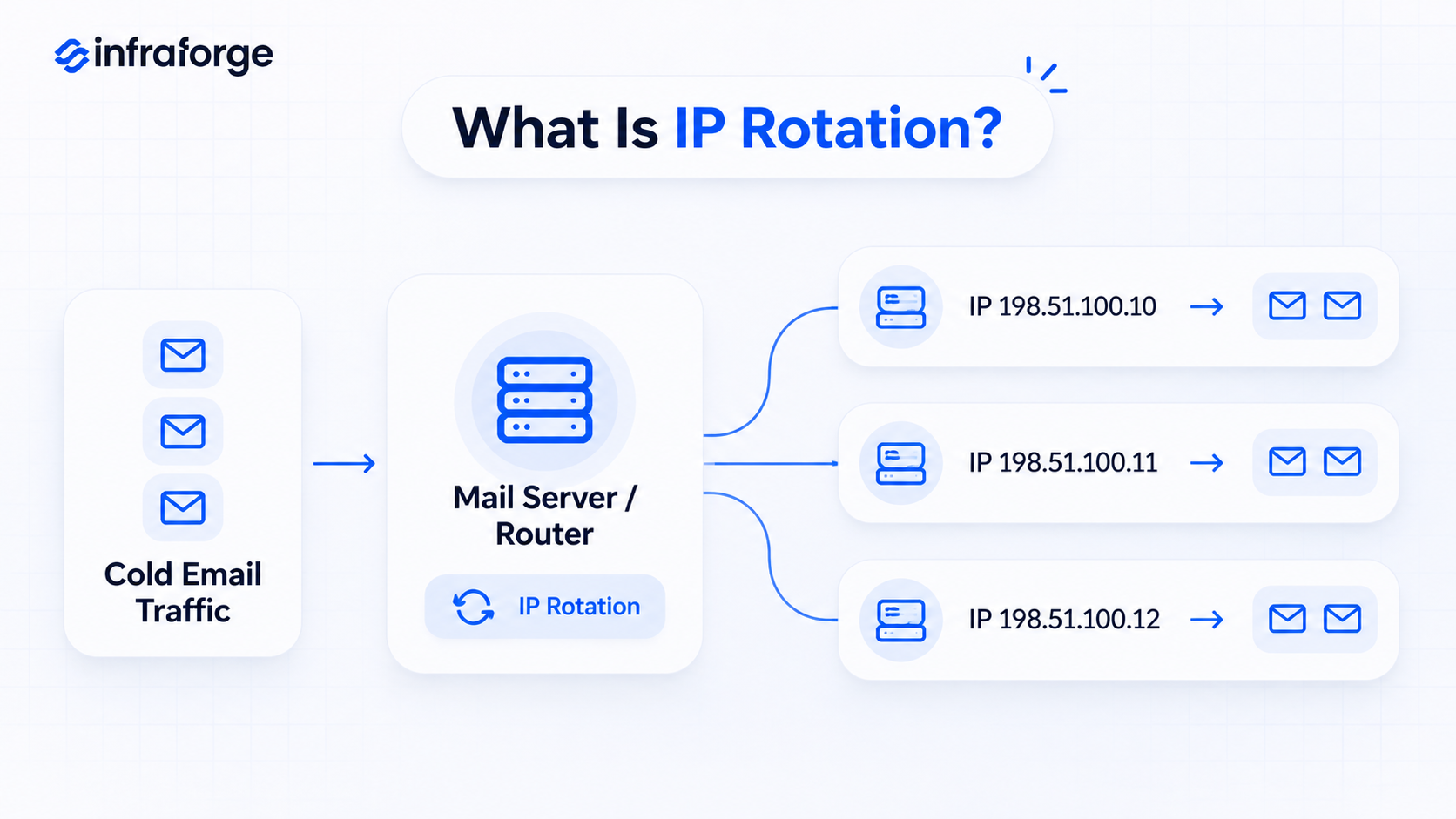
For cold email, IP rotation generally involves assigning different groups of mailboxes or email streams to separate sending IPs. The infrastructure determines which IP handles each message.
That said, frequent IP switching isn't always a good idea. Google recommends sending from the same IP where possible. If multiple IPs are necessary, Google recommends using different IPs for different message types.
An IP rotation setup uses multiple IP addresses and routing rules to distribute traffic.
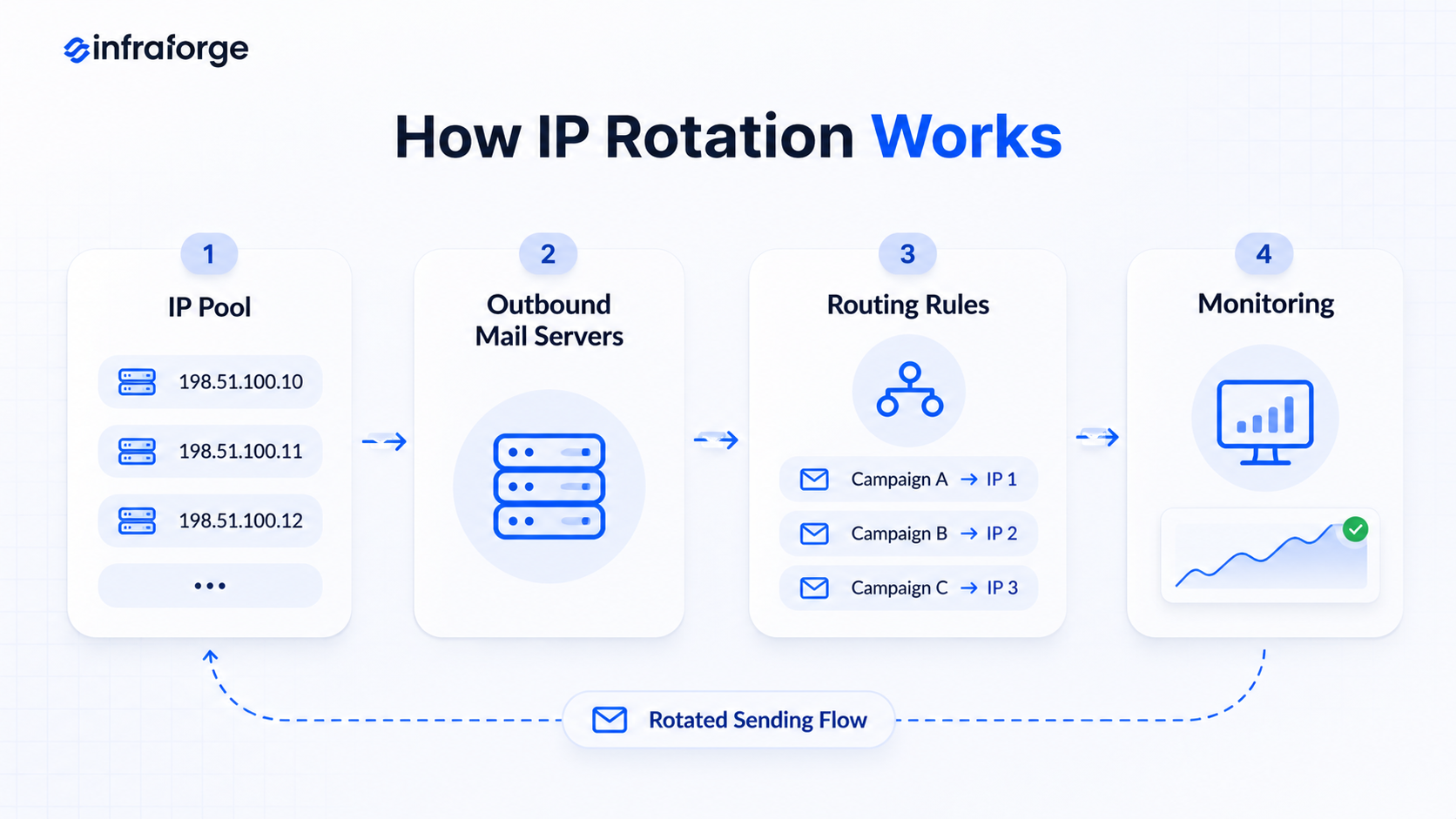
The process usually involves four steps:
For cold email, keeping IP assignments stable is important. Groups of mailboxes should have a consistent sending path instead of switching between random IPs for every message.
This guide to scaling email with API-driven IP pools explains how senders group IPs by campaign type.
Mailbox providers also consider domain reputation and authentication, along with list quality and spam complaints. A good IP reputation alone cannot guarantee inbox placement.
Google's official email sender guidelines cover these requirements in more detail.
IP rotation methods differ based on when and how the system switches between addresses.
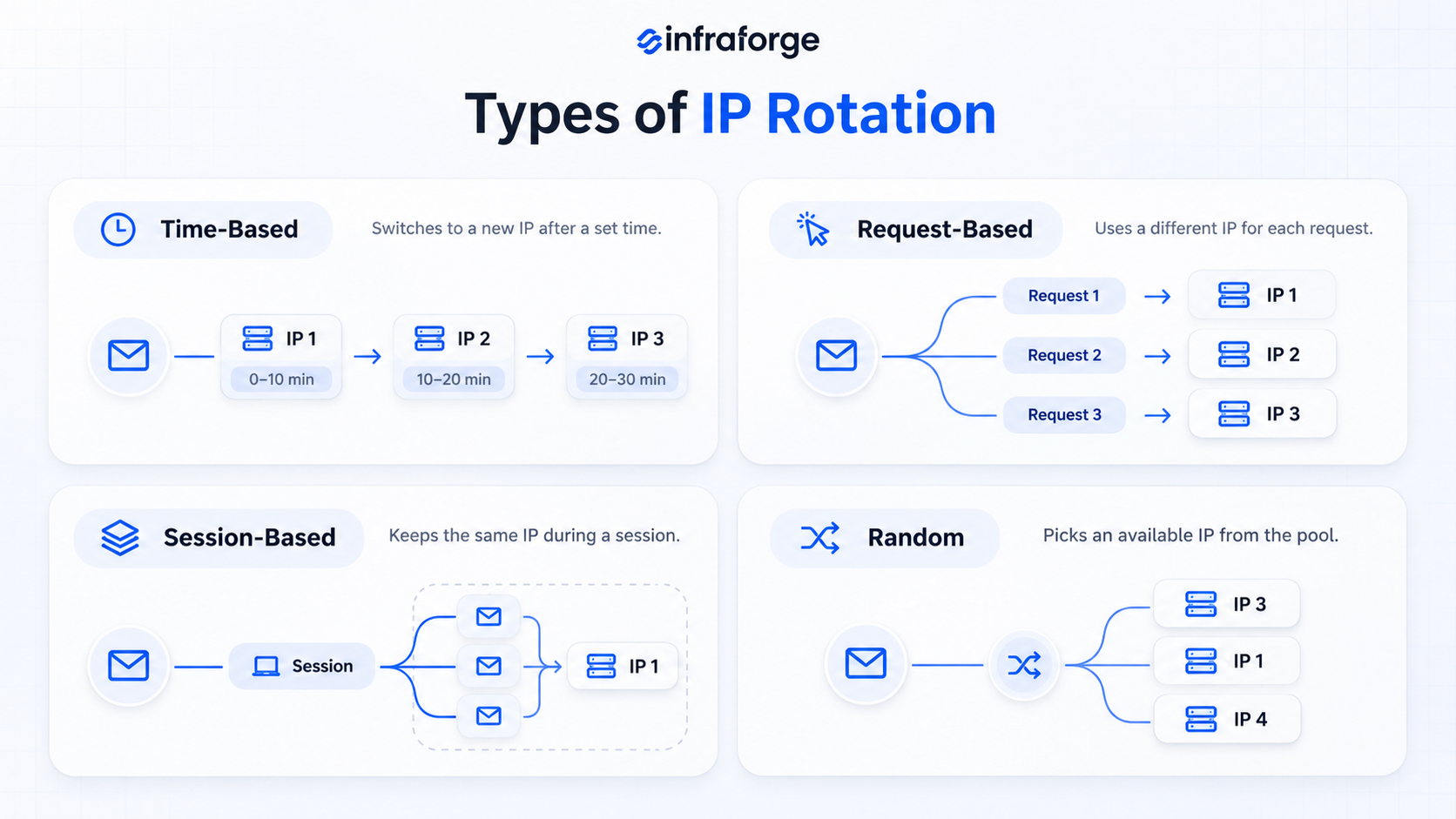
Time-based rotation switches to another IP after a set period. For example, a system might change IPs every 10 minutes or every hour.
The switch happens according to a schedule, regardless of the traffic being handled.
For cold email, frequent switching can make it harder to maintain a consistent sending history. A stable IP assignment is usually a better approach.
Request-based rotation assigns a different IP to each request.
For example, a proxy service might use a new IP every time someone loads a webpage. In email, the equivalent would be sending each message through a different IP.
Frequent switching is not a recommended cold email practice. Each new IP needs to establish its own sending reputation.
Session-based rotation, also called sticky-session rotation, keeps the same IP throughout a session. The system switches to another IP when the session ends.
For email, a similar setup would keep a group of mailboxes assigned to the same IP over time. The assignment remains stable unless there's a reason to change it.
Strictly speaking, a stable mailbox-to-IP assignment is closer to a stable routing arrangement. That distinction matters when planning cold email infrastructure.
Random rotation selects an available IP from the pool without following a set order.
The system can select a different IP for each request or session. Random IP selection is a poor fit for cold email because it creates inconsistent sending patterns.
Using many rapidly changing IPs and domains to distribute unwanted email can also resemble snowshoe spam.
Spamhaus explains how this practice spreads spam across multiple IPs and domains to evade reputation-based filters.
IP rotation can help manage email infrastructure when multiple sending IPs serve different purposes.
Its main benefits include:
IP rotation does not improve poor list quality, high complaint rates, or weak domain reputation. It should be part of a wider email infrastructure plan.
IP management becomes useful when different types of email traffic need separate sending paths.
The right setup depends on sending volume and email type. It also depends on the recipient provider and your ability to maintain each IP's reputation.
A static IP stays the same for each connection or sending session. A rotating IP setup switches between multiple addresses based on predefined rules.
A static IP is easier to manage because there's only one sending address to monitor. Multiple IPs make sense when different email streams need separate sending paths.
These terms describe two different things. Rotation describes how traffic moves between IP addresses. Dedicated describes who uses an IP address.
A dedicated IP can also be part of a multi-IP setup.
The more useful comparison is between shared and dedicated IPs.
Google confirms that activity from any sender using a shared IP can affect the reputation of other senders on that IP.
Dedicated IPs avoid that shared-sender issue, but they also make the sender responsible for maintaining the IP's reputation. They do not guarantee inbox placement or protect domain reputation from poor sending practices.
If you're moving to dedicated IPs, this guide on how to set up dedicated IPs for email outreach walks through the setup.
IP rotation and inbox rotation happen at different levels of the email sending setup.
IP rotation changes the outbound IP address. Inbox rotation changes the mailbox used to send an email.
Inbox rotation does not automatically mean IP rotation.
For example, 20 mailboxes can send emails through the same outbound server and IP. In that setup, the mailboxes rotate, but the sending IP remains the same.
If those mailboxes use different outbound IPs, both types of rotation may happen together.
Managing multiple IPs also adds work.
Here are some important points to consider:
Useful official resources include Google's sender requirements, Microsoft's guidance on new IPs, RFC 7208, and Spamhaus sender guidelines.
The right setup depends on sending volume, email types, and how much control you need over each IP.
Keep these points in mind:
Google recommends keeping spam rates below 0.10% in Postmaster Tools and avoiding rates of 0.30% or higher. Postmaster Tools also shows authentication results and delivery errors. Google retired its domain and IP reputation dashboards in 2025.
One important distinction: adding more IPs does not bypass Gmail's sender requirements or make unwanted email acceptable. Google advises senders to email people who want to receive their messages.
If you're planning to use IP rotation for your cold email campaigns, Infraforge offers private email infrastructure with dedicated IPs. It helps you manage multiple IPs, domains, and mailboxes without handling every technical task manually.
Here's how Infraforge supports IP rotation:
As a rule of thumb, keep each IP below 40 mailboxes. At that ratio, 200 mailboxes need about 5 IPs.
If you want to simplify IP rotation and manage your cold email infrastructure from one platform, explore Infraforge and get started with dedicated IPs.
IP rotation can help you manage multiple sending IPs and keep your cold email campaigns organized.
The key is to use the right IP setup, warm up new IPs properly, and monitor their reputation.
If you're planning to set up IP rotation for your cold email campaigns, get dedicated IPs from Infraforge.
It gives you the infrastructure to manage your sending IPs and scale your cold email operations with greater control.
IP rotation can help organize multiple sending streams, but it does not guarantee better deliverability. Google recommends using the same IP where possible and assigning separate IPs to different message types when multiple IPs are needed.
There is no single number that works for every sender. The requirement depends on sending volume and email types. Recipient providers and the sending limits on each IP matter too.
Use only as many IPs as the infrastructure needs. Using far more IPs than your volume requires can look like snowshoe behavior to filters.
There is no universal rotation schedule. Frequent switching can make it harder to build a consistent sending history.
Keep IP assignments stable and change them when there is a clear infrastructure or operational reason.
Inbox rotation does not always rotate IPs. It changes the sending mailbox, and the IP changes only when those mailboxes use different outbound IP addresses.
Yes, a new IP needs warmup because it has little or no sending reputation. Microsoft recommends a gradual ramp-up because new IPs are more likely to experience delivery issues until they build a positive reputation.
The ramp-up period depends on volume, list accuracy, and complaint rates. Pre-warmed domains and mailboxes can shorten the wait for new senders.
Infraforge's multi-IP provisioning lets you rotate across multiple IPs to spread sending volume and protect your reputation. Each workspace can use its own IP, and built-in sender rotation spreads emails across your mailboxes.