To determine how many mailboxes you need for email outreach, focus on three key factors:
Add a 20–50% buffer to your mailbox count to handle growth, reduce strain, and ensure flexibility. For example, if you need 10 mailboxes, plan for 12–15. Tools like Infraforge simplify scaling by offering pre-warmed mailboxes, automated setups, and domain management.
Example Formula:
(Daily emails ÷ Safe emails per mailbox) × 1.1–1.3 (buffer)
Proper mailbox management ensures high deliverability and smooth scaling while protecting your sender reputation.
Figuring out the right number of mailboxes involves looking at three main factors.
Your expected daily email volume is the first thing to consider. For instance, if you're targeting 2,000 prospects per month and sending a 5-email sequence, that adds up to 10,000 emails monthly - or roughly 330–350 emails per day. On the other hand, a smaller B2B team aiming for 600 new prospects daily with a 4-email sequence would need to send 2,400 emails each day. The key is to break down your monthly targets and sequence length into a daily volume and then plan your mailboxes accordingly.
Next, think about the restrictions set by your email provider. Even though platforms like Google Workspace and Microsoft 365 allow large volumes, the limits for cold outreach are much lower to ensure good deliverability. Experts recommend sending 30 to 50 cold emails per mailbox per day when warming up or being cautious, with a typical cap of 50 to 60 emails per day for ongoing campaigns. Even if your accounts are fully warmed up, it’s best to stay well below 100 cold emails per mailbox daily. Keeping within these limits helps maintain your sender reputation and keeps your emails out of spam folders.
New mailboxes need time to warm up before they can handle high volumes. This process starts with sending just 5–10 emails per day and gradually increases over time. A proper warm-up usually takes 2–4 weeks, with full capacity reached in 2–3 months. During this period, a new mailbox might only manage 5 to 20 cold emails per day, which means you’ll likely need more mailboxes upfront than you will later. If you need to send 300+ emails daily right away, you’ll either need extra new mailboxes or rely on pre-warmed accounts. Services like Infraforge can simplify this by offering pre-warmed domains and mailboxes with dedicated IPs, letting you start sending immediately without waiting for a lengthy warm-up period. These factors all play a role in determining how many mailboxes you’ll need for your outreach efforts.
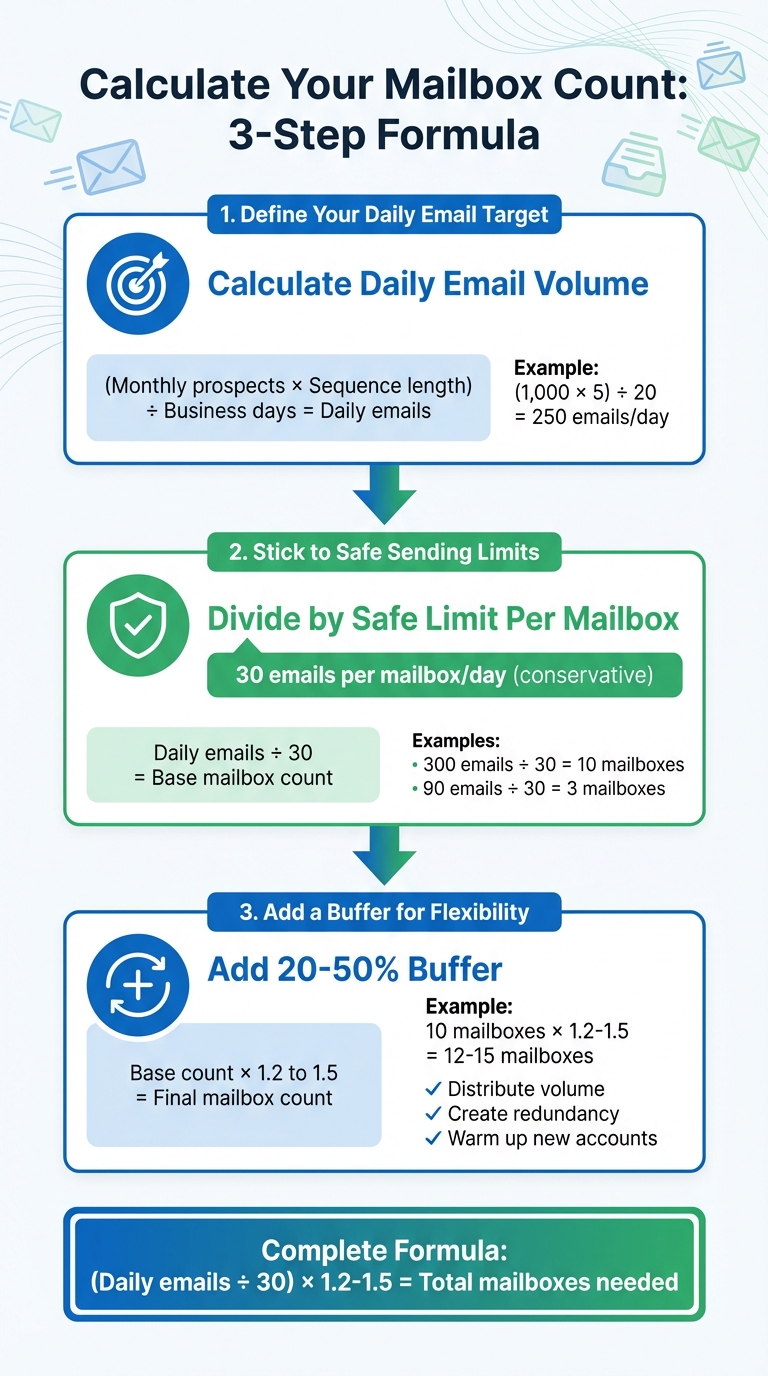
How to Calculate Email Outreach Mailbox Requirements in 3 Steps
Here’s a simple three-step formula to help you determine how many mailboxes you’ll need for your email outreach.
Start by figuring out how many emails you need to send daily. To do this, consider your meeting goals, conversion rates, sequence length, and the typical 20–22 business days in a month.
For example, if your goal is to reach 1,000 prospects in a month with a 5-email sequence over 20 business days, your daily target would be:
(1,000 × 5) ÷ 20 = 250 emails per day
Once you have your daily target, you can calculate how many mailboxes you’ll need based on safe sending limits.
To maintain your sender reputation, limit each mailbox to 30 cold emails per day. While seasoned and healthy mailboxes might handle 40–50 emails daily, starting with 30 is a safer bet.
To calculate the number of mailboxes required, divide your daily email target by 30. For instance:
This ensures you stay within safe limits while scaling your outreach.
It’s wise to add 20–50% more mailboxes as a buffer. This allows you to:
For example, if your baseline is 10 mailboxes, aim for 12–15 mailboxes. This setup reduces the strain on each mailbox, keeping daily sends closer to 20–25 emails instead of nearing the 30–40 range. This approach is much safer for the long haul.
If you’re scaling a team’s outreach, platforms like Infraforge can simplify the process. They offer pre-warmed mailboxes and automated configurations, and their built-in calculator can recommend the exact number of mailboxes you’ll need based on your email sequences and volume.
Let’s break down how to scale your mailboxes based on your team size and email outreach needs. Staying within safe sending limits is key as your campaigns grow.
If your team sends fewer than 1,000 emails per week, you’ll need 2–6 mailboxes. With five mailboxes, you can send about 125–175 emails daily, totaling 625–875 emails per week. For solo founders or small teams, 2–3 mailboxes are usually enough to handle basic A/B testing while maintaining natural sending patterns.
This setup typically runs on a single dedicated domain and requires a warm-up period of at least 2–3 weeks before you can scale to full capacity. As your outreach expands, you’ll need to add more mailboxes to keep up with demand.
For teams sending 1,000–5,000 emails per week, you’ll need 8–25 mailboxes. With 15 mailboxes, you can manage approximately 2,250 emails weekly. To hit 3,000–4,000 emails, you can either add more mailboxes or increase sending to 35–40 emails per day per mailbox, keeping a close eye on deliverability.
A good rule of thumb at this level is using 3 mailboxes per domain, meaning you’ll operate across 3–8 domains. Distributing these domains across multiple providers - like Google Workspace, Microsoft 365, or specialized platforms such as Infraforge or Mailforge - helps you avoid over-reliance on any single provider.
As your email volume grows beyond this range, you’ll need to make further adjustments.
For high-volume teams sending 5,000 to 50,000+ emails per week, the required mailboxes jump to 30–300+. Each mailbox can handle about 150 cold emails weekly. For example, sending 20,000–25,000 weekly emails typically requires 130–165 mailboxes. To minimize risks, you’ll want to split these across 2–4 mailboxes per domain.
At this scale, most agencies move to private infrastructure like Infraforge, which offers features like dedicated IPs, automated DNS setup, pre-warmed mailboxes, and API access for seamless scaling. Cost-wise, Infraforge provides 200 mailboxes for $651 per month - a more affordable option compared to Google Workspace ($1,680/month) or Microsoft 365 ($1,200/month) for the same capacity. This setup allows you to manage hundreds of mailboxes, dozens of domains, and multiple IPs without the manual effort or restrictions of consumer-focused platforms.
Managing your mailbox inventory effectively is crucial for maintaining high deliverability and scaling your email campaigns. By keeping a close eye on campaign metrics, you can determine when to increase or reduce your mailbox count.
Your metrics will often tell you when it’s time to expand. If you’re consistently hitting the limit of 30 emails per mailbox and notice bounce rates creeping up, it’s a clear signal to add more mailboxes.
Pay close attention to bounce rates exceeding 2% or inbox placement rates dropping below 80%. These are signs that your current mailboxes are overburdened, which can harm your domain reputation. If spam rates surpass 5% or your domain reputation falls below 70, it’s essential to spread your email volume across additional pre-warmed mailboxes. Other warning signs include delays in email sends caused by provider throttling or automated pauses in your outreach tools.
Expanding your campaigns also requires more mailboxes. For instance, if you’re scaling daily email volume from 1,000 to 10,000 emails (which would need about 36 mailboxes at 30 emails each), you should add a 20–30% buffer to handle the growth seamlessly. In a setup with 50 mailboxes, this means provisioning an extra 10 mailboxes to avoid reputation issues.
On the flip side, reducing your mailbox count makes sense when email volume drops consistently, and most of your mailboxes are operating well below capacity. Keeping mailboxes active unnecessarily can lead to wasted costs, as many platforms charge per mailbox slot regardless of usage. If your daily email volume has decreased or campaigns have scaled down, consolidating mailboxes can help optimize expenses.
Indicators for reducing mailboxes include inbox placement rates above 90%, bounce rates below 1%, and reply rates exceeding 2%. To test, you can pause 20% of your mailboxes for a week and monitor spam rates, ensuring they stay under 0.1%. Additionally, idle mailboxes can harm reputation due to inactivity, so consider pruning mailboxes that show low usage over a 2–4 week period.
These adjustments align with safe sending practices, ensuring your campaigns remain efficient and scalable without jeopardizing deliverability.
Managing mailbox adjustments manually can be time-consuming, but private infrastructure solutions like Infraforge simplify the process. Infraforge tracks real-time metrics - such as reputation scores and IP health - via an API and dashboard, alerting you when it’s time to add or remove mailboxes. Their system also includes pre-warmed domains, automated DNS/SSL configuration, and dedicated IPs, enabling you to provision mailboxes in minutes instead of waiting weeks.
Infraforge’s pricing model charges based on capacity rather than active mailboxes, giving you flexibility to adjust without extra costs. For example, at $3–$4 per slot monthly, you can manage your sending needs efficiently. A setup with 200 mailboxes costs $651/month, which is far more cost-effective than many consumer-focused platforms.
Additionally, Infraforge’s isolated infrastructure ensures your reputation isn’t affected by other senders. With features like sender rotation and smart sending limits, it helps maintain deliverability as you scale. Plus, its integration with tools like Salesforge - and free access to Warmforge for Salesforge users - provides ongoing health checks without requiring separate monitoring tools.
To determine and maintain the right number of mailboxes for your cold email outreach, focus on three key principles: set a clear daily send target, adhere to safe per-mailbox limits (usually 25–40 cold emails per day after proper warm-up), and incorporate a buffer to protect your deliverability. For example, if your goal is to send 600 emails daily and each mailbox is capped at 30 emails, you’ll need 20 mailboxes. Adding a 10–30% buffer means you’ll need 22–26 mailboxes, ensuring that any issues with a domain or mailbox won’t disrupt your campaigns.
Here’s the formula:
Mailbox count = (Target daily cold emails ÷ Safe emails per mailbox per day) × 1.1–1.3 (buffer).
For smaller teams sending 100–150 emails daily, 4–6 mailboxes with a 10–20% buffer should suffice. Larger teams handling higher volumes should plan for bigger buffers to account for domain rotation and campaign variability.
Keep in mind that every new mailbox requires a gradual warm-up period, which can take anywhere from 2 to 12 weeks, depending on your risk tolerance. It’s crucial to plan mailbox acquisition well in advance, as new mailboxes can’t immediately handle high email volumes without jeopardizing deliverability. Regularly monitor key metrics like bounce rates, spam complaints, inbox placement, and domain reputation to determine when to scale up or down.
For teams managing a large number of domains and mailboxes, platforms like Infraforge simplify scaling. They offer features like dedicated IPs, automated DNS and authentication setup, pre-warmed domains, and multi-IP provisioning - all for $3–$4 per mailbox per month. For instance, managing 200 mailboxes would cost $651 per month. Infraforge also integrates with tools like Salesforge and Warmforge, combining multi-channel outreach, automated warm-up, and deliverability monitoring. This makes it easier to adjust your mailbox count programmatically as your campaigns grow.
To stay ahead, revisit your mailbox strategy regularly. Set realistic daily email targets, use the mailbox formula, and align your setup to meet those targets. If you identify gaps, plan to acquire and warm additional mailboxes over the next 4–8 weeks. Monitor mailbox health closely to base scaling decisions on data rather than guesswork.
To figure out how many mailboxes you’ll need, consider a few key factors: your outreach goals, the size of your audience, and how many emails you plan to send each day. If you’re running a smaller campaign, 1-2 mailboxes might do the job. For larger campaigns, you’ll likely need more to ensure good deliverability and to steer clear of spam filters.
Start small, using just a few mailboxes, and make sure they’re properly warmed up before sending out a high volume of emails. As your campaign grows, you can scale up gradually. Tools like Infraforge can make this easier by offering pre-warmed mailboxes, dedicated IPs, and automated setup - all designed to boost your email deliverability and simplify the process.
Exceeding safe sending limits can seriously harm your email outreach. When you send too many emails too quickly, they might get flagged as spam. This not only lowers your deliverability rate but also makes it tougher to connect with your audience. Worst-case scenario? Your email account could be suspended, and your sender reputation might take a hit that’s hard to recover from.
To keep your email campaigns running smoothly, maintaining a strong sender reputation is key. By following safe sending practices, you’ll protect your outreach efforts and keep your results consistent over time.
Infraforge takes the headache out of cold email outreach by offering a private and scalable email infrastructure built for top-notch deliverability and performance. With features like dedicated IPs, automated DNS configuration, and pre-warmed domains and mailboxes, it minimizes the chances of your emails ending up in spam folders. Plus, it gets your campaigns up and running in no time.
Designed to integrate smoothly with your favorite sending tools, Infraforge can handle large-scale outreach effortlessly. By automating technical tasks and providing a dependable infrastructure, it lets you focus on creating impactful email campaigns instead of getting bogged down with setup challenges.