Email bounces can quickly ruin your cold outreach efforts. A bounced email means it never reached your prospect's inbox, impacting your sender reputation and email deliverability. Here’s what you need to know:
High bounce rates hurt your email campaigns by:
To avoid bounces:
Platforms like Infraforge simplify this process with features like dedicated IPs, pre-warmed domains, and automated DNS setup, ensuring lower bounce rates and better deliverability.
Email Bounce Rate Benchmarks and Infraforge Platform Comparison
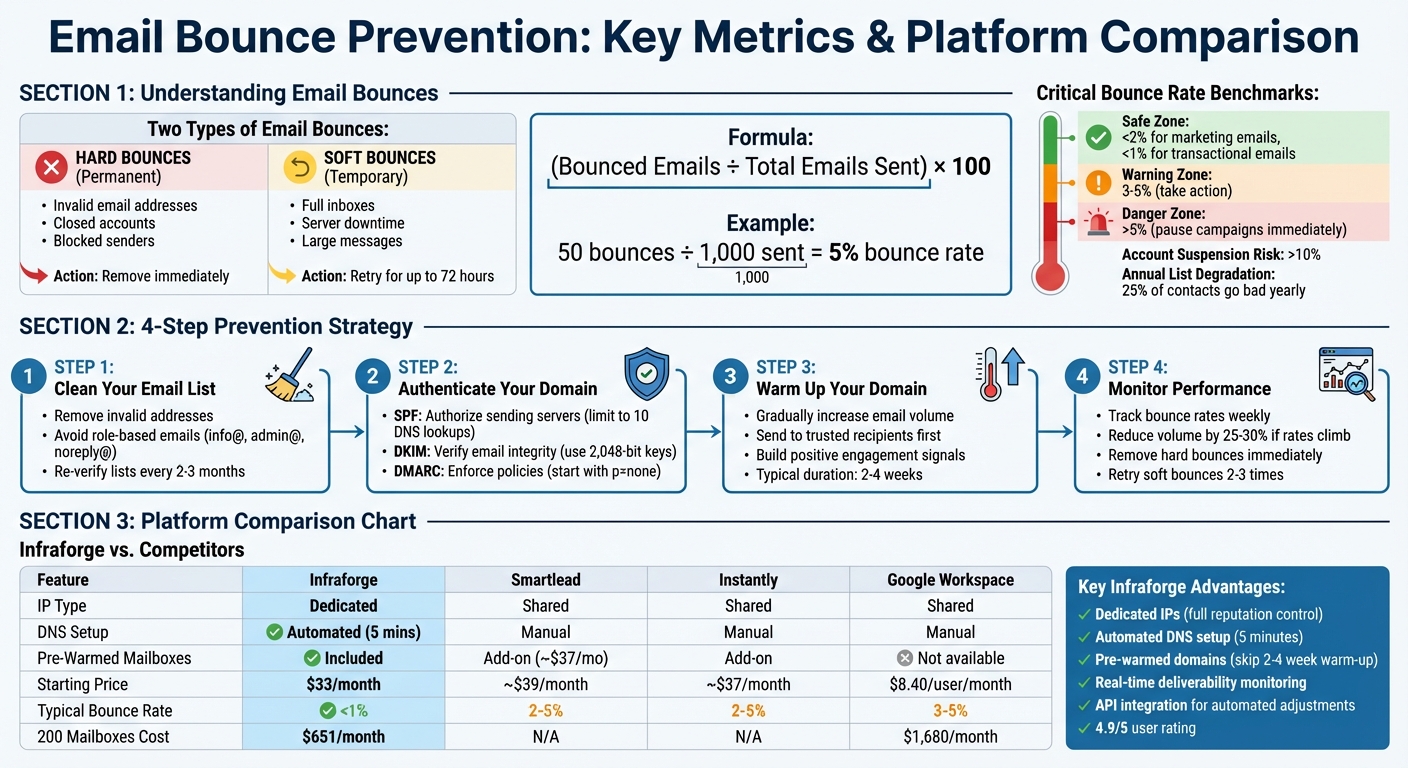
An email bounce happens when your message fails to reach its recipient and gets sent back to you. There are two main types: hard bounces and soft bounces. Hard bounces are permanent issues - like non-existent email addresses, invalid domains, or blocked senders - and require you to remove those addresses immediately. Soft bounces, on the other hand, are temporary. They can occur due to full inboxes, server downtime, or overly large messages. Most email providers will retry delivering soft bounces for up to 72 hours.
Hard bounces often stem from problems like typos (e.g., typing "[email protected]" instead of "[email protected]"), outdated contact information, or disposable email addresses that expire quickly. Soft bounces, meanwhile, usually point to technical hiccups such as DNS errors, overly aggressive spam filters, or greylisting. It’s important to understand the difference because they affect your sender reputation in distinct ways.
Bounce rates directly influence your sender reputation, which is critical for email deliverability. High bounce rates can make Internet Service Providers (ISPs) view your emails as spam. ISPs closely monitor bounce rates, and poor list hygiene - like sending to outdated or invalid addresses - can result in your emails being flagged. On average, bounce rates should stay below 2% for marketing emails and under 1% for transactional emails. If your bounce rate exceeds 5%, it’s time to pause your campaigns and address the issue.
The consequences of high bounce rates can escalate quickly. When ISPs flag your domain, spam filters become stricter, causing even valid emails to land in spam folders - or be blocked altogether. Here’s another challenge: about 25% of email contacts go "bad" every year due to things like job changes or account deactivations. This makes routine list cleaning essential to maintaining a healthy email list.
You can calculate your bounce rate using this formula:
(Bounced Emails ÷ Total Emails Sent) × 100. For example, if you send 1,000 emails and 50 of them bounce, your bounce rate is 5% - well above the safe threshold. Each bounce not only wastes your effort but also further damages your sender reputation.
(function(d,u,ac){var s=d.createElement('script');s.type='text/javascript';s.src='https://a.omappapi.com/app/js/api.min.js';s.async=true;s.dataset.user=u;s.dataset.campaign=ac;d.getElementsByTagName('head')[0].appendChild(s);})(document,372145,'feze9r0wnb47lvigfxao');
Avoiding email bounces requires a proactive approach, focusing on maintaining a clean email list, authenticating your domain, and gradually building a strong sender reputation. These methods address common bounce triggers, from invalid addresses to server rejections.
Start by cleaning up your email list. Remove invalid addresses and avoid sending to role-based emails like info@, admin@, or noreply@. These types of addresses are not only less likely to engage but are also more prone to bouncing or being flagged by spam filters.
To ensure your list is accurate, use email verification tools. These services check if an email address is valid and capable of receiving messages. Tools such as ZeroBounce (starting at $0.009 per email check), MailerCheck ($10 for 1,000 verifications), and NeverBounce (about $0.008 per email for up to 10,000 emails) can scan your list and flag problematic entries.
Domain authentication is key to reducing hard bounces and ensuring your emails are recognized as legitimate by recipient servers. This involves setting up three essential protocols:
Most major email providers now require these protocols for bulk email campaigns. When setting up DKIM, opt for a 2,048-bit key for stronger security, though a 1,024-bit key is acceptable for basic needs. For SPF, ensure your record stays under 10 DNS lookups to avoid validation errors. Start with a DMARC policy of p=none to monitor authentication activity before implementing stricter rules.
| Protocol | Purpose | DNS Record Type | Key Tip |
|---|---|---|---|
| SPF | Authorizes sending servers | TXT | Limit to 10 DNS lookups. |
| DKIM | Verifies email integrity | TXT | Use 2,048-bit keys for better security. |
| DMARC | Enforces authentication policies | TXT | Begin with p=none for monitoring. |
Once your domain is authenticated, you can focus on building a strong sender reputation.
New domains and IP addresses start with no established reputation. Sending a large volume of emails right away can raise red flags with Internet Service Providers, potentially leading to your messages being marked as spam.
Domain warming is the solution. This process involves gradually increasing your email volume by sending small batches to trusted recipients. By doing so, you generate positive engagement signals - like opens and replies - that help build your credibility as a sender.
For dedicated IP addresses, warming them up gradually is essential before launching large-scale campaigns. This step ensures your emails reach inboxes instead of getting lost in spam folders.
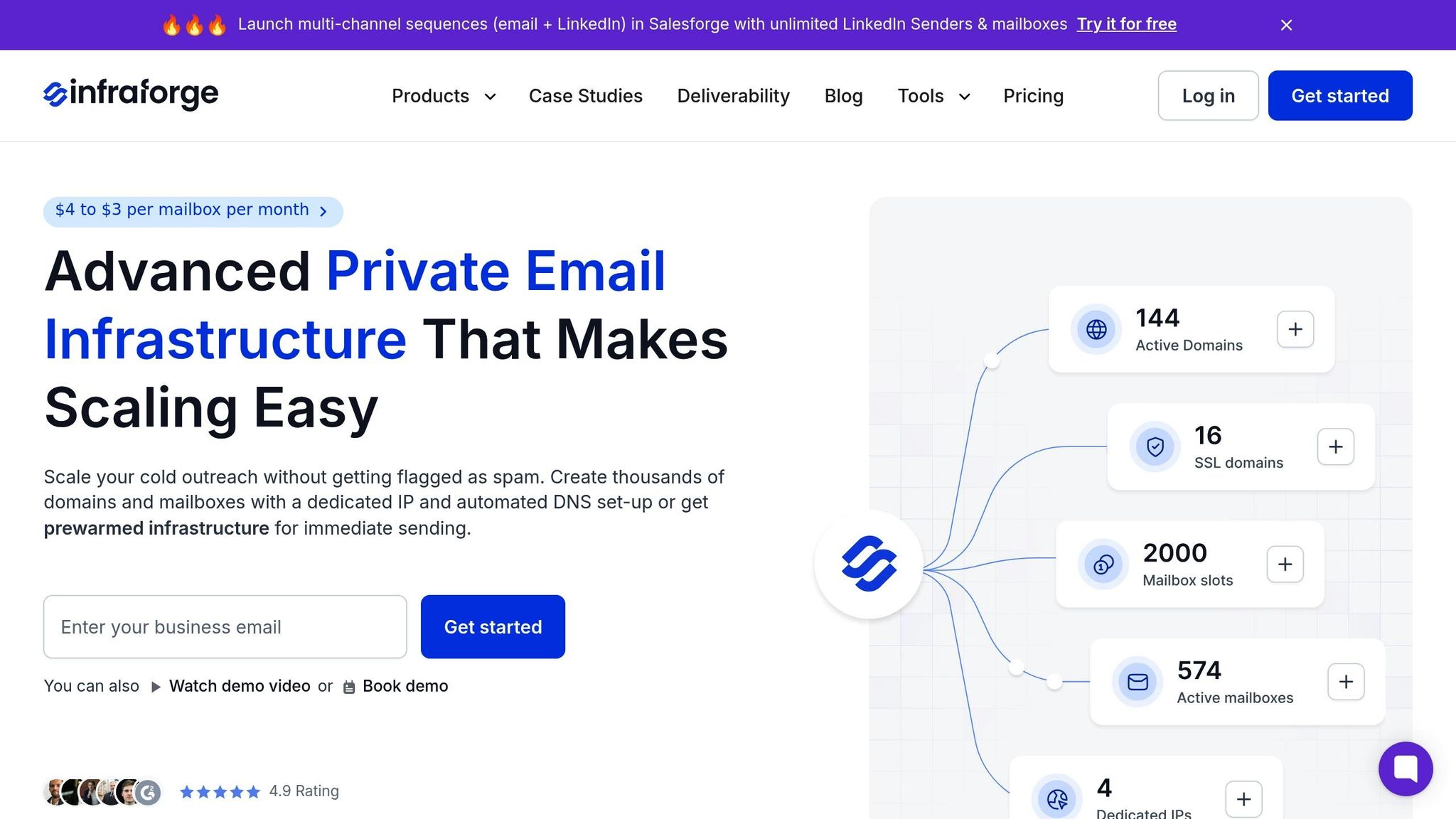
Infraforge tackles the root causes of email bounces by addressing infrastructure issues. Unlike shared IP services, Infraforge provides dedicated IPs, ensuring your sending reputation is entirely under your control. This approach creates a dependable and scalable foundation for email outreach, which is explored further below.
With dedicated IPs, only your sending behavior affects your reputation, keeping bounce rates consistently below 2%. Infraforge also offers multi-IP provisioning, allowing you to spread email volume across multiple dedicated addresses. This is especially useful during high-volume periods, such as the warm-up phase, as it prevents sudden spikes that could trigger spam filters.
Each dedicated IP includes automated setup for SPF, DKIM, and DMARC protocols, ensuring immediate compliance with authentication standards. By aligning these protocols, Infraforge eliminates one of the most common causes of hard bounces - emails being rejected due to unauthorized sending IPs.
Manual DNS setup can derail cold outreach campaigns with even the smallest errors, like an incorrect SPF record or a missing DKIM signature. Infraforge simplifies this process by automating DNS configuration in just five minutes, removing the risk of manual mistakes.
Additionally, Infraforge provides pre-warmed domains, bypassing the lengthy warm-up period typically required for new domains. Cold domains are often flagged by email service providers, leading to bounces or spam folder placement. By starting with pre-warmed infrastructure, Infraforge allows you to skip the usual 2-4 week warm-up period and begin your campaigns with established credibility. This trust from the outset helps keep bounce rates well below the critical 3-5% range.
"During my time at a Fortune 500 company and now across all our products, Infraforge has been my go-to solution for Email Infrastructure. Its deliverability and impact are unmatched." - Rahul Lakhaney, CEO, Enrich.so and Maximise
Infraforge stands out from competitors by offering purpose-built infrastructure that ensures reliable email deliverability. Unlike general business email providers or other cold outreach platforms, Infraforge combines technical advantages with competitive pricing. For instance, managing 200 mailboxes with Infraforge costs $651 per month, compared to $1,680 for Google Workspace or $1,200 for MS365. Both Google and Microsoft rely on shared IPs, which can leave you vulnerable to reputation issues caused by other users.
| Feature | Infraforge | Smartlead | Instantly | Google Workspace |
|---|---|---|---|---|
| IP Type | Dedicated | Shared | Shared | Shared |
| DNS Setup | Automated (5 mins) | Manual | Manual | Manual |
| Pre-Warmed Mailboxes | Included | Add-on (~$37/month) | Add-on | Not available |
| Starting Price | $33/month (10 slots, annual) | ~$39/month | ~$37/month | $8.40/user/month |
| Typical Bounce Rate | <1% | 2-5% | 2-5% | 3-5% (cold outreach) |
Infraforge also offers an API for seamless scaling, letting you add new IPs and mailboxes as your email volume grows - all without manual effort. This scalability, combined with dedicated infrastructure, ensures low bounce rates even as your campaigns expand from hundreds to thousands of emails daily.
Keeping a close eye on your campaigns in real time can make all the difference between success and damage to your sender reputation. Email service providers often suspend accounts if bounce rates exceed 10%, so monitoring isn’t just a best practice - it’s a necessity. Spotting a deliverability issue when it’s at 2% instead of 5% can mean the difference between maintaining a healthy infrastructure and being flagged. This kind of vigilance allows you to act quickly and effectively.
In addition to maintaining a clean email list, handling bounce types properly is crucial for long-term success. Hard bounces should be removed immediately, while soft bounces can be retried 2–3 times over a few days. If addresses continue to bounce, take action by removing them entirely. This approach protects your sender reputation and ensures your email campaigns remain effective.
When bounce rates start climbing, it’s wise to reduce your sending volume by 25–30% to avoid further damage. Reviewing metrics weekly can help you catch subtle issues, like declining open rates, before they escalate into major problems. By continuously tracking performance, you can identify trends and address them across your entire email infrastructure.
For seamless real-time monitoring, Infraforge offers tools designed to simplify the process. The Masterbox feature consolidates email performance metrics for all your workspace accounts. This centralized dashboard makes it easy to see if deliverability issues are isolated to a single mailbox or affecting your entire domain. It tracks bounce rates, blacklist status, and spam complaints in real time, so you don’t need to log into multiple inboxes.
"Stay on the money with real-time deliverability monitoring and alerts. Plug and play with your entire growth stack through direct integration with Salesforge and other sending tools." - Infraforge
Infraforge’s dashboard provides bounce and blacklist tracking that goes beyond what tools like Google Workspace and MS365 Postmaster offer. With dedicated IPs, you have complete control over your sender reputation. The platform’s automated systems can pause sending or rotate inboxes when bounce rates approach unsafe levels, preventing the cascading failures that often occur with shared IPs where others’ bad practices can impact your deliverability.
Infraforge’s API integration with Salesforge takes campaign management to the next level by automating adjustments to keep deliverability on track. If bounce rates exceed safe limits, the system can pause campaigns, rotate inboxes, or redistribute email volume across multiple dedicated IPs - all without requiring manual intervention.
These automated adjustments work alongside proactive list management and authentication practices to keep bounce rates low. This creates a system that adapts as your campaigns scale, whether you’re sending hundreds or thousands of emails daily. Thanks to this reliability, users consistently rate Infraforge highly, with the platform maintaining a 4.9/5 rating. Even during high-volume periods, the system ensures smooth, efficient delivery with minimal effort on your part.
Avoiding email bounces isn’t about finding a single solution - it’s about creating a system where authentication, domain warming, list hygiene, and real-time monitoring work together to protect your sender reputation. Each piece of the puzzle plays a critical role. For example, even the most perfectly authenticated email will harm your reputation if it’s sent to an invalid address. Skipping any of these steps weakens the entire system, so a comprehensive approach is essential for maintaining reliable email deliverability.
As your email campaigns scale, managing infrastructure manually becomes more challenging. Dedicated IPs provide complete control over your reputation, while using multiple IPs helps distribute sending volume and reduce risks. Automated DNS setup further minimizes potential errors during configuration.
Platforms like Infraforge bring all these elements together into one seamless solution. They emphasize the importance of re-verifying your email lists every 2–3 months to account for changes like job transitions or deactivated accounts. Even the best-maintained lists naturally degrade over time as professionals move between roles or companies. Looking ahead, by 2026, AI-driven email filters will make it even harder for cold outreach to reach primary inboxes, making high-quality personalization more important than ever.
To maintain healthy email infrastructure, keeping bounce rates low is non-negotiable. By combining strong authentication, gradual domain warming, strict list hygiene, and ongoing monitoring, you can create a scalable, sustainable system for your outreach efforts. Tools like Infraforge simplify this process by offering features such as dedicated IPs, automated DNS setup, pre-warmed domains, and real-time monitoring - all designed to safeguard your email deliverability and help you achieve consistent success.
To keep email bounce rates low in your cold outreach campaigns, start with cleaning and verifying your email lists. Remove invalid or inactive addresses regularly, and steer clear of sending emails to contacts that consistently trigger soft bounces.
Next, make sure your email setup is backed by proper authentication protocols like SPF, DKIM, and DMARC. These measures help establish credibility with email providers, improving your chances of landing in the inbox. Using a dedicated domain that’s already pre-warmed and private IPs can also boost your email deliverability. Tools like Infraforge make this easier by automating DNS setup, providing pre-warmed domains, and offering private email infrastructure specifically designed for cold outreach.
With these steps in place, you’ll be better equipped to lower bounce rates and ensure your emails reach their intended audience.
When it comes to getting your emails into inboxes where they belong, domain authentication is a must. By setting up SPF, DKIM, and DMARC, you're essentially proving that your email server has permission to send messages on behalf of your domain. Plus, these protocols ensure that your emails stay intact during transit.
Why does this matter? It improves your email deliverability and reduces the risk of your messages being flagged as spam or outright rejected by the recipient's mail server. On top of that, proper authentication helps you build trust with email providers, keeping your sender reputation strong and cutting down on bounces - especially important for cold outreach campaigns.
Keeping your email list tidy is a must if you want to maintain solid email deliverability. By clearing out invalid, outdated, or inactive addresses, you can dodge hard bounces that hurt your sender reputation and reduce the chances of your emails ending up in spam folders. This also protects your domain from being blacklisted, ensuring your messages land where they’re supposed to - right in your recipients' inboxes.
On top of that, a clean email list helps streamline your outreach efforts. By targeting only active and engaged recipients, you not only save time and resources but also enhance the overall effectiveness of your campaigns.