If your emails are ending up in spam or not being delivered, your SMTP settings might be the problem. Proper configuration ensures your emails are authenticated, secure, and compliant with email providers' standards. Here's what you need to know:
Starting February 2024, Gmail and Yahoo require bulk senders to meet stricter standards, including SPF, DKIM, DMARC, and spam complaint rates below 0.3%. Misconfigurations can hurt deliverability, so getting these settings right is essential. Platforms like Infraforge can help automate and simplify this process, ensuring compliance and high deliverability rates.
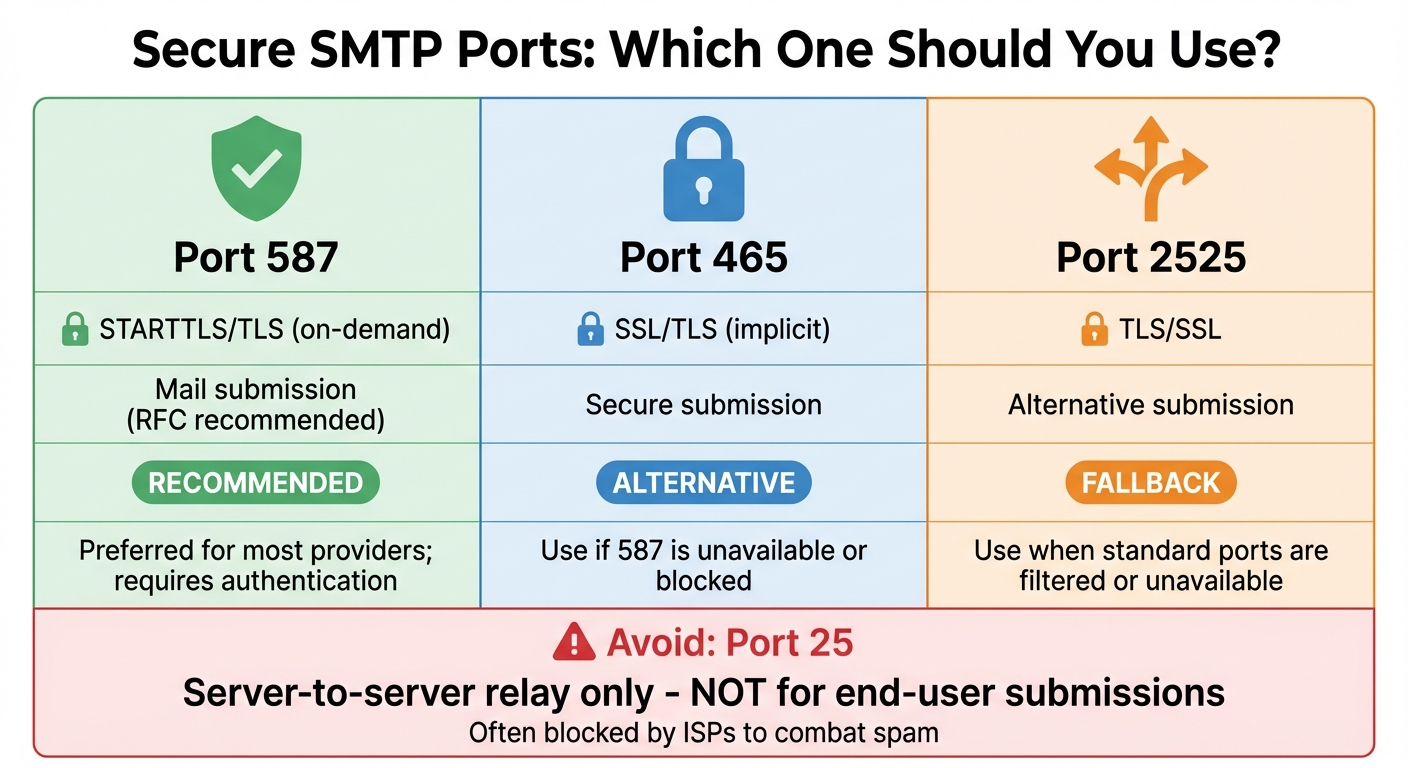
Secure SMTP Ports Comparison: 587, 465, 2525 for Email Deliverability
SMTP authentication ensures users log in before sending emails, preventing your server from being exploited as an open relay. STARTTLS upgrades an unsecured connection on port 587 to a secure, encrypted one after the handshake. On the other hand, SMTPS establishes encryption from the very first packet on port 465. Both methods safeguard your credentials during transmission and restrict email relay to authorized users.
Setting up these protocols is a cornerstone of secure and reliable email delivery. They form the basis for the additional security measures outlined below.
Encrypted authentication protects against unauthorized access, such as spam or phishing attempts. Most mail transfer agents now require authentication by default, effectively blocking relay attempts from users without valid credentials. This approach also prevents login data from being intercepted. When combined with TLS encryption, it meets the evolving standards of major ISPs like Gmail and Yahoo, which now require authentication along with SPF, DKIM, and DMARC for high-volume senders.
By securing credentials and requiring authentication, you reduce the risk of misuse, including spam and spoofing.
Open relays are a favorite tool for spammers, allowing them to flood the network with unwanted emails. Requiring authentication closes this loophole. When paired with DNS records, such as SPF and DKIM, authentication significantly reduces the chances of spoofing. Research highlights that authenticated email sessions play a key role in minimizing spoofing incidents.
Mailbox providers often flag unauthenticated or unencrypted SMTP traffic as high-risk, applying stricter spam filters or even throttling email delivery. Adopting strong authentication practices bolsters your sender reputation and improves the likelihood of your emails landing in recipients' inboxes. Without proper authentication, your emails are more likely to be marked as spam or blacklisted due to perceived security risks.
Enabling SMTP authentication aligns with industry standards like RFC 3207 (for STARTTLS) and RFC 8314 (for SMTPS on port 465). It also complies with updated bulk-sender requirements from Gmail and Yahoo coming into effect in 2024. Organizations such as M3AAWG recommend these protocols to avoid filtering issues and maintain sender credibility. Configure your mail clients to use port 587 with STARTTLS as the primary option, and port 465 as a fallback. Use tools like Mail-Tester and review SMTP logs regularly to identify and resolve any misconfigurations early on.
Once you've secured email transmission with SMTP authentication, the next step is ensuring that only authorized servers can send emails on your behalf. This is where SPF (Sender Policy Framework) steps in.
An SPF record is a type of DNS TXT entry that specifies which mail servers and IP addresses are permitted to send emails from your domain. When an email claiming to be from your domain is received, the recipient's mail server checks your SPF record to confirm if the sending IP is authorized. This process not only verifies the sender's legitimacy but also strengthens overall email security and reputation.
SPF plays a key role in stopping unauthorized servers from sending emails using your domain. By blocking these unauthorized relays, it significantly reduces the chances of attackers using your domain for malicious purposes. For high-volume senders, major providers require SPF as part of their email authentication protocols. When paired with DKIM and DMARC, SPF creates a solid framework for email authentication, ensuring the integrity of your emails.
Without an SPF record, spammers can easily forge your domain's sender address. SPF prevents this by enabling recipient servers to verify and reject emails from unauthorized IPs. This reduces the risk of your domain being used for spoofing, which can damage your reputation and even lead to blacklisting. In essence, SPF acts as a protective shield, ensuring your domain isn't exploited for spam or phishing attacks.
SPF doesn't just block spoofing - it also boosts your sender reputation. A properly configured SPF record signals to ISPs like Gmail and Outlook that your emails are legitimate, improving inbox placement rates. In fact, with SPF in place, deliverability rates can reach as high as 98–99%. Without SPF, your emails are more likely to be flagged by spam filters or outright rejected, as mailbox providers consider SPF a fundamental identifier for email senders.
Starting in early 2024, platforms like Gmail and Yahoo will require bulk senders to have properly configured SPF, DKIM, and DMARC records. These measures are typically expected alongside low spam complaint rates (below 0.3%). Industry standards treat SPF as a non-negotiable practice for secure email communication.
To implement SPF, begin by identifying all authorized sending sources - this could include your SMTP server or third-party email service providers like SendGrid or Amazon SES. Then, create a single TXT record in your DNS. Here's an example of a typical SPF record:
v=spf1 ip4:192.0.2.1 include:_spf.google.com -all
Use tools like MXToolbox to validate your configuration. Make sure the record stays within 10 DNS lookups to avoid errors. For testing, start with a softfail policy (~all) and, once you're confident in the setup, switch to a stricter policy (-all) for full enforcement.
Once you've set up SPF to protect your authorized sending IPs, the next step is DKIM (DomainKeys Identified Mail). DKIM adds a layer of verification by ensuring your domain is authenticated and your message remains intact during delivery. It works by attaching a DKIM-Signature header to each outgoing email. Your mail server uses a private key to sign this header, and receiving servers confirm its authenticity by checking the corresponding public key stored in your DNS records at selector._domainkey.yourdomain.com.
DKIM builds on SPF by adding an extra level of protection. While SPF validates the sending IP address, DKIM focuses on verifying the sender’s domain and safeguarding the email’s content. This cryptographic signature ties the message to your domain, ensuring that forwarded emails maintain their authenticity. Major email providers like Gmail and Outlook rely on this dual-layer verification as a standard for bulk senders starting in 2024.
Phishing attacks often involve forging the From: address to mimic trusted brands. By implementing DKIM, you can sign your outgoing emails, making it easier for recipients to differentiate between legitimate messages and fraudulent ones. This is especially crucial for industries like banking, e-commerce, and SaaS, where phishing attempts are common.
DKIM doesn’t just authenticate your emails - it also helps internet service providers (ISPs) associate user engagement and complaint data with your domain. This improves your sender reputation. For high-volume senders (over 5,000 emails daily), major U.S. providers require DKIM to ensure consistent inbox placement. Providers like Twilio SendGrid have shown that strong authentication, including DKIM, can lead to delivery rates above 99% and inbox placement rates over 90% for transactional emails.
To implement DKIM, generate a 2048-bit RSA key pair using your mail server (e.g., OpenDKIM for Postfix) or your email provider's dashboard. Select a unique identifier (like s1 or mail2025), publish the public key as a DNS TXT record, and enable signing on your SMTP server. Ensure the signing domain (d=) matches your visible From: domain for DMARC compliance. Test your setup using tools like Mail-Tester or by checking Gmail’s "Show original" option to confirm a DKIM=PASS result.
Platforms such as Infraforge simplify this process by automating DKIM key generation and DNS record publishing, especially for multi-domain and multi-IP configurations. Together with SPF and DMARC, DKIM creates a solid framework for improving email deliverability and protecting your brand.
Once you’ve configured SPF and DKIM, the last piece of the puzzle is DMARC (Domain-based Message Authentication, Reporting & Conformance). This DNS-based policy tells receiving mail servers how to handle emails that fail SPF or DKIM checks. It also ensures that the visible "From:" domain matches the authenticated domains. To set it up, you’ll need to publish a DMARC record as a TXT entry under _dmarc.yourdomain.com. For instance, you might start with something like: v=DMARC1; p=none; rua=mailto:[email protected] to begin monitoring activity. Once in place, this step completes your email authentication setup, ensuring that only verified emails make it to your recipients.
DMARC works by enforcing alignment between the visible "From:" domain and the domains authenticated through SPF and DKIM.
When configured to quarantine or reject, DMARC empowers receiving servers to block emails pretending to come from your domain but failing authentication. This significantly reduces phishing risks and helps protect your organization - and U.S.-based customers - from potential fraud and credential theft.
A well-implemented DMARC policy helps email providers distinguish legitimate messages from malicious ones. This improves your sender reputation and ensures more consistent inbox delivery. Plus, keeping spam complaints below 0.3% is critical for compliance.
SPF, DKIM, and DMARC are now considered essential by major U.S. mailbox providers and industry groups. By implementing DMARC, your organization not only aligns with these standards but also reduces the risk of throttling or being blocked. It’s a clear sign of your commitment to email security. Start with a p=none policy to monitor activity, then gradually move to stricter settings like p=quarantine; pct=50 and eventually p=reject; pct=100 once alignment is stable. Tools like Infraforge can simplify this process, automating DMARC configurations for high-volume cold email campaigns in the U.S..
Selecting the right SMTP port is just as important as setting up SPF, DKIM, and DMARC. The go-to option for secure email submission is port 587 with STARTTLS, which is the current standard recommended by RFC for authenticated client-to-server mail submission. This port encrypts your SMTP session, safeguarding both your credentials and message content from interception. Another option is port 465 (implicit SSL/TLS), which is widely supported and can be used if your provider recommends it or if network restrictions block port 587. On the other hand, port 25 is designed for server-to-server relay and is not suitable for end-user submissions - many U.S. ISPs block or throttle it to combat spam. Lastly, port 2525 is an alternative often provided by email service providers (ESPs) when standard ports like 587 or 465 are unavailable, and it typically works with STARTTLS. Choosing the correct port is a critical step in ensuring email authentication and security.
| Secure SMTP Port | Encryption Type | Primary Use | Notes |
|---|---|---|---|
| 587 | STARTTLS/TLS (on-demand) | Mail submission (recommended by RFC) | Preferred for most providers; requires authentication |
| 465 | SSL/TLS (implicit) | Secure submission | Use if 587 is unavailable or blocked |
| 2525 | TLS/SSL | Alternative submission | Use when standard ports are filtered or unavailable |
Using ports 587 or 465 with TLS/SSL ensures that your SMTP session is encrypted, protecting your credentials and the content of your messages from being intercepted. These ports also require authentication, which prevents unauthorized use of your SMTP server and eliminates the risk of open relays. Secure and authenticated submissions align with SPF, DKIM, and DMARC protocols, ensuring that your emails are sent through a verified and trusted SMTP path that matches your domain's records.
When you use secure submission ports like 587 or 465 with mandatory authentication, only verified users or applications can send emails through your server. This setup stops spammers from exploiting your SMTP host as an open relay. Additionally, U.S. ISPs and mailbox providers prioritize traffic coming through these secure channels, while unauthenticated submissions on port 25 are heavily scrutinized and often flagged for spam.
Major email providers like Gmail, Yahoo, and Outlook consider connection security and protocol compliance when evaluating sender reputation. Sending emails through recommended ports with STARTTLS or SSL/TLS demonstrates adherence to modern standards and helps avoid technical issues that could harm your reputation. Misconfigured or insecure ports can lead to connection failures and higher bounce rates. Following secure port practices plays a significant role in maintaining strong deliverability, often cited in the 85–95%+ range by industry experts.
RFC 6409 (Message Submission) and related guidelines recommend using port 587 with STARTTLS and authentication for client submissions, distinguishing it from server relay on port 25. Aligning with these standards ensures compatibility with modern mail transfer agents and cloud providers, reduces protocol errors, and meets the expectations of spam and abuse filters used by major email providers. For businesses handling high-volume or cold outreach, platforms like Infraforge simplify the process by offering features like dedicated IPs, automated DNS setup, pre-warmed domains, SSL, domain masking, and multi-IP provisioning. These tools handle much of the complexity around port configuration, encryption, and scaling, making secure email practices more accessible and efficient.
Reverse DNS (rDNS) relies on a PTR (Pointer) record to link your sending IP address to a hostname - usually the fully qualified domain name (FQDN) of your mail server. When your server sends an email, major U.S. email providers perform a reverse lookup on your IP to confirm it maps to a legitimate hostname. They also check if this hostname has an A record pointing back to the same IP, a process called forward-confirmed reverse DNS (FCrDNS). If your IP is missing a PTR record, has a generic PTR, or if the PTR doesn’t match your SMTP greeting name, many spam filters will flag or outright reject your emails.
To set up reverse DNS, you’ll need to work with the organization managing your IP block - this is often your cloud provider, ISP, or email platform - since PTR records can’t be edited through standard DNS management tools. Start by identifying your sending IP(s) and selecting a branded hostname that matches your mail server. Make sure this hostname has an A record pointing to the sending IP, then request the PTR configuration from your provider. After the update, verify the setup using tools like nslookup or dig. Properly aligning these settings strengthens your email authentication and security measures.
A correctly configured PTR record is an essential part of your SMTP setup. It acts as a basic identity check for your server. If reverse and forward DNS don’t align, spam filters often treat the connection as suspicious or misconfigured, increasing the likelihood of rejection or higher spam scores. Many major U.S. email providers expect this alignment as a sign of a reliable sender, enhancing your email trustworthiness.
Spammers frequently rely on compromised systems with poorly configured rDNS, making PTR records a key spam-filtering criterion. Without a proper PTR - or if a generic one is used - receiving servers often impose stricter filters or raise spam scores. By configuring a branded PTR that matches your SMTP greeting name, you clearly separate your mail from spam sources, reducing the risk of being flagged or exploited.
Your IP and domain reputation are built over time based on metrics like spam complaints, bounces, and user engagement. Missing or misaligned PTR records can harm your reputation, making it harder to achieve consistent email deliverability. With a properly configured reverse DNS that matches your SMTP hostname and forward DNS, your emails are less likely to be rejected or sent to spam, helping you achieve deliverability rates as high as 98–99%. This alignment is especially critical for dedicated IPs, as it allows mailbox providers to associate your IP with your brand and sending history, improving inbox placement over time. For businesses managing high-volume emails or cold outreach, platforms like Infraforge streamline this process by providing dedicated IPs, automated DNS setup, pre-warmed domains, SSL, domain masking, and multi-IP provisioning. These tools ensure your PTR and other DNS records are always configured correctly.
Email standards, such as those outlined in RFC 5321, emphasize the importance of HELO/EHLO identification and DNS alignment. Best-practice guidelines from major email providers also highlight reverse DNS as a critical requirement for sending IPs. Proper PTR alignment is a baseline technical standard for compliant email infrastructure, helping to maintain consistent IP and domain identities. This consistency supports authentication policies and reduces the risk of false-positive spam filtering, ensuring smoother email delivery.
Once authentication and DNS alignment are in place, the next step to ensure smooth email deliverability is managing send rates effectively. Rate limiting sets a cap on the number of emails sent within a specific timeframe (e.g., 100 emails per minute per IP). Throttling, on the other hand, dynamically adjusts send rates based on domain or provider rules. Popular mail transfer agents (MTAs) like Postfix, Exim, and Microsoft Exchange use counters to track connections, messages, and recipients over time. When configured thresholds are reached, these MTAs either defer or reject new messages. Unlike rate limiting, throttling queues emails instead of discarding them, allowing for delays without losing messages. This approach helps maintain server stability and ensures predictable email traffic, which is crucial for protecting sender reputation and avoiding spam filters.
Unexpected email surges, often caused by compromised accounts or scripts, can lead to blocklisting and harm your reputation. By enforcing rate limits at the user, API key, or IP level, you can curb these abuses and prevent widespread issues. Throttling, when combined with monitoring bounce rates and complaint spikes, allows your team to identify and stop suspicious activity before it escalates. This ensures that legitimate emails aren’t associated with spammy behavior, reducing the risk of mailbox providers flagging all mail from your domain or IP as abusive.
Mailbox providers in the U.S., such as Gmail and Yahoo, closely monitor email volume patterns, error rates, and complaints. Managing send rates carefully helps reduce SMTP errors and safeguards your sender reputation. Controlled rates also prevent sudden spikes, reduce temporary deferrals (like 4xx errors), and keep bounce and complaint rates low. Over time, predictable email traffic combined with strong engagement metrics builds a solid IP and domain reputation. This leads to better inbox placement and fewer emails being marked as spam. A good deliverability rate is typically above 85%, with the ideal target being 98–99%.
For practical guidance:
Platforms like Infraforge simplify this process by offering features such as dedicated IPs, pre-warmed domains, and multi-IP provisioning. These tools come with built-in deliverability controls, including managed rate limiting and throttling tailored to mailbox-provider tolerances and warm-up phases. They can also distribute traffic across multiple IPs and apply domain-specific throttling policies. Additionally, their APIs allow outbound tools like Salesforge to respect dynamic rate limits as campaigns scale.
Email industry standards emphasize controlled sending volumes and low complaint rates. Starting February 2024, Gmail and Yahoo will require bulk senders (those sending over 5,000 emails daily) to maintain spam complaint rates below 0.3%. Adopting rate limiting and throttling ensures compliance with these expectations. It demonstrates to mailbox providers that you respect server capacity, adapt to temporary deferrals, and avoid sending in bursts. These practices, combined with proper authentication and policy records, help establish trust with mailbox providers and improve deliverability.
Once your send rates are optimized, the next step is keeping a close eye on your sender reputation. This is essentially a score that email service providers like Gmail and Yahoo assign based on factors like bounce rates, spam complaints, and user engagement. A drop in this score can push your emails straight into spam folders - even if your authentication settings are flawless. By consistently tracking your reputation, you can ensure that your secured SMTP settings lead to reliable inbox delivery. This vigilance not only minimizes spam issues but also lays the groundwork for effective log analysis.
Keeping an eye on SMTP logs is essential for spotting unusual activity, such as high bounce rates or error codes like SMTP timeouts, which might indicate misconfigurations or compromised accounts. Tools like MXToolbox can help you check if your IP has been flagged on blocklists like Spamhaus, which can block your emails from reaching recipients altogether. Additionally, setting up ISP feedback loops allows you to monitor spam complaints in real time. This makes it easier to remove problematic addresses and address suspicious activity before it damages your domain's reputation.
To maintain strong deliverability rates - ideally around 98–99% - you’ll need to keep bounce rates low and spam complaints under 0.3%. Tools like SendGrid dashboards and Mail-Tester can help you verify these metrics and ensure everything is on track. For instance, Shopify leveraged SendGrid’s monitoring tools and IP pool management to achieve excellent inbox placement rates.
Platforms like Infraforge take reputation tracking a step further by providing real-time alerts and unique metrics like their proprietary Heat Score™. By using dedicated IPs, Infraforge isolates your sending reputation, shielding you from issues caused by other senders. As Silver L., CEO of Infraforge, remarked:
"Infraforge quickly helped to solve a challenge regarding email deliverability. What I like about Infraforge is its ease of use and quality of support".
Starting February 2024, Gmail and Yahoo will require bulk senders - those sending more than 5,000 emails daily - to meet specific standards. These include configuring SPF, DKIM, and DMARC, offering a one-click unsubscribe option, and keeping spam complaint rates below 0.3%. Regular monitoring is crucial to ensure compliance with these guidelines. Conduct routine audits of your SMTP setup, analyze engagement trends, and adjust sending volumes based on ISP feedback. Staying updated through resources like M3AAWG helps you adapt to new filtering algorithms and authentication requirements before they disrupt your deliverability.
Once your secure settings are in place, it's time to refine your email headers and envelope for better authentication and deliverability. These elements, like the SMTP envelope and email headers, serve as technical identifiers that help receiving servers verify the legitimacy of your emails. Even with proper authentication protocols, misconfigured headers can still land your messages in spam folders. To avoid this, ensure the SMTP envelope sender (MAIL FROM/Return-Path) aligns with the visible From header. For example, using [email protected] as the envelope sender and [email protected] in the From header maintains consistency. This alignment allows SPF, DKIM, and DMARC to function effectively, ensuring your emails pass authentication checks with major providers like Gmail and Yahoo. Properly configured headers are a key factor in how email providers assess your messages' legitimacy.
Headers that are mismatched or missing can raise red flags and send your emails straight to spam. For instance, avoid using a third-party envelope sender like [email protected] with an unrelated From header such as [email protected]. Such discrepancies can lead to authentication failures. To prevent this, use your verified sending domain consistently across all key fields, including the envelope sender, From address, and DKIM signing domain. Additionally, include a unique Message-ID that references your domain (e.g., <[email protected]>). Generic or missing Message-IDs can appear suspicious to spam filters.
Clean and consistent headers are essential for building trust with recipients. Use a recognizable From name, such as "Acme Weekly [email protected]", to minimize spam complaints and boost engagement. Starting in February 2024, Gmail and Yahoo will require bulk senders (sending over 5,000 emails daily) to include a List-Unsubscribe header with a one-click unsubscribe option. This feature helps reduce complaint rates. Also, make sure the Reply-To address matches your verified domain to further establish trust with recipients.
Adhering to email standards like RFC 5321 (SMTP) and RFC 5322 (Internet message format) ensures your headers meet the technical expectations of receiving servers. Essential fields, such as Date, From, To, and Message-ID, must be correctly formatted, while optional fields like List-ID can help classify your emails as legitimate list traffic. For U.S.-based senders, including a List-Unsubscribe header, a clear unsubscribe link in the body, and a valid U.S. postal address in the footer supports CAN-SPAM compliance and signals that your emails are permission-based. Tools like Infraforge can simplify the process by automating envelope sender standardization, DNS and SSL configuration, and header optimization, making scalable email outreach easier. Optimizing your headers is a crucial step toward improving deliverability and ensuring your emails align with industry standards.
Opportunistic TLS encryption is a smart way to secure outbound SMTP connections. By enabling this setting, your mail server will try to encrypt every outgoing connection using the STARTTLS command on port 587. If the recipient's server doesn’t support TLS, the email will still be delivered unencrypted. Unlike mandatory TLS, which blocks delivery when encryption isn’t available, opportunistic TLS ensures most of your emails are encrypted while maintaining maximum deliverability. This method has become a standard in modern email systems, with major ISPs increasingly expecting encrypted connections as part of best practices for email deliverability. When combined with secure authentication, DNS alignment, and optimized headers, opportunistic TLS completes your email security framework. Beyond encryption, it strengthens your SMTP authentication setup in several key areas.
Opportunistic TLS encrypts both your email content and authentication headers, protecting them from interception or tampering during transmission. While TLS itself doesn’t authenticate your sender domain - that’s the job of SPF, DKIM, and DMARC - it ensures the secure transmission of your emails. Many platforms simplify this process by automating TLS configurations.
Using TLS encryption not only improves security but also boosts your sender reputation. Major ISPs like Gmail and Outlook favor emails sent over encrypted connections, as they reflect better security practices. Encrypted emails often achieve 10–20% higher inbox placement rates. For instance, Shopify achieved a 99.5% delivery rate and 91.3% inbox placement by using a TLS-optimized relay alongside DKIM. This shows how combining encryption with proper authentication can significantly improve email deliverability. On the other hand, unencrypted emails are at risk of being rejected by providers with stricter security policies.
Opportunistic TLS aligns with established email security standards and is now considered a baseline for secure email operations. Starting in 2024, Gmail and Yahoo have implemented stricter requirements for bulk senders, mandating the use of SPF, DKIM, and DMARC alongside secure connections. To enable this in Postfix, configure the TLS security level (e.g., smtpd_tls_security_level = may) and use port 587 with valid SSL certificates. Providers like Infraforge simplify this process by offering pre-configured SSL certificates and up-to-date TLS settings, eliminating the need for manual cryptographic configurations while ensuring compliance with modern security standards.
Infraforge takes the hassle out of SMTP setup by automating the process, saving time and reducing the risk of manual errors. Configuring SMTP manually, especially across multiple domains and IPs, can be tedious and error-prone. Infraforge streamlines this by automatically setting up SPF, DKIM, and DMARC records as soon as you add a domain. This means your first domain and mailbox can be ready for production in just 5 minutes, allowing you to focus on your email outreach while Infraforge manages the technical details.
The platform also provides dedicated IPs, which help you build and maintain an isolated sender reputation. With optimized setups, this can lead to inbox placement rates of up to 99%. Additionally, Infraforge includes pre-warmed domains and mailboxes equipped with pre-configured SSL and domain masking, so you can start sending emails immediately - no lengthy warm-up process required.
For businesses handling large-scale email operations, Infraforge offers multi-IP provisioning, automatically distributing your email load across multiple dedicated IPs. This prevents ISP throttling and ensures reliable deliverability, even at high volumes. By automating DNS record management and IP provisioning, Infraforge reduces the risks of misconfigurations and reputation issues, as highlighted earlier. Its API also supports programmatic scaling and integrates seamlessly with tools like Salesforge, making it a flexible solution for growing needs.
Real-time monitoring is another standout feature, offering dashboards and alerts for key metrics like sender reputation, bounce rates, and delivery performance. These tools let you make proactive adjustments to your SMTP settings, ensuring consistent deliverability. As Silver L., CEO of a satisfied customer, shared:
"Infraforge quickly helped to solve a challenge regarding email deliverability. What I like about Infraforge is its ease of use and quality of support."
Here’s a comparison of Infraforge with other popular SMTP providers:
| Feature | Infraforge | SendGrid | Amazon SES |
|---|---|---|---|
| Dedicated IPs | Yes (optimized for cold email) | Via IP pools | Upon request (high volume) |
| Multi-IP Provisioning | Yes (automatic scaling) | Yes (IP pool management) | Limited (via VPC) |
| Automated DNS Setup | Yes (SPF/DKIM/DMARC) | Manual/user-managed | Manual/user-managed |
| Pre-warmed Domains | Yes (ready to send) | No (manual warm-up) | No (user-managed warm-up) |
| API Access | Yes (full programmatic control) | Yes (Email API) | Yes (SMTP/API integration) |
| Real-time Monitoring | Yes (built-in dashboards) | Yes (deliverability tools) | Yes (logs and metrics) |
Infraforge also stands out in terms of pricing. At $651 per month for 200 mailboxes, it’s a cost-effective solution compared to alternatives like Google Workspace ($1,680/month) or MS365 ($1,200/month) for cold outreach infrastructure. Plus, Infraforge offers features specifically designed to boost email deliverability, making it a smart choice for businesses focused on effective email campaigns.
Getting your emails into inboxes consistently hinges on precise SMTP configuration. The ten settings outlined in this article - like enabling SMTP authentication, setting up SPF, DKIM, and DMARC, using secure ports, configuring reverse DNS, and keeping an eye on sender reputation - are the backbone of reliable email deliverability. Starting in early 2024, Gmail and Yahoo have made these protocols mandatory for bulk senders (those sending over 5,000 emails daily), requiring spam complaint rates to stay below 0.3%. In short, proper setup isn’t optional anymore - it’s essential.
The numbers back this up. According to Validity, top-tier deliverability rates hover between 98–99%, while anything under 70% signals major issues with configuration or reputation. A Twilio SendGrid case study further illustrates the point: businesses with optimized infrastructure, IP management, and authentication achieved a 99.5% delivery rate and a 91.3% inbox placement rate.
These stats highlight the importance of getting your setup right, especially for large-scale email campaigns. Managing DNS records, warming up IPs, monitoring reputation metrics, and fine-tuning rate limits can be overwhelming and time-consuming when done manually. That’s where specialized platforms come into play.
Infraforge simplifies the process by automating critical tasks like SPF, DKIM, and DMARC setup. Designed specifically for cold outreach, it offers built-in authentication, throttling, and monitoring to maintain high deliverability as you scale. With real-time dashboards and automated DNS management, the platform helps prevent misconfigurations that could harm your sender reputation overnight.
Infraforge makes setting up your SMTP a breeze with tools like automated DNS configuration, dedicated IPs, and pre-warmed domains and mailboxes. These features are specifically designed to boost email deliverability, ensuring your messages land where they’re supposed to. Plus, with smart sender rotation and real-time insights into deliverability, you can fine-tune your email strategy while keeping complete control over your infrastructure.
This platform is an excellent choice for cold email outreach, offering advanced tools to help you scale campaigns efficiently and securely. Its smooth integration with other outreach tools also makes it a go-to solution for handling large-scale email operations with ease.
SPF, DKIM, and DMARC work as a team to authenticate your emails and guard against spoofing, which can help ensure your messages actually land in inboxes. Here's how they work:
Using these protocols not only helps protect your domain from being used for malicious purposes but also improves the chances of your emails avoiding the spam folder and reaching your audience.
Using secure SMTP ports like 587 or 465 plays a key role in keeping your emails safe and ensuring they reach their destination. These ports support encrypted communication, which protects your email credentials and content from being intercepted by third parties.
On top of that, many email servers mandate the use of secure ports to comply with current security protocols. By opting for these ports, you’re not only boosting the security of your email transmissions but also lowering the chances of your messages being marked as spam or outright rejected.