
Personalized Outbound Strategy
Get The Right Outbound Strategy In Minutes
Enter your email to get a custom plan & stack recommendation for your business
It's being carefully crafted by AI
Please check your mailbox in 5 minutes

Hypertide gives you 25 Entra inboxes with one domain for $25 a month.
That works out to just $1 per inbox, while its Google inboxes cost $3.30 each.
For a cold email team buying hundreds of inboxes, that price difference can add up quickly.
But these are not simply cheaper and more expensive versions of the same inbox. They use different infrastructure and come with different sending limits.
So if you are looking at Hypertide for serious cold email scale, the real question is not which option has the lower price.
It is what you actually get for that price and how well the setup works as your sending volume grows.
That is what I’ll find out in this Hypertide review.

Hypertide gives you Google inboxes and Microsoft Entra infrastructure for cold email. It handles SPF, DKIM, DMARC, DNS setup, and uploading your inboxes to supported sending tools. You also get domain analytics, agency workspaces, API access, bulk automations, Relay, and Layover.
What you do not get is a cold email sequencer. You still need a separate sending tool to run your campaigns. You also do not get a free trial or guaranteed inbox placement.
If you specifically want Google Workspace and Microsoft 365 mailboxes for cold outreach, Primeforge is a closer alternative to compare.
The important difference is that Hypertide's Microsoft option is Entra infrastructure, while Primeforge provides Microsoft 365 mailboxes.
So Primeforge is worth comparing if you want cold email infrastructure built around standard Google Workspace and Microsoft 365 mailboxes rather than Hypertide's Google and Entra setup.
Hypertide handles the technical setup needed to get your cold email inboxes ready for a sending tool.
Here is how it works:
If a domain gets blocked or you need to replace it, you can swap it inside Hypertide. Its Layover feature keeps a cancelled domain active for another 18 days, while Relay forwards future replies to your new inbox.
Hypertide features deal with what happens after you start sending, especially when domains need to be tested, rested, or replaced.
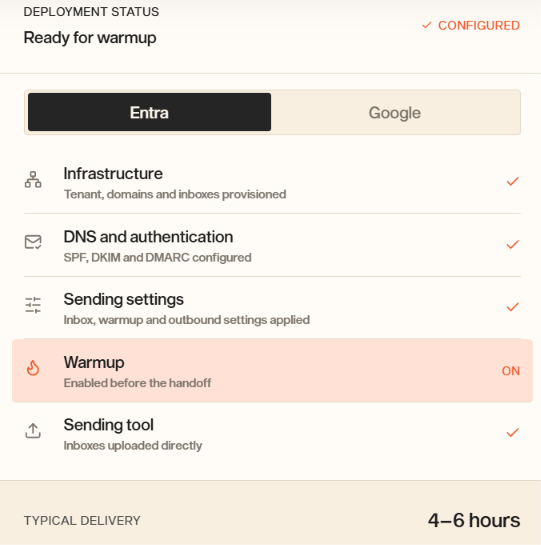
Setting up dozens of inboxes usually means switching between your provider, DNS records, warmup settings, and sending tool. Hypertide brings those steps together. It sets up the infrastructure, configures SPF, DKIM, and DMARC, applies your inbox and sending settings, starts warmup, and adds the inboxes to your connected sending tool. Setup typically takes 4–6 hours.
You can choose between Google and Entra inboxes. Google charges per inbox, so you can order the exact number you need. Entra charges per domain and currently includes 25 inboxes per domain, along with native Outlook.com access. You can order and manage both through Hypertide.
Hypertide puts Entra orders on separate tenants rather than grouping them together. If you run several domains, this means your setup does not share a tenant with other Hypertide orders.
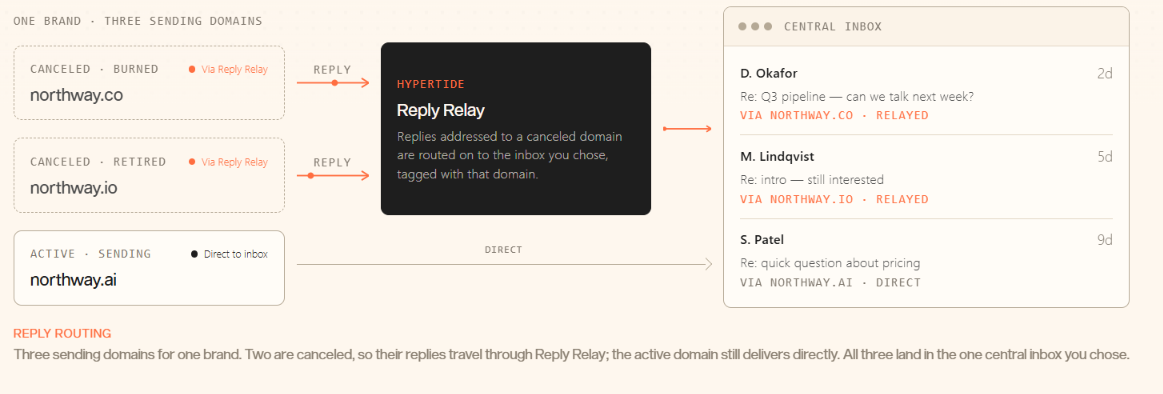
Prospects sometimes reply weeks after you stop using the domain you emailed them from. Reply Relay forwards those late replies to a central inbox of your choice. Each reply includes a tag showing the original domain, so you can trace it back to the campaign or client.
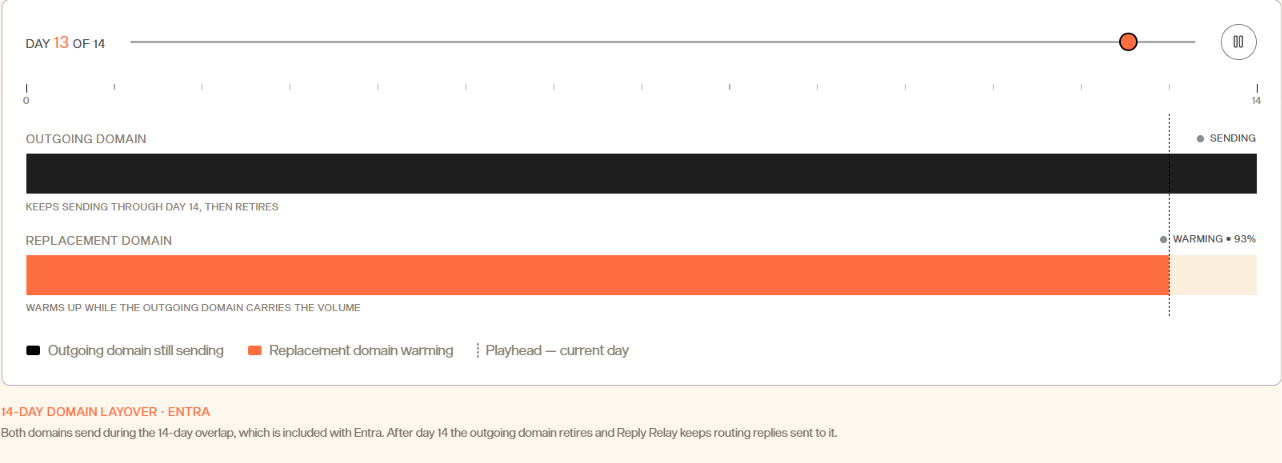
When you replace an Entra domain, the old one can keep sending for 14 days while the new one warms up. Entra includes this overlap, so you do not pay for both sets of domains during that time. Once the old domain retires, Reply Relay can still forward replies sent to it.
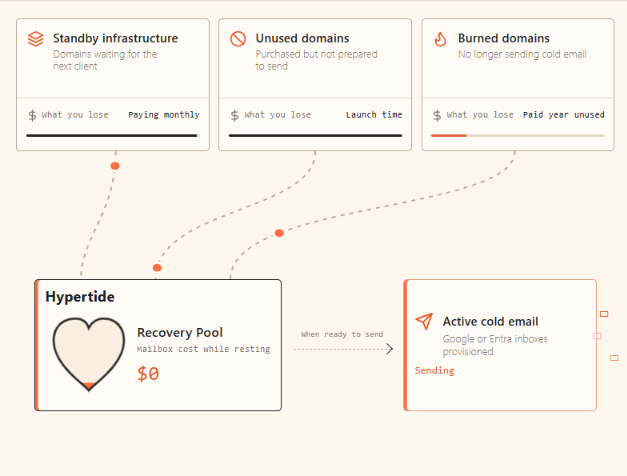
Recovery Pool gives you a place to keep backup domains without paying for Google or Entra sending inboxes you are not using. Hypertide creates a postmaster@ inbox and keeps the domain in its internal warmup pool. When you need it again, you can switch it back to Google or Entra infrastructure.
When replies slow down, it can be hard to tell whether your copy or your sending domain is the problem. Hypertide lets you test your campaign copy against a neutral message from the same domain. If the neutral message lands well but your campaign copy does not, your copy is more likely the issue.
If both do poorly, your domain and infrastructure need a closer look. These domain-level tests are free for Hypertide customers.

When several cold email domains redirect to the same website, they create a visible link between them. Hypertide Stealth changes how those redirects work. Real visitors can still reach your website, but crawler-style requests do not get the same destination redirect.
Hypertide says it has seen fewer blacklist incidents with this setup. It also notes that this is an observation, not a finding from a controlled study.
Using the same nameservers across a large batch of domains can create another shared pattern. Hypertide spreads domains purchased through its platform across a pool of 100 nameservers instead.
This currently applies only to domains bought through Hypertide. Support for domains you bring yourself is listed as coming soon.
For teams managing several clients, Hypertide includes agency workspaces, domain-level analytics, bulk app automations, unlimited team seats, and API access. These tools help you handle everyday infrastructure tasks without managing each domain or inbox individually.
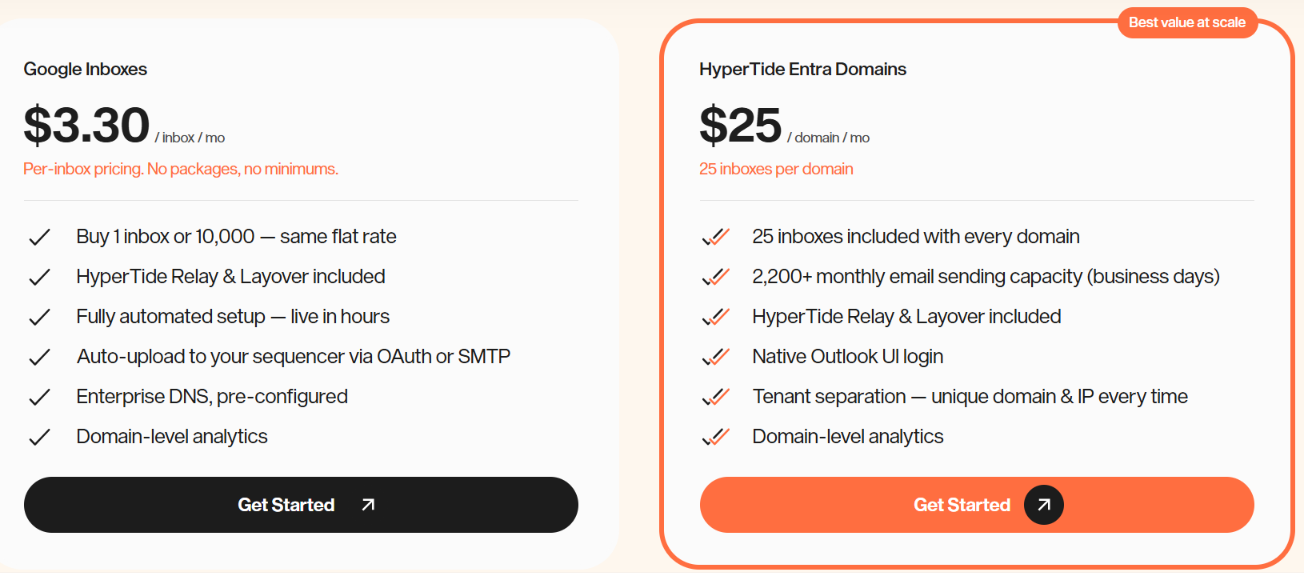
Hypertide has separate pricing for Google inboxes and Entra domains.
For example, if you need 100 inboxes, here is what you would pay with each option:
Keep in mind that Google inboxes and Entra domains use different infrastructure, so this is a pricing example rather than a like-for-like comparison.
Both options include Relay and Layover, domain-level analytics, enterprise DNS, agency workspaces, API access, unlimited team seats, bulk app automations, and OAuth/SMTP sequencer upload. Hypertide does not offer a free trial. Plans are month-to-month, and you can cancel through the web app.
There are too few independent user reviews of Hypertide to draw a strong conclusion about the overall customer experience.
Trustpilot currently has only one review, so one person's experience should not be treated as representative of everyone using the platform.
So, for now, there simply is not enough independent feedback to judge how Hypertide performs for customers over time.
Yes, Hypertide has the infrastructure and management tools to handle a large cold email setup.
For example, if you need 500 Entra inboxes, you would need 20 domains because each domain includes 25 inboxes.
Once you are managing 20 domains and 500 inboxes, you need more than just the inboxes themselves. Hypertide gives you agency workspaces to separate client setups, domain-level analytics to track your domains, bulk automations to make changes at scale, and API access to automate more of the work.
You can scale Google separately as well. There are no fixed packages or minimum orders, so you can add the number of Google inboxes you need.
So, if your concern is whether Hypertide can set up and manage hundreds or thousands of cold email inboxes, the answer is yes. What the available data does not establish independently is how those inboxes will perform in terms of deliverability at that volume.
Hypertide is best suited for cold email agencies and high-volume senders. It’s especially useful if you manage many inboxes and domains and don’t want to set everything up manually.
However, Hypertide will not fit every cold email setup.
Overall, Hypertide fits better when you need Google and Entra infrastructure that can be managed across a larger cold email operation.
If Hypertide's Entra setup is not what you need, Primeforge is a closer alternative for teams that specifically want Google Workspace and Microsoft 365 mailboxes for cold email.
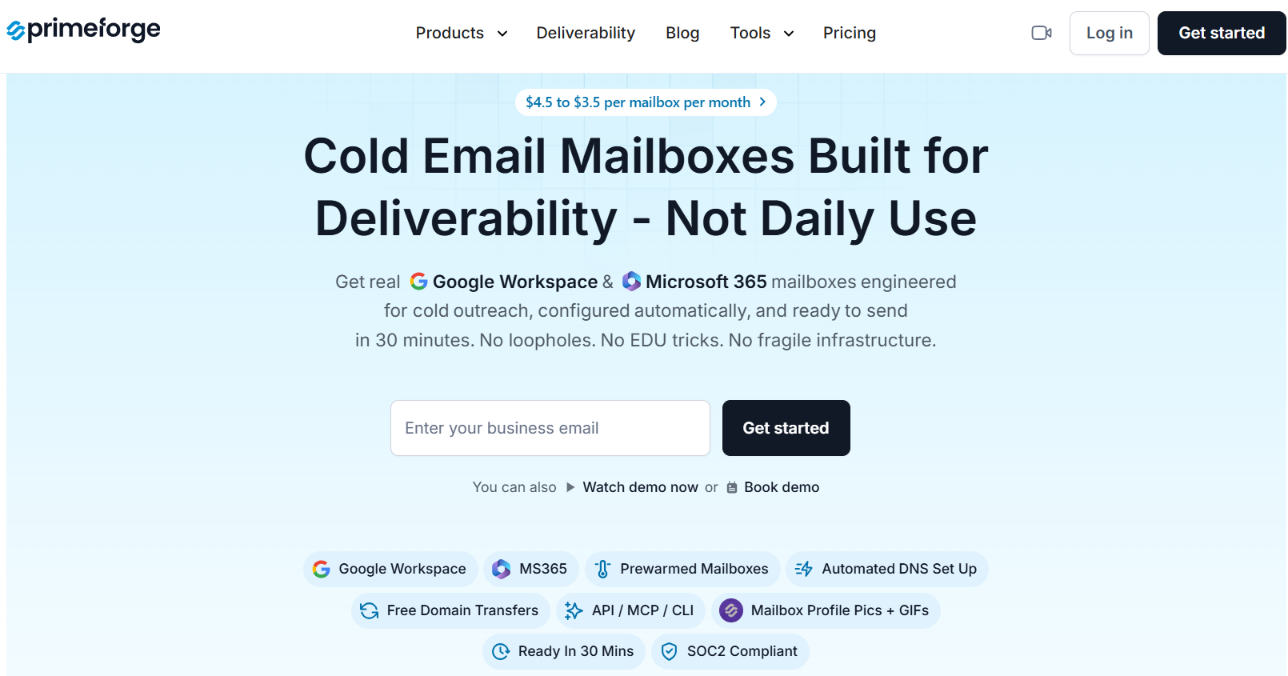
Primeforge gives you Google Workspace and Microsoft 365 mailboxes with US-based IPs. It also adds several mailbox management features that are useful when you are running a larger setup.
Here is where Primeforge stands out as an alternative:
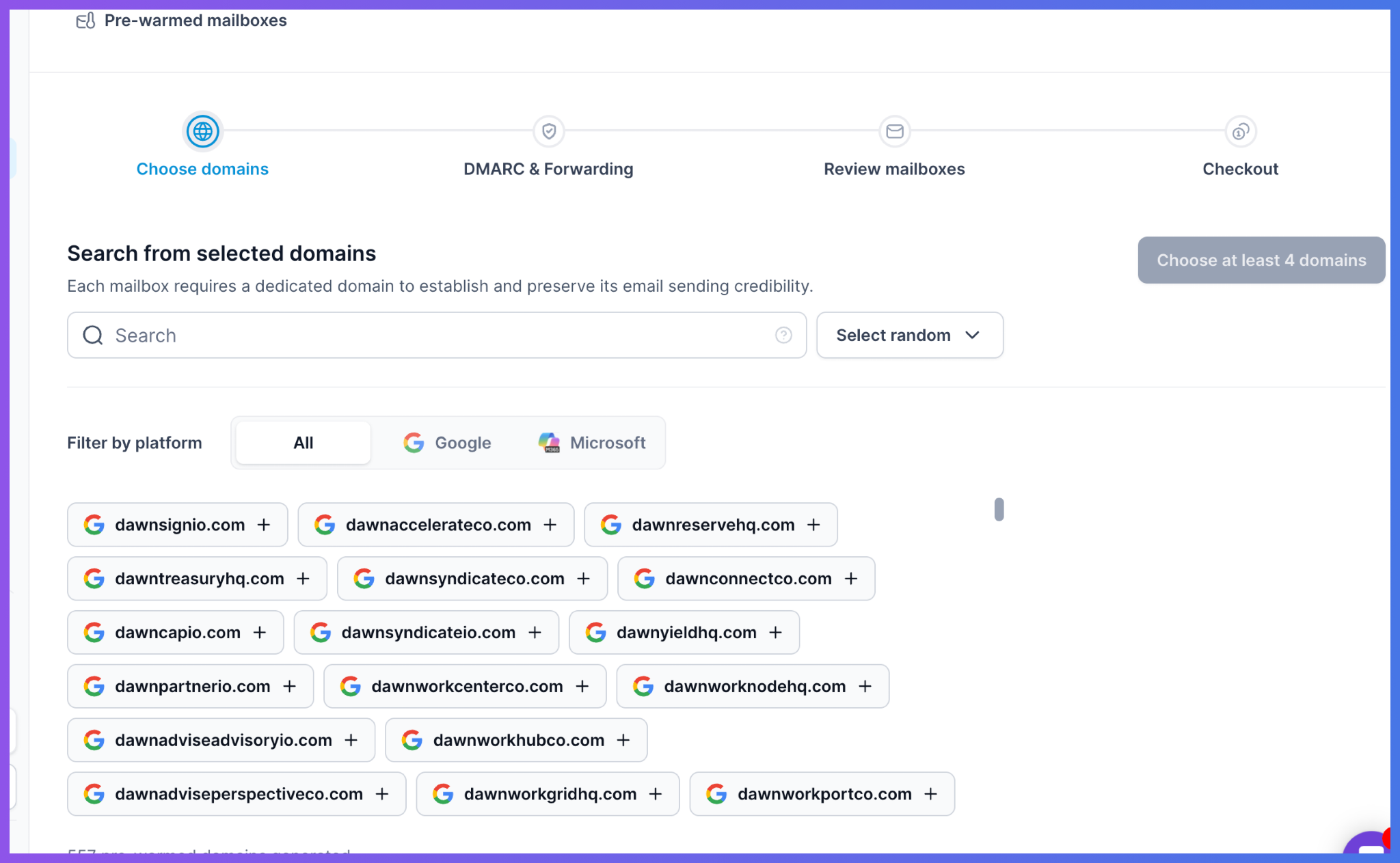
So, Hypertide makes more sense if you specifically want its Entra infrastructure. Primeforge is the better fit if you specifically want Google Workspace and Microsoft 365 mailboxes with more mailbox management features.
Enter your email to get a custom plan & stack recommendation for your business
Please check your mailbox in 5 minutes

Hypertide is worth considering if you want to scale cold email with Google and Entra infrastructure.
Its $25 Entra plan gives you 25 inboxes per domain, while the platform handles much of the setup and gives you tools to manage a larger number of domains and inboxes.
The main concern is that independent user feedback is still limited, so there is not much third-party evidence showing how the infrastructure performs over time.
If you prefer to scale with Google Workspace and Microsoft 365 mailboxes, Primeforge is the better alternative to consider. You can also choose pre-warmed mailboxes and get detailed mailbox analytics, bulk DNS updates, and more mailbox-level management.
If that setup fits your outreach better, you can get started with Primeforge.