
Personalized Outbound Strategy
Get The Right Outbound Strategy In Minutes
Enter your email to get a custom plan & stack recommendation for your business
It's being carefully crafted by AI
Please check your mailbox in 5 minutes

You buy pre-warmed inboxes to skip the weeks of preparation before launching a cold email campaign.
But what happens when those inboxes struggle as soon as you increase your sending volume?
That is what one LiteMail customer experienced. The inboxes worked initially, but burned within three days after he increased the daily volume from 10 emails to just 15.
His experience caught my attention because LiteMail sells pre-warmed Google and Microsoft inboxes to teams that want to start sending sooner.
So, are you actually avoiding the warm-up wait, or simply paying more for inboxes that still require careful handling?
I reviewed LiteMail’s pre-warmed setup, pricing, sending limits, and customer feedback to find out.
LiteMail handles the infrastructure you need before your cold email campaigns reach a sending tool.
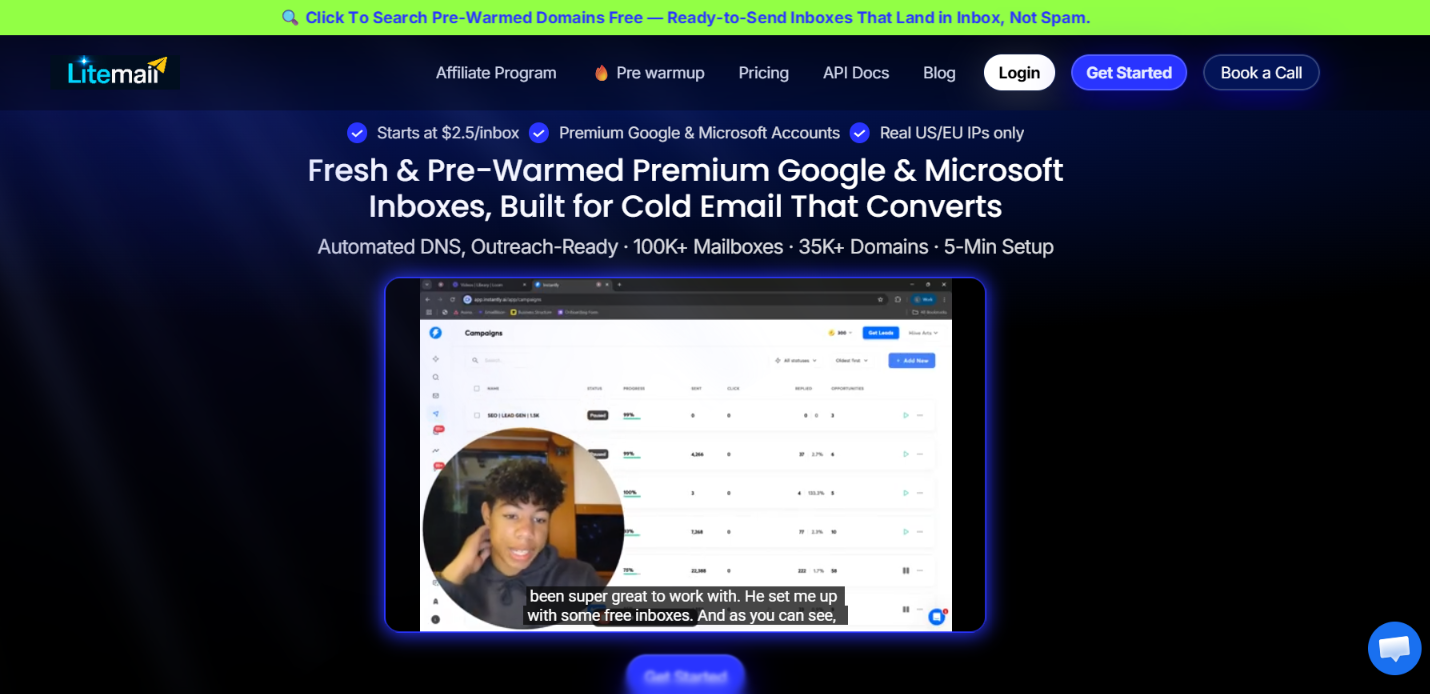
You can get Google Workspace or Microsoft 365 inboxes, with both fresh and pre-warmed options. LiteMail also handles SPF, DKIM, and DMARC, so you do not have to configure these records manually for every domain.
With fresh inboxes, you can connect an existing domain or add a new one. With pre-warmed plans, domains are included alongside inboxes that LiteMail says have already completed 12 weeks of warm-up.
Once everything is set up, you can connect the inboxes to cold email tools such as Instantly and Smartlead through OAuth. You still need a separate sending tool to create and run your campaigns.
Primeforge covers a similar use case, so here is a quick comparison:
The basic offer is similar. Both give you Google and Microsoft inboxes for cold outreach and handle the technical setup. The differences become more important when you look specifically at how their pre-warmed inboxes work and what you are paying for.
With LiteMail, the main difference between fresh and pre-warmed inboxes is how soon you can launch your campaign.
Fresh inboxes start with no sending history. LiteMail puts the warm-up period at 4-6 weeks, which means you need to build that history before using the inboxes for your normal cold email campaigns.
The pre-warmed option removes that initial wait. The domains come with 12 weeks of sending history already built, and LiteMail positions the inboxes as ready for cold email from day one.
You also get more bundled into the pre-warmed plans.
So, you are not simply paying more for the same number of inboxes. You are paying to skip the initial warm-up period and get domains with an existing sending history.
There is a trade-off, though. The $39 pre-warmed Starter plan gives you 5 inboxes, while the $37 fresh Starter plan gives you 10. If you have time to warm your own setup, fresh inboxes give you more inboxes for roughly the same monthly price.
But if a campaign needs to launch soon, the extra cost of pre-warmed inboxes may make more sense than waiting several weeks before you can start sending.
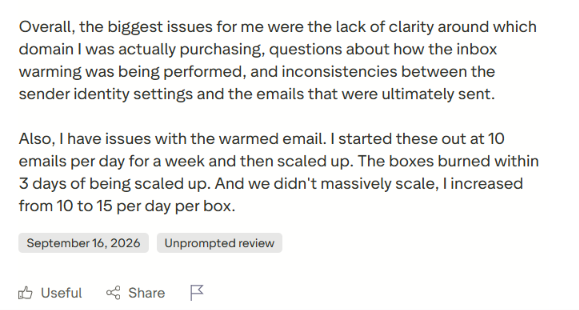
For pre-warmed inboxes, the real test starts when you begin increasing the sending volume. One customer left a 1-star Trustpilot review after using LiteMail's warmed inboxes. According to the customer, they started by sending 10 emails per inbox per day for one week.
They then increased the volume to 15 emails per inbox per day. The customer said the inboxes burned within three days of that increase. What stands out is that the jump was only five additional emails per inbox each day, rather than a sudden increase to a much higher volume.
The same customer also questioned how the inboxes had been warmed. They reported seeing what appeared to be Russian-language spam in some inboxes, while others appeared to contain messages mainly going back and forth between inboxes in the same system. There were other issues in the review too. T
he customer said they received a different domain from the one they thought they had selected and had problems with sender identity settings carrying over correctly.
This is still one customer's experience, so it does not show that every LiteMail pre-warmed inbox will have the same problem.
But it is relevant when you are paying extra for pre-warmed inboxes. Having an existing sending history does not mean you can ignore what happens to the inbox once real cold email campaigns begin.
The negative experience above is not what most LiteMail reviewers report. On Trustpilot, LiteMail has a 4.5/5 TrustScore from 25 reviews.
Customer support comes up often, with users mentioning quick replies, help with setup, and support when connecting their inboxes and domains.
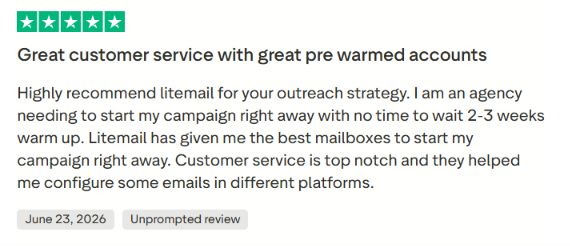
There is also positive feedback specifically about the pre-warmed inboxes. One agency customer said they needed to start a campaign immediately and did not have two to three weeks to wait for warm-up. They said LiteMail's pre-warmed accounts allowed them to start the campaign right away.
Another customer said the pre-warmed domains worked well when they had a campaign with a short launch deadline.
G2 has much less feedback to work with. LiteMail has a 4.8/5 rating from only two reviews. One reviewer gave it 4.5/5 and highlighted the pre-warmed mailboxes and pricing, while the other gave it 5/5 and praised the responsive customer support but said the domain names were not automatically aligned with what they needed.
You can use LiteMail to set up your domains and inboxes, handle email authentication, and then move those inboxes into your cold email sending tool.
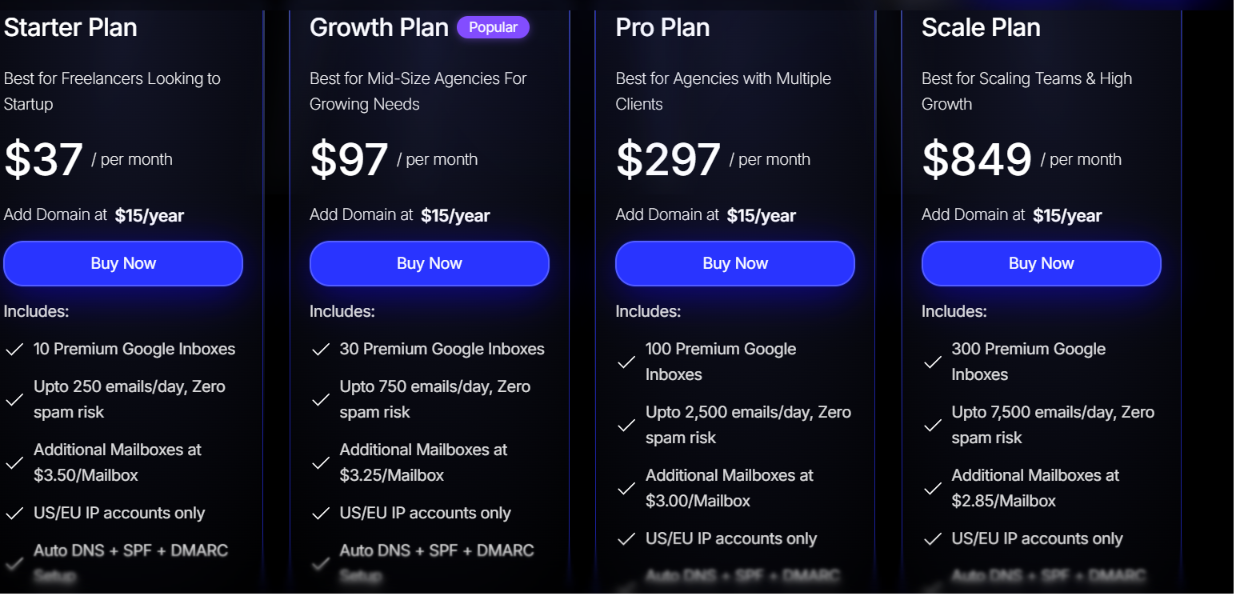
LiteMail has separate pricing for its fresh and pre-warmed inboxes. Fresh Google Workspace and Microsoft 365 plans start at $37/month for 10 inboxes, while pre-warmed plans start at $39/month for 5 inboxes and one domain.
Here is the full pricing:
Fresh plans do not include a domain in the monthly price. LiteMail lists domains at $15/year. The fresh-plan pricing is same for both Google Workspace and Microsoft 365.
Pre-warmed plans include domains and inboxes with 12 weeks of sending history.
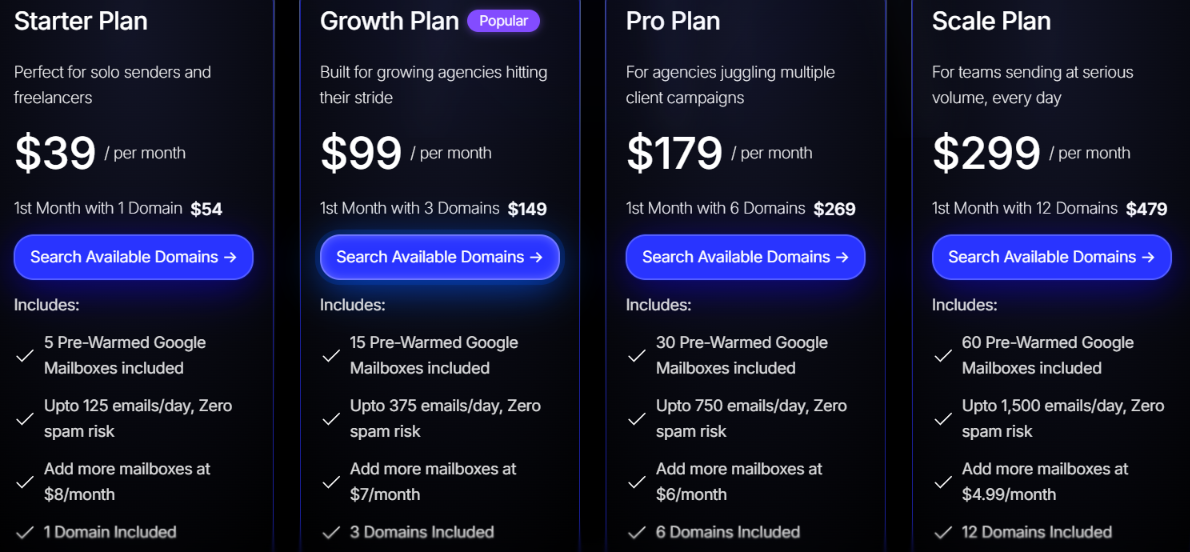
The pricing difference becomes clearer at the entry level. $37/month gets you 10 fresh inboxes, while $39/month gets you 5 pre-warmed inboxes and one pre-warmed domain. So you are getting fewer inboxes with the pre-warmed plan, but you are paying to avoid the initial warm-up period and get the sending history already built.
LiteMail is a good fit if you want Google Workspace or Microsoft 365 inboxes for cold email but don’t want to set everything up yourself.
So, LiteMail is mainly worth considering when saving the initial warm-up time matters more to you than getting the highest number of inboxes for your monthly budget.
LiteMail and Primeforge cover a similar need. Both give you Google Workspace and Microsoft 365 mailboxes for cold outreach, and both offer pre-warmed options.
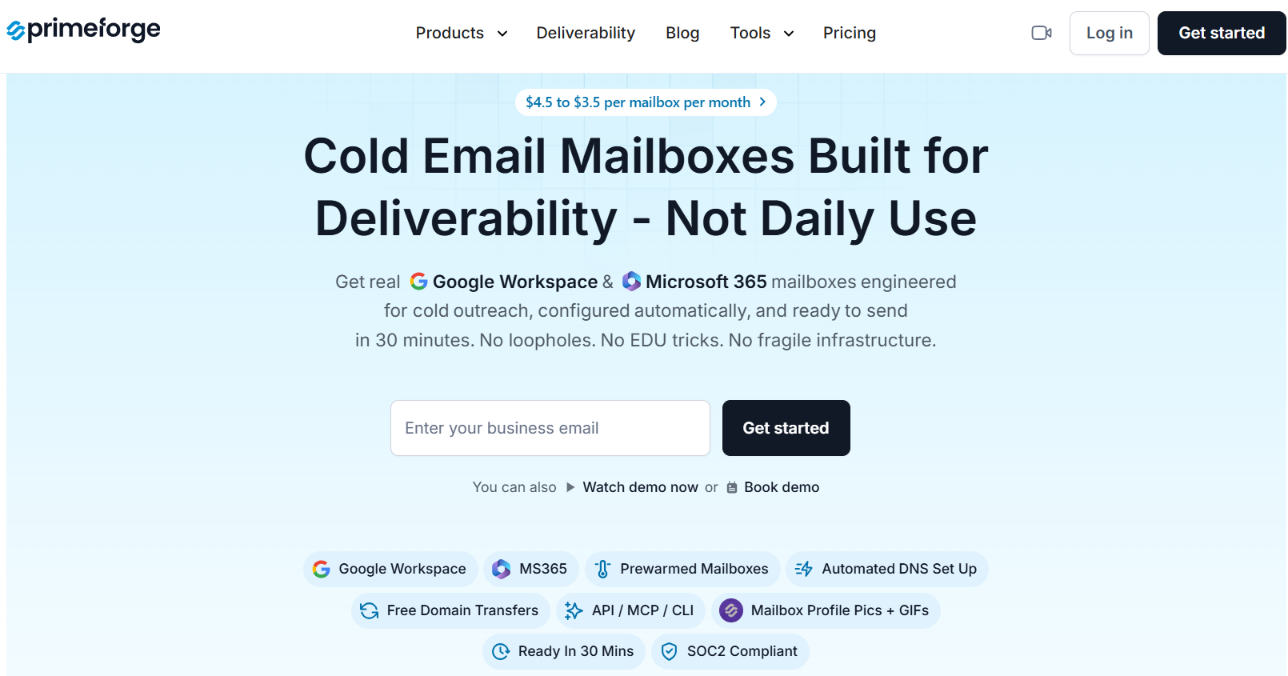
Primeforge becomes a more relevant alternative when you need to manage a larger mailbox setup beyond simply getting the inboxes ready.
Here is where Primeforge differs:
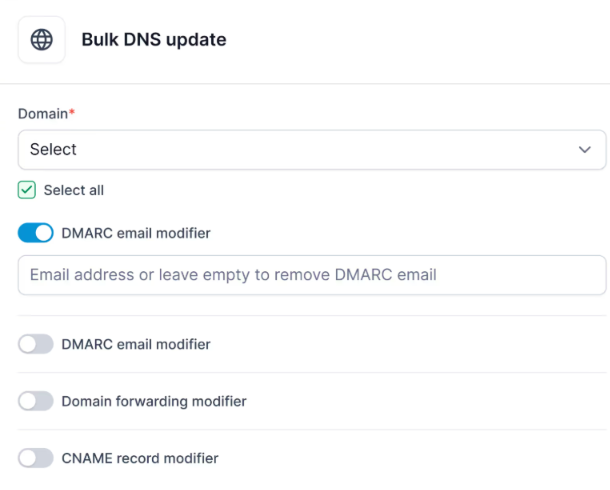
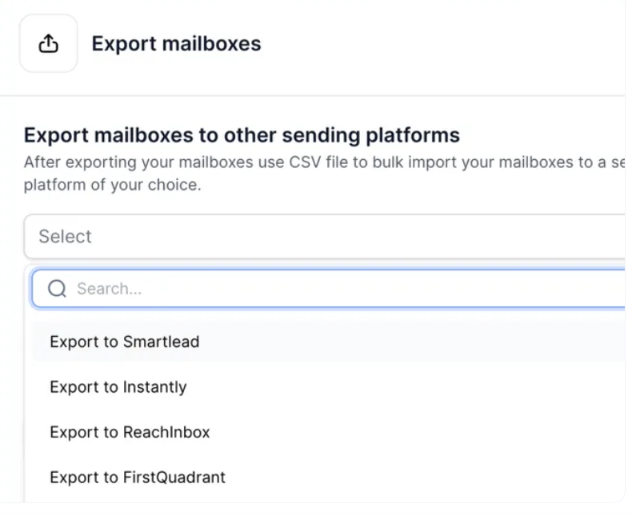
So, if LiteMail's main appeal is its ready-made Google and Microsoft inboxes, it still covers that need well.
But if you manage a growing number of domains and mailboxes and need bulk DNS changes, reusable mailbox slots, separate workspaces, and API-based management, Primeforge offers those specific tools.
Enter your email to get a custom plan & stack recommendation for your business
Please check your mailbox in 5 minutes

Yes, LiteMail's pre-warmed inboxes can be worth it if you need to start sending sooner instead of waiting 4-6 weeks for fresh inboxes to warm up.
You get 12 weeks of sending history, automated DNS setup, and domains included with the pre-warmed plans. But you pay more per inbox. The Starter plan costs $39/month for 5 pre-warmed inboxes, while 10 fresh inboxes cost $37/month.
If you need more inboxes, Primeforge may offer better value. Its mailboxes cost between $3.50 and $4.50 each per month, compared with $7.80 per inbox on LiteMail’s pre-warmed Starter plan. Primeforge also includes bulk DNS updates, reusable mailbox slots, multiple workspaces, and API access.
LiteMail is a good fit if your main priority is skipping the warm-up period. But if you need more mailboxes and better tools for managing them at scale, Primeforge is worth considering.