Email campaigns, warm-ups, sender rotation, and follow-ups
AI email personalization
AI agents for outreach workflows
Master inbox
$32/month
Instantly
Email campaign sending, follow-ups, and inbox rotation
Personalization variables
AI campaign optimization
Unibox
$37.6/month
Lemlist
Email + LinkedIn outreach sequences and follow-ups
Dynamic variables and AI personalization
AI message generation
Unified inbox
$63/month
Mailshake
Email and LinkedIn campaigns with automated follow-ups
Personalization fields
AI email writer
Lead Catcher reply tracking
$25/month
Woodpecker
Cold email campaigns, sending schedules, and follow-ups
Personalization snippets
AI interest detection
Central inbox
$24/month
Reply.io
Email + multichannel outreach sequences and follow-ups
AI message generation
AI SDR (Jason AI)
Shared inbox
$89/month
QuickMail
Email and LinkedIn campaign sending with follow-ups
Basic personalization
AI rewriting
Shared inbox
$9/month
Snov.io
Email + LinkedIn outreach campaigns and follow-ups
AI email generator
AI writing tools
Unibox
$29/month
Saleshandy
Email outreach campaigns, follow-ups, and sender rotation
AI sequence generator
Basic AI features
Unified inbox
$25/month
1. Salesforge
Salesforge is a Multichanneloutbound sales platform built to run email and LinkedIn outreach from one place.
Instead of using separate tools for sending emails, LinkedIn messaging, warm-up, and reply management, Salesforge brings these parts together in one workspace.
You can launch campaigns using unlimited mailboxes and LinkedIn senders.
If you prefer automation, you can also use the platform’s AI SDR, Agent Frank, which can handle prospecting, outreach, follow-ups, and meeting booking.
Salesforge also includes Primebox™, a shared inbox that collects replies from both email and LinkedIn, so conversations stay organized as outreach grows.
For email infrastructure, Salesforge works with Mailforge, Infraforge, and Primeforge.
Mailforge offers ready-to-use mailboxes on shared IP infrastructure for quick setup, while Infraforge provides dedicated IP infrastructure and more control over sending environments.
This means you can add domains and mailboxes directly from the Forge stack or connect your own infrastructure.
Key Features
Run email and LinkedIn outreach together instead of using separate tools
Connect unlimited mailboxes and LinkedIn senders as your outreach grows
Use AI SDR Agent Frank to automate prospecting, outreach, and follow-ups
Manage all replies in one place with Primebox™
Warm up your mailboxes automatically with Warmforge
Rotate mailboxes and sending IPs automatically when sending campaigns
Create sequences in multiple languages when targeting different regions
Test different outreach messages withA/B testing
Connect Salesforge with your CRM and other tools using integrations or API
Pricing
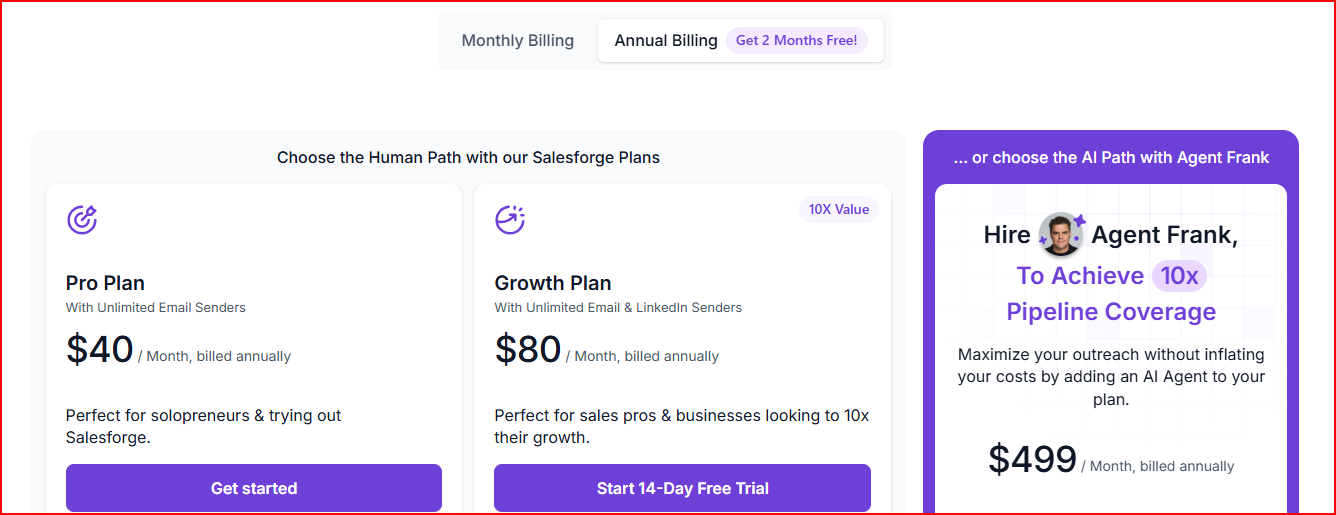
This image shows the Salesforge pricing
Pro Plan - $40/month (billed annually)
Run outreach with 1,000 active contacts and up to 5,000 emails per month
Connect unlimited mailboxes and use unlimited warm-up, with Primebox to manage replies
Growth Plan - $80/month (billed annually)
Run campaigns with 10,000 active contacts and up to 50,000 emails per month
Unlimited users and unlimited LinkedIn senders, plus A/B testing and onboarding support
Agent Frank (AI SDR) - $499/month
AI agent that can find prospects, send outreach, follow up, and book meetings
Works 24/7 across email and LinkedIn
Pros
You can run both email and LinkedIn outreach from one place, so campaigns are easier to manage.
Scaling outreach becomes easier because you can connect unlimited mailboxes and LinkedIn senders.
Built-in warm-up helps keep your emails landing in inboxes instead of spam.
The AI SDR can handle prospecting and outreach tasks automatically, saving time for your team.
Cons
You need separate domains and mailboxes if you don’t already have email infrastructure.
Using the AI SDR (Agent Frank) adds extra cost to the platform.
Personalized Outbound Strategy
Get The Right Outbound Strategy In Minutes
Enter your email to get a custom plan & stack recommendation for your
business
It's being carefully crafted by AI
Please check your mailbox in 5 minutes
2. Smartlead
Smartlead is a cold email and outbound automation platform designed to help teams run outreach at scale.
It allows you to manage campaigns, mailboxes, and leads from one place.
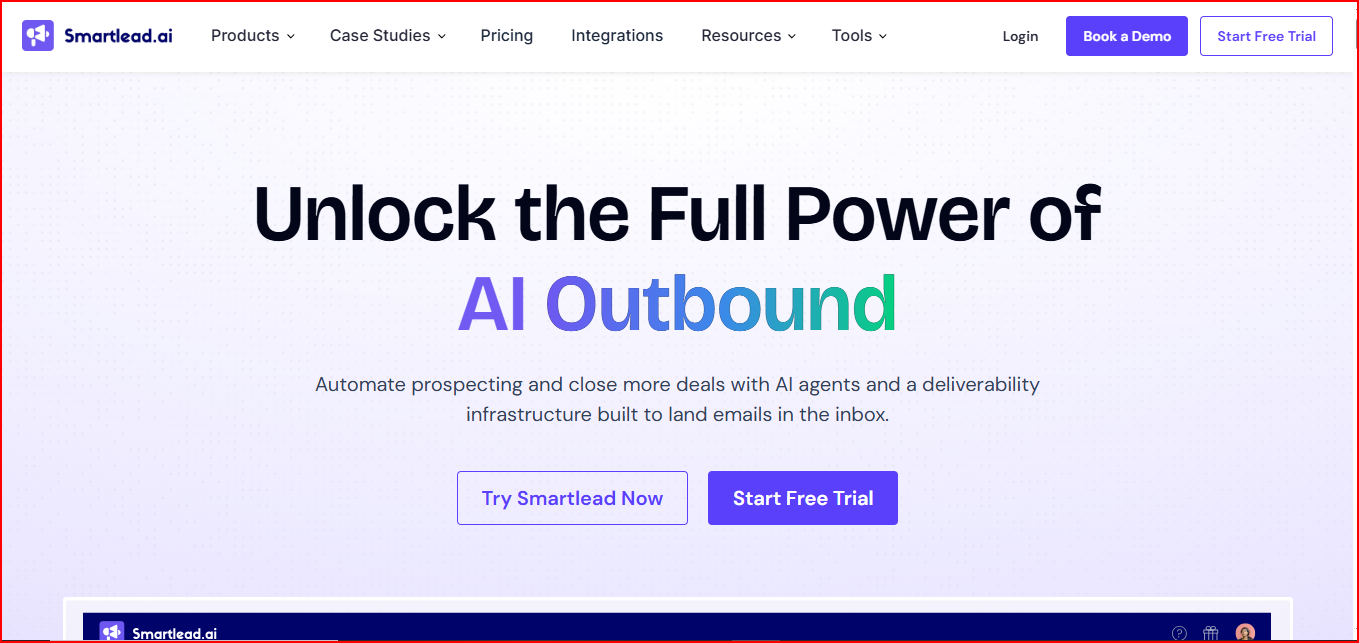
This image shows the Smartlead - Cold Email automation tool with Infrastructure
You can add unlimited mailboxes and store unlimited leads, so teams don’t have to worry about account limits while running campaigns.
Smartlead also includes a deliverability system called SmartInfra, which handles things like DNS setup, warm-up, sender rotation, and reputation monitoring.
This helps prepare mailboxes before campaigns start.
The platform also includes AI agents, mailbox infrastructure tools, and a unified inbox, so outreach, replies, and campaign management can be handled inside one system.
Key Features
Add unlimited mailboxes and store unlimited leads for outreach campaigns
SmartInfra deliverability system that manages DNS, warm-up, and sender rotation
Dedicated infrastructure and IPs to control sender reputation
SmartProspect lead system that adds verified leads as you send emails
SmartSenders mailboxes that come with domains, DNS, SPF, DKIM, and DMARC setup
SmartAgents AI agents that can research leads, write emails, and update CRM
Master Inbox to manage replies from campaigns in one place
SmartDialer for calling prospects alongside email outreach
Built-in CRM board to track deals and conversations
Pricing
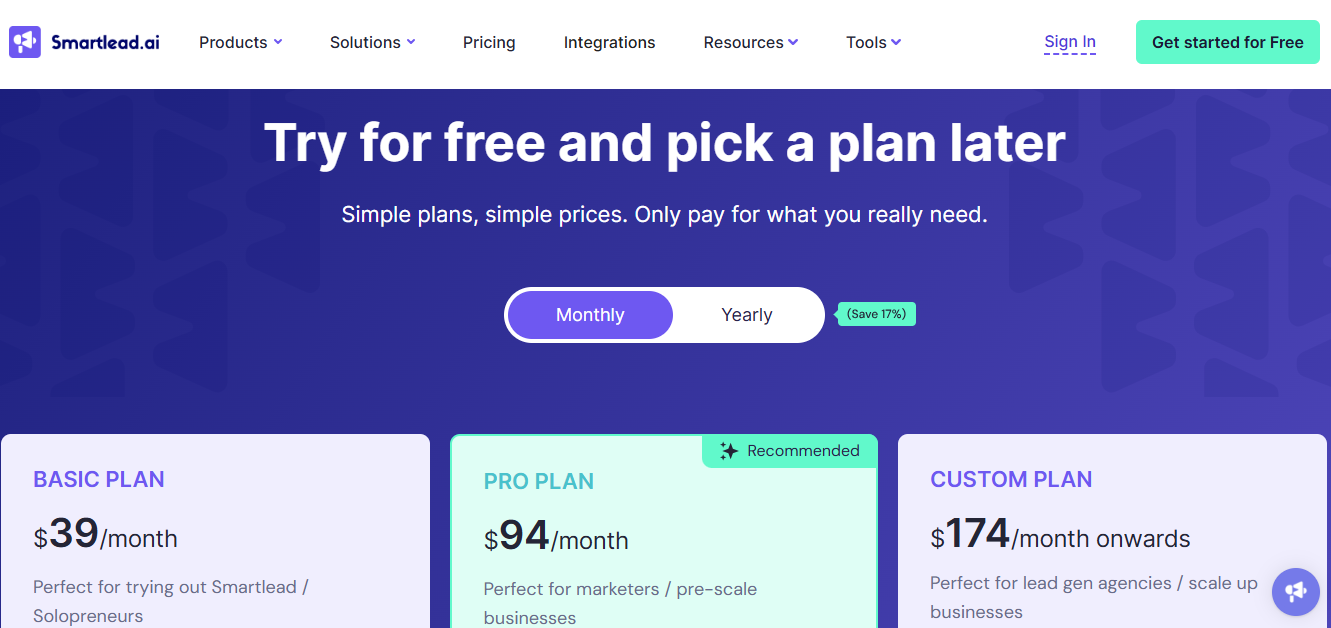
This image shows the Smartlead pricing
Base Plan - $32/month
Send 6,000 emails per month and manage 2,000 contacts
Includes 2,000 verified prospect emails and access to warm-up pool
Pro Plan - $78/month
Manage 30,000 contacts and send up to 90,000 emails per month
Includes 30,000 verified prospect emails
Smart Plan - $144/month
Unlimited contact storage and 150,000 email sends per month
Includes 50,000 verified prospect emails
Prime Plan - $324/month
Unlimited contacts and over 5.6M email sends per month
Includes 2M+ verified prospect emails
Pros
You can connect unlimited mailboxes, which makes it easier to scale your cold email campaigns.
The platform handles DNS setup, warm-up, and sender rotation, so getting campaigns ready takes less manual work.
You can see bounce rates, spam signals, and sender reputation in one place, which helps keep an eye on deliverability.
Replies from different campaigns appear in one inbox, so conversations are easier to manage.
AI agents can help with lead research and parts of outreach, which can save time.
Cons
If you don’t already have sending infrastructure, you’ll still need to buy domains and mailboxes separately.
Some infrastructure features, like SmartSenders or SmartServers, may need extra setup depending on how you want to run campaigns.
Since Smartlead includes several systems (AI agents, infrastructure tools, inbox, CRM), it may take a little time to get used to everything.
3. Instantly
Instantly is a cold email outreach platform built to help teams find leads, run email campaigns, and manage replies from one place.
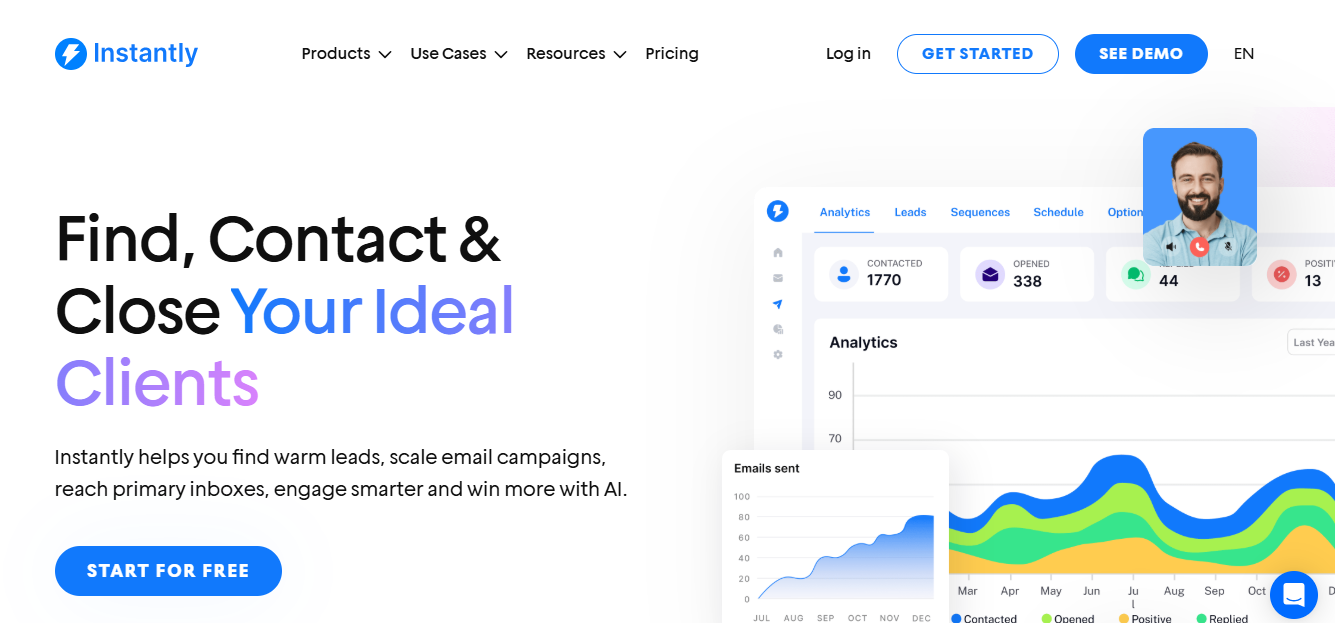
This image shows the Instantly - Email automation tool with personalized AI
The platform allows you to add unlimited email accounts and run outreach campaigns at scale.
It also includes email warm-up and deliverability settings to help emails reach primary inboxes.
Replies from different campaigns and inboxes can be managed inside Unibox, so conversations stay organized as outreach grows.
Key Features
Unlimited email warm-up to prepare mailboxes before sending
AI prompts to enrich and personalize leads
Advanced lead search with filters and buying signals
Unibox shared inbox to manage replies from multiple accounts
AI reply labels to categorize responses automatically
Campaign analytics that track pipeline, conversions, and revenue
A/Z testing for outreach campaigns
Reputation protection and bounce detection
Pricing
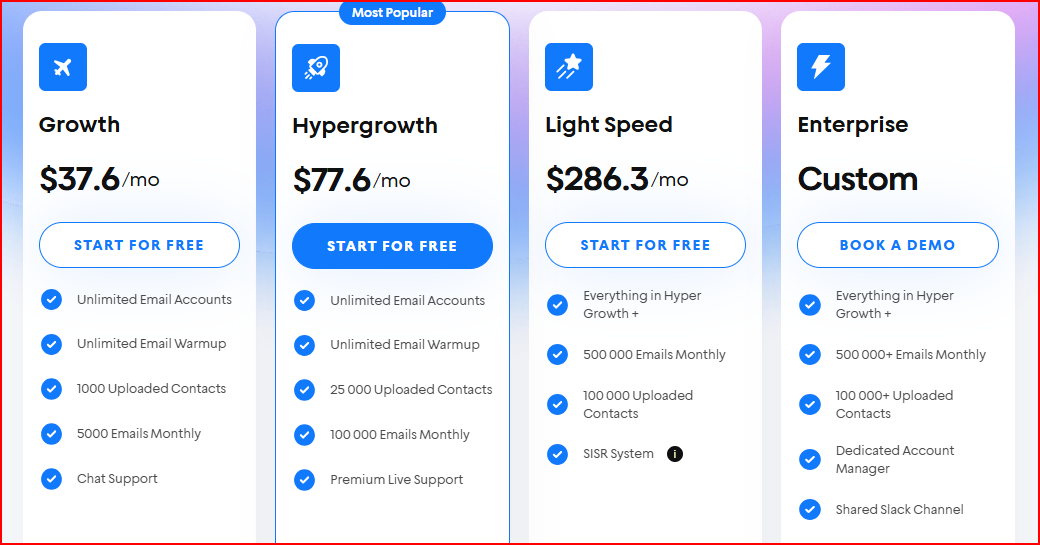
This image shows the Instantly pricing
Growth - $37.6/month
Send 5,000 emails per month and upload up to 1,000 contacts
Includes unlimited email accounts and unlimited warm-up
Hypergrowth - $77.6/month
Send 100,000 emails per month with up to 25,000 contacts
Includes priority support and advanced outreach features
Light Speed - $286.3/month
Send 500,000 emails per month
Store 100,000 uploaded contacts
Enterprise - Custom pricing
Supports 500,000+ emails per month
Includes a dedicated account manager and a private deliverability network
Pros
You can connect unlimited email accounts, which makes it easier to scale outreach.
Built-in email warm-up helps prepare mailboxes before sending campaigns.
The Unibox keeps replies from different campaigns in one place, so conversations are easier to manage.
The platform also includes lead search and AI tools, which can help with prospecting and personalization.
The interface is simple and easy to use, so getting campaigns running doesn’t take long.
Cons
Some advanced features, like lead data or higher sending limits, require higher plans.
You need to set up or connect your own sending infrastructure if you want more control over domains and mailboxes.
4. Lemlist
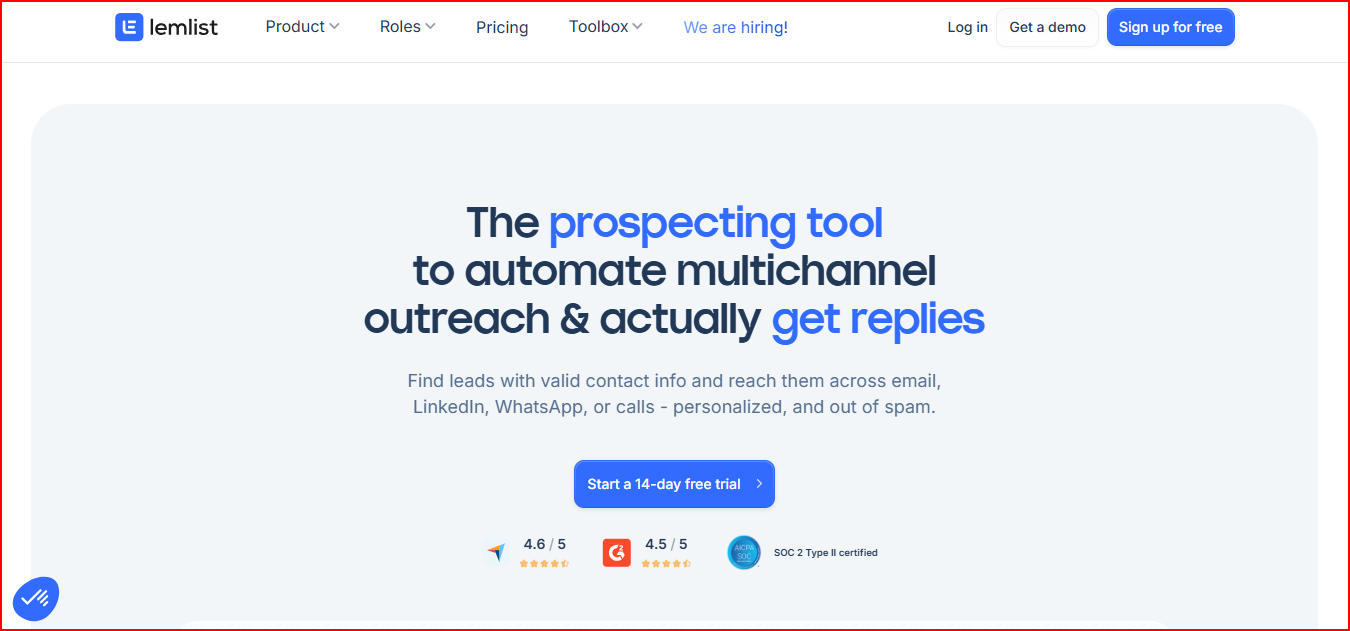
Lemlist is a multichannel outreach platform designed for teams that want to run outbound campaigns across more than just email.
This image shows the Lemlist - Multichannel Outreach tool
With Lemlist, you can find leads, enrich their contact data, and reach them through email, LinkedIn, WhatsApp, or calls from one platform.
The tool also includes a large lead database with hundreds of millions of contacts, which helps teams identify prospects who match their ideal customer profile.
The platform also focuses on personalization and deliverability.
Lemlist includes AI-powered personalization to tailor outreach messages and Lemwarm, a built-in warm-up tool designed to help emails stay out of spam folders.
Key Features
Email finder and verifier to get verified contact details
Multichannel outreach sequences across email, LinkedIn, WhatsApp, and calls
AI-powered personalization to customize outreach messages
Unified inbox to manage replies from multiple channels
Inbox rotation to support email deliverability
lemwarm deliverability booster for automated email warm-up
Intent signals and lead filters to identify potential buyers
CRM integrations and API access
Pricing
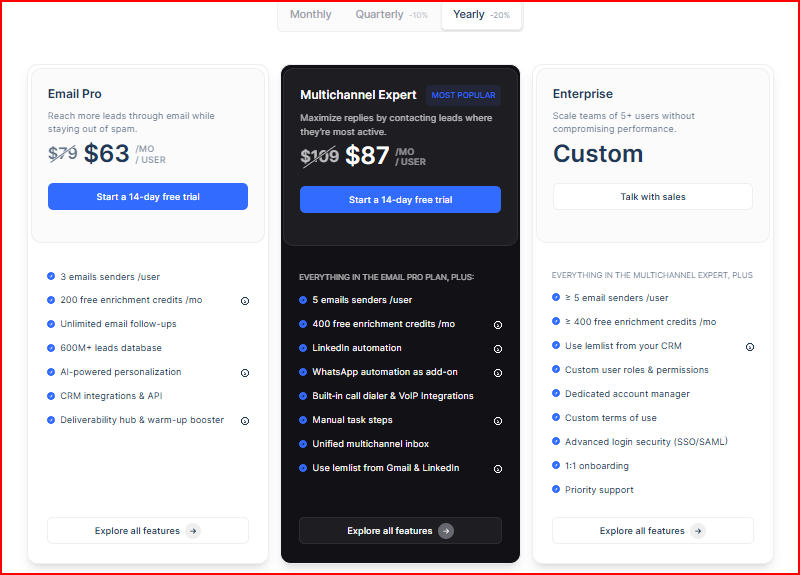
This image shows the Lemlist pricing
Email Pro - $63/month per user (billed yearly)
Good if you want to run email-focused outreach campaigns.
Includes 3 email senders per user and unlimited email follow-ups
Access to 600M+ lead database and AI-powered personalization
Multichannel Expert - $87/month per user (billed yearly)
Designed for teams running outreach across multiple channels.
Includes 5 email senders per user and LinkedIn automation
Access to a unified multichannel inbox and built-in calling
Enterprise - Custom pricing
Built for larger sales teams.
Supports larger teams with advanced roles and permissions
Includes a dedicated account manager and priority support
Pros
You can run email, LinkedIn, calls, and even WhatsApp outreach from one place, so managing campaigns across channels becomes easier.
Lemlist includes a large lead database and email finder, which helps you find prospects without using another tool.
Built-in lemwarm helps warm up your mailboxes, which supports better email deliverability.
You can personalize outreach using AI and dynamic variables, which makes messages feel more relevant.
Replies from different channels stay organized in one inbox, so conversations are easier to track.
Cons
Pricing is per user, which increases costs as teams grow.
Running larger campaigns requires adding more sending emails or domains as add-ons.
Some features, like WhatsApp automation or calling numbers, are available as add-ons.
5. Mailshake
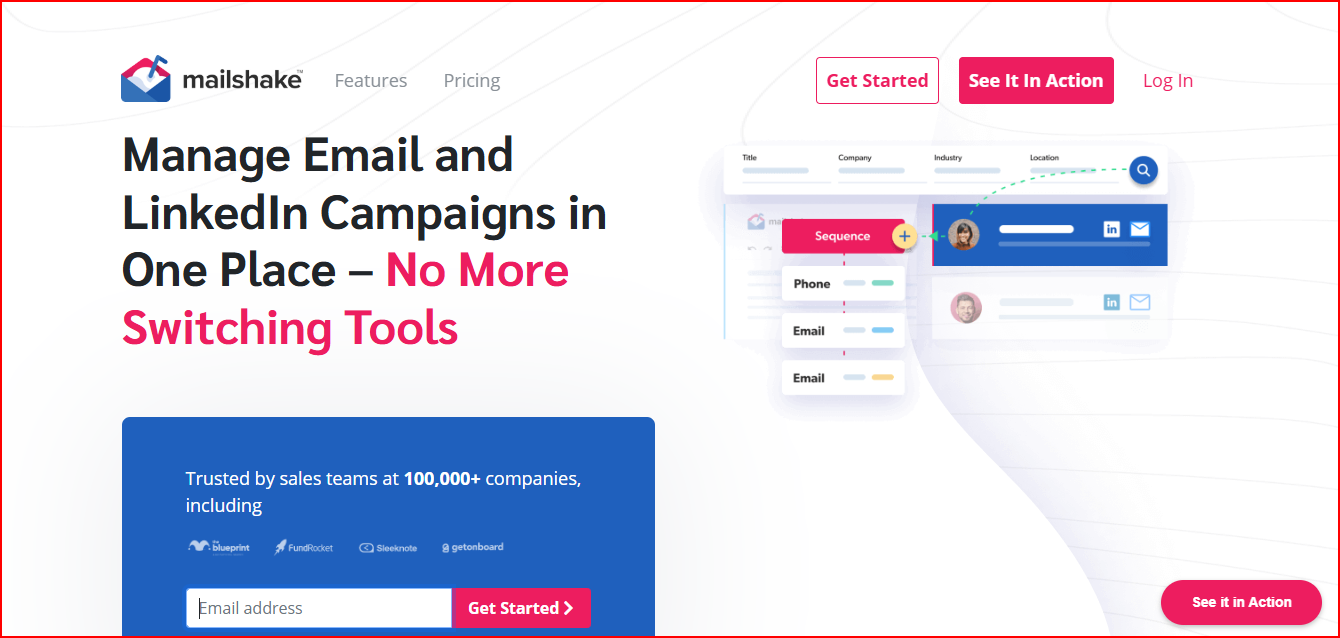
Mailshake is a sales engagement and outreach platform that helps teams run email and LinkedIn campaigns from one dashboard.
This image shows the Mailshake - Multichannel outreach automation tool
You can send cold email sequences, follow up automatically, and track engagement from your campaigns.
Mailshake also includes tools like Data Finder to search for prospects and Lead Catcher to highlight the most engaged leads so teams know who to respond to first.
The platform also includes AI tools for writing email copy, deliverability features like email warm-up, and campaign analytics to track opens, replies, and clicks.
Key Features
Email and LinkedIn outreach sequences from one dashboard
Lead Catcher to surface the most engaged prospects
Data Finder to search for business contacts
SHAKESpeare AI writer to help generate email copy
Email warm-up to build sender reputation
A/B testing for outreach campaigns
Pipeline-focused analytics to track opens, replies, and clicks
Unified inbox to manage conversations
Power dialer and phone outreach in advanced plans
Pricing
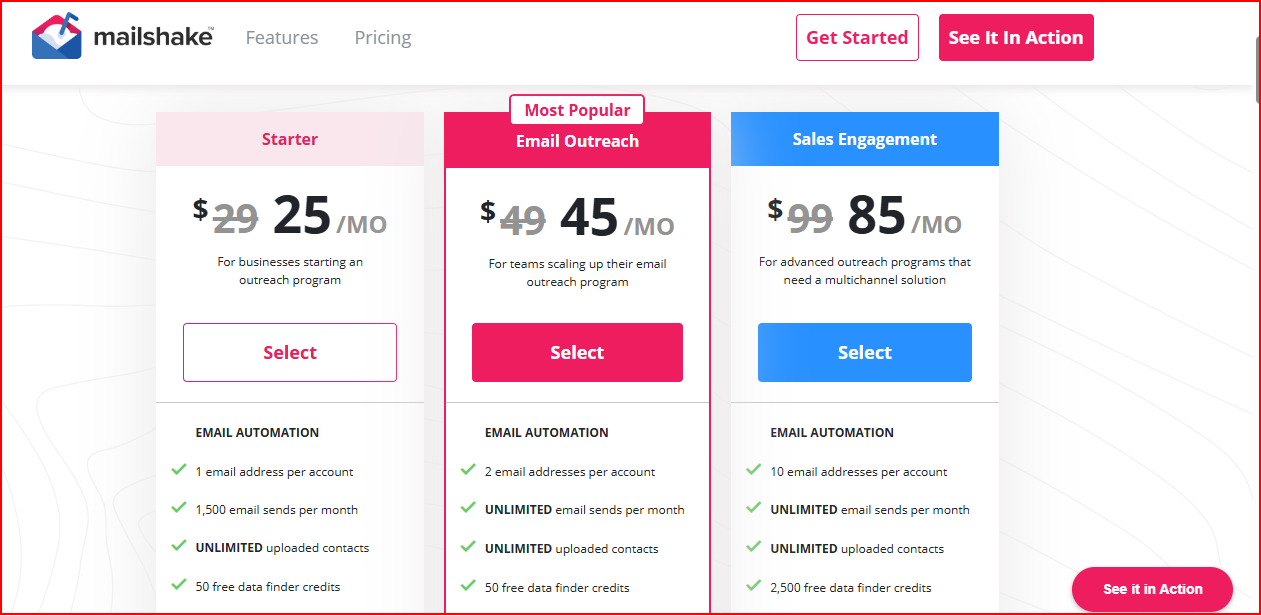
This image shows the Mailshake pricing
Starter - $29/month
Send 1,500 emails per month with 1 email address per account
Includes unlimited campaigns, unlimited warm-up, and email verification
Email Outreach - $49/month
Send unlimited emails with 2 email addresses per account
Includes email rotation, advanced scheduling, and CRM integrations
Sales Engagement - $99/month
Connect 10 email addresses per account with unlimited email sends
Includes LinkedIn automation, phone dialer, and unified inbox
Agency Plan - Custom pricing
Includes unlimited email addresses
Built for agencies managing multiple outreach campaigns
Pros
You can run email and LinkedIn outreach from one place, which makes managing campaigns simpler.
Built-in tools like email warm-up, list cleaning, and spam word checks help support better deliverability.
The platform shows opens, replies, and campaign performance, so it’s easier to see how your outreach is doing.
Features like AI email writing and templates can help speed up the creation of outreach messages.
Cons
Some features, like LinkedIn automation and calling, are only available in higher plans.
Each user account connects a limited number of email addresses, depending on the plan.
Larger outreach setups require multiple user accounts to connect to more sending emails.
6. Woodpecker
Woodpecker is a cold email outreach tool designed to help teams send personalized campaigns while keeping deliverability under control.
This image shows the Woodpecker - complete outreach tool
The platform includes tools for email verification, warm-up, inbox rotation, and deliverability monitoring, which help reduce sending issues before campaigns start.
You can also find B2B leads from a large lead database, manage campaigns, and track replies from one place.
Woodpecker also allows you to combine email outreach with LinkedIn actions like profile visits, connection invites, and messages within the same campaign.
Key Features
Free catch-all email verification to avoid sending emails to invalid addresses
Automatic email warm-up to build sender reputation
Inbox rotation and adaptive sending to manage sending limits
Deliverability monitor to track potential sending issues
Centralized inbox to manage replies from campaigns
Condition-based campaigns for automated follow-ups
B2B lead finder with a large contact database
LinkedIn outreach actions that can be added to campaigns
Domain audit tools to check SPF, DKIM, and DNS setup
Pricing
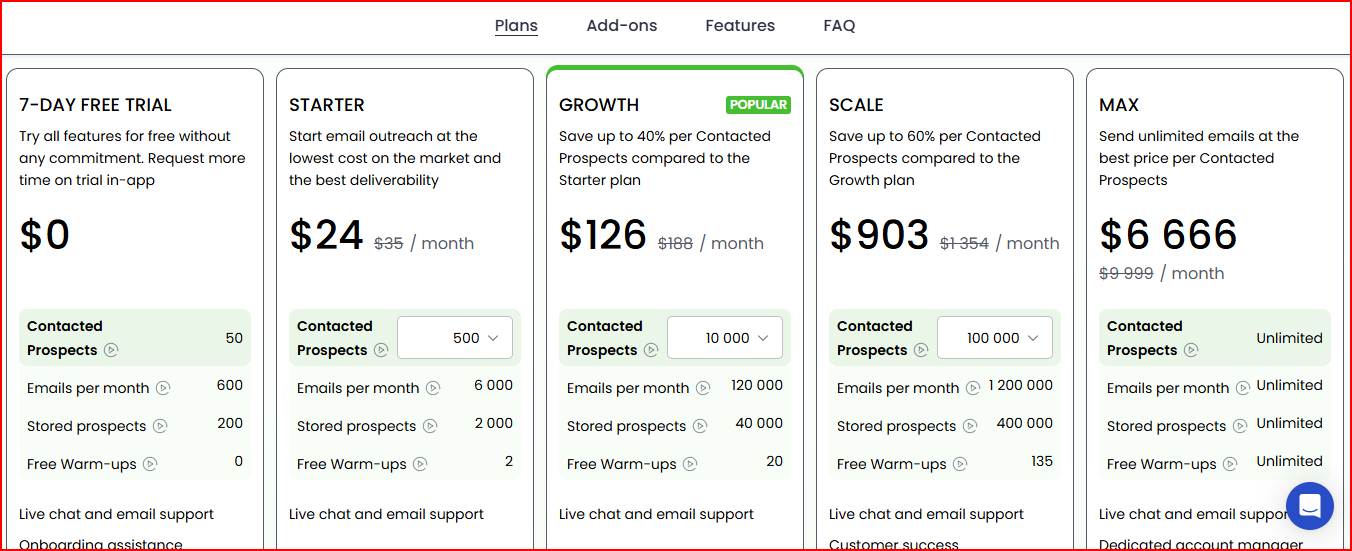
This image shows the Woodpecker pricing
Starter - $24/month
Contact 500 prospects and send up to 6,000 emails per month
Includes 2 free warm-ups and email verification
Growth - $126/month
Contact 10,000 prospects and send up to 120,000 emails per month
Includes 20 free warm-ups
Scale - $903/month
Contact 100,000 prospects and send up to 1.2M emails per month
Includes 135 warm-ups
Max - $6,666/month
Unlimited prospects and unlimited emails
Includes unlimited warm-ups and dedicated account support
Pros
Woodpecker includes email warm-up and verification, which helps keep your outreach lists clean before sending.
Features like adaptive sending and sending limits help protect your sender reputation while running campaigns.
You can combine email with LinkedIn steps in the same sequence, which helps when running multichannel outreach.
Replies from campaigns stay organized in one inbox, making conversations easier to manage.
The platform also includes a lead finder database, so you can search for prospects directly inside the tool.
Cons
LinkedIn automation is available as an add-on rather than included by default.
Larger campaigns may require higher plans as sending limits increase.
Some infrastructure options, like domains, emails, or dedicated servers, are paid add-ons.
7. Reply.io
Reply.io is a sales engagement platform built to help teams automate outreach and manage conversations across multiple channels.
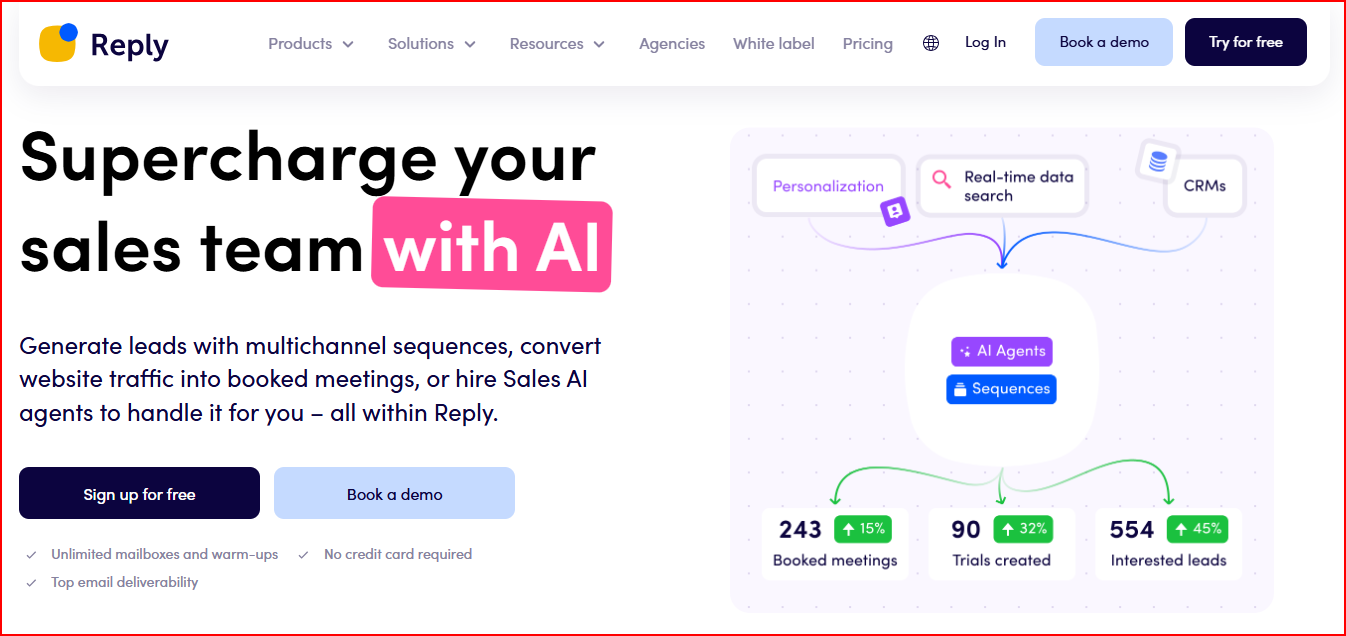
This image shows the Reply.io - AI Email automation tool
You can run outreach using email sequences, LinkedIn touchpoints, calls, SMS, and other connected channels.
The platform also includes tools to search for contacts from a large B2B database, enrich contact data, and personalize messages using AI.
Reply.io also focuses on deliverability.
The platform includes email warm-up and a set of deliverability tools designed to help emails reach the inbox.
It also offers Jason AI SDR, an AI agent that can help automate prospecting, outreach, and responses.
Key Features
AI audience suggestions to help target the right prospects
Email finder and contact enrichment tools
Multichannel outreach sequences across email, LinkedIn, SMS, calls, and other channels
Unified inbox to manage conversations from campaigns
Meeting scheduler inside outreach sequences
Email warm-up and deliverability tools
AI-generated sequences and responses
Jason AI SDR for automated outreach
Pricing
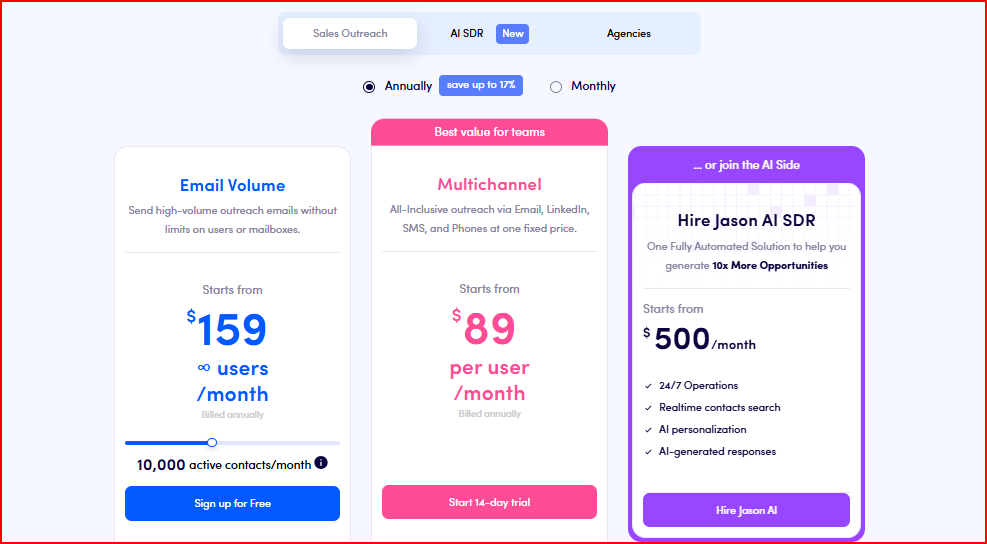
This image shows the Reply.io pricing
Email Volume Plan - From $159/month
Includes unlimited mailboxes and unlimited email warm-up
Supports 10,000 active contacts per month
Multichannel Plan - From $89/user/month
Includes email, LinkedIn, calls, SMS, and WhatsApp automation
Supports 10 mailboxes and unlimited emails
Jason AI SDR - From $500/month
AI agent that can automate prospecting and outreach activities
Runs 24/7 automated outreach with AI personalization
Pros
You can run multichannel outreach from one platform, including email, LinkedIn, calls, and SMS.
Reply.io includes AI SDR agents and automation tools, which can help handle prospecting and parts of outreach.
The platform gives access to a large B2B contact database, which helps with finding leads for campaigns.
Built-in deliverability tools and email warm-up help support better inbox placement.
Replies and conversations stay organized in one inbox, making it easier to manage outreach.
Cons
LinkedIn and other channels may require additional add-ons depending on the setup.
Pricing can increase when adding more channels or AI features.
Some plans limit the number of mailboxes available for outreach.
8. QuickMail
QuickMail is an outbound automation platform built to help teams run email and LinkedIn outreach from one tool.
This image shows the QuickMail - Multichannel outreach automation platform
You can connect multiple email addresses and LinkedIn accounts, then run campaigns that automatically rotate sending across those accounts.
This helps teams scale outreach while managing replies from one place.
QuickMail also includes deliverability features like Deliverability AI, inbox rotation, blacklist monitoring, and automated warming.
These help emails reach the inbox.
The platform also provides analytics, A/B/Z testing, and integrations so teams can track campaign performance and connect outreach with other tools.
Key Features
Email and LinkedIn outreach from one platform
Unlimited email and LinkedIn senders on higher plans
Automatic sender rotation across multiple accounts
Deliverability AI and automated deliverability insights
Reword with AI to improve email variations
Unified inbox to manage replies from campaigns
Advanced campaign analytics and A/B/Z testing
Integrations with CRM and automation tools
Free AutoWarmer with MailFlow
Pricing
This image shows the QuickMail pricing
Starter - $9/month
Connect 1 email sender and 1 LinkedIn account
Send 3,000 emails per month to up to 1,000 contacts
Growth - $99/month
Connect unlimited email senders and LinkedIn accounts
Send 100,000 emails per month with up to 30,000 contacts
Agency - $299/month
Connect unlimited email senders and LinkedIn accounts with unlimited users
Send 300,000 emails per month with up to 50,000 contacts
Pros
You can connect unlimited email accounts and LinkedIn senders, which makes it easier to scale outreach.
QuickMail automatically rotates senders, which helps spread sending volume across accounts.
Replies from both email and LinkedIn appear in one inbox, so managing conversations is simpler.
The platform includes deliverability tools like inbox rotation and blcklist monitoring, which help keep campaigns running smoothly.
Team members can work from the same workspace without extra seat costs, which is helpful for agencies or teams.
Cons
Some advanced features are only available in higher plans.
The starter plan includes limited senders and lower sending limits.
Managing infrastructure like domains and mailboxes still needs to be handled separately, depending on your setup.
9. Snov.io
Snov.io is a lead generation and outreach automation platform that helps teams find prospects, verify emails, and run outreach campaigns from one place.
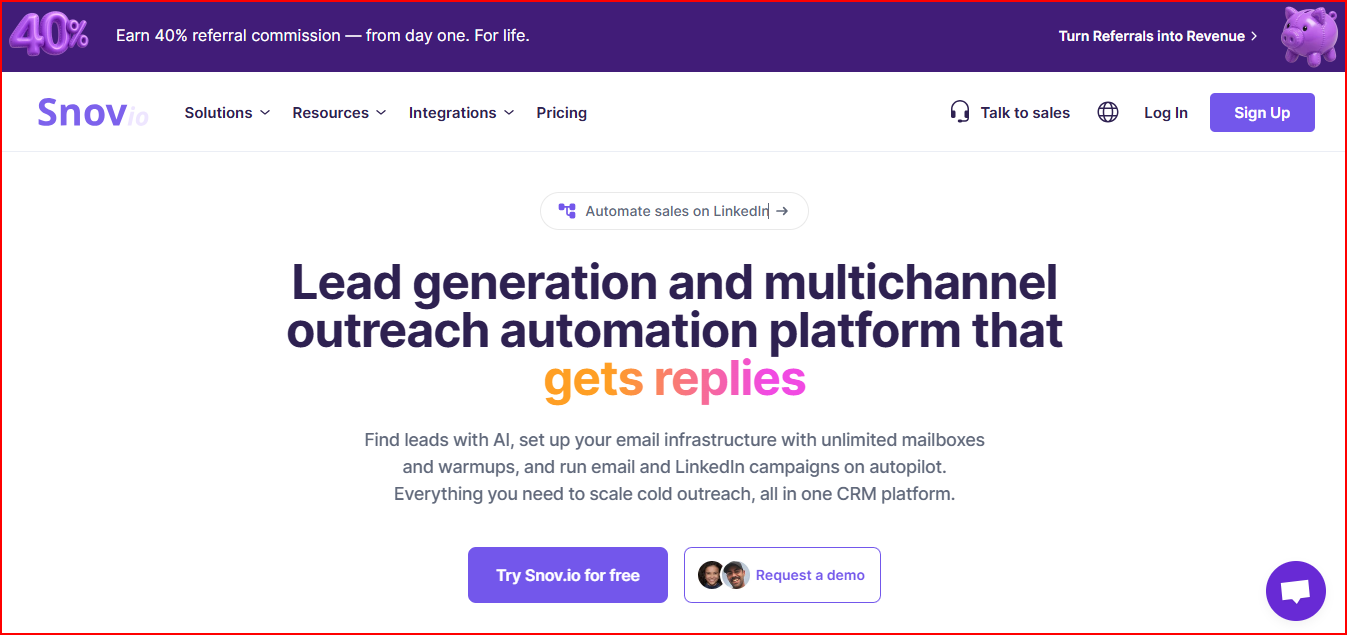
This image shows the Snov.io - Lead generation and multichannel outreach automation tool
The platform includes tools to find leads from databases or LinkedIn, verify email addresses, and build prospect lists.
You can then run email and LinkedIn outreach campaigns using automated sequences.
Snov.io also includes features for email infrastructure setup, warm-up, and deliverability monitoring, along with a built-in sales CRM to track deals and manage leads.
Key Features
Email finder and lead search tools to collect verified prospects
Email verifier to clean lists and reduce bounce rates
Multichannel outreach campaigns across email and LinkedIn
Automated mailbox warm-up to build sender reputation
Deliverability monitoring and spam risk checks
Shared inbox (Unibox) to manage campaign replies
Sales CRM to track leads and deals
AI-powered lead search and email writing tools
LinkedIn automation and browser extension
Pricing
Starter - $29/month
Includes 1,000 credits and up to 5,000 recipients
Supports unlimited email campaigns, senders, and follow-ups
Pro - $74/month
Includes 5,000 credits and up to 25,000 recipients
Adds features like A/B testing, dynamic personalization, and advanced campaign controls
Custom Ultra - Custom pricing
Includes 200,000+ credits and large recipient limits
Provides dedicated implementation support and priority service
Pros
You can find leads and verified email addresses inside the platform, so prospecting and outreach can happen in one place.
You can run email and LinkedIn outreach in the same campaign, which makes multichannel outreach easier to manage.
Snov.io also includes email verification and warm-up tools, which help protect sender reputation before sending campaigns.
The platform provides deliverability monitoring and diagnostics, so you can keep track of spam risks and inbox placement.
It also includes a built-in CRM, so you can track leads, deals, and conversations without switching tools.
Cons
LinkedIn automation is available as a paid add-on rather than included by default.
Sending limits depend on credits and recipient limits within the plan.
Larger outreach campaigns may require higher plans as credit usage increases.
10. Saleshandy
Saleshandy is a cold email outreach platform designed to help teams find leads, set up email infrastructure, and run outreach campaigns from one place.
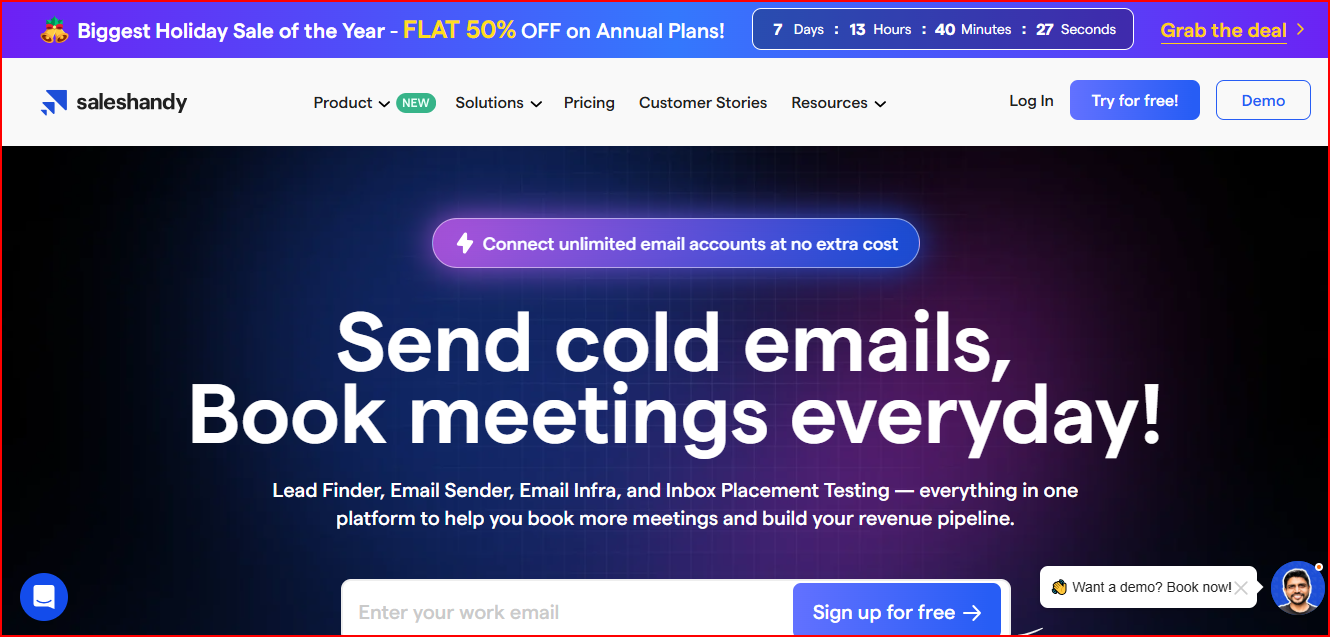
This image shows the Saleshandy - Lead generation and Email automation tool
The platform includes tools for lead generation, email automation, and deliverability monitoring.
You can find prospects from a large contact database, enrich lead data, and launch automated email sequences.
Saleshandy also allows you to connect unlimited email accounts, which helps teams scale outreach campaigns.
It also includes features like email warm-up, sender rotation, and inbox placement testing to support deliverability
Key Features
AI Lead Finder to build targeted prospect lists
Email warm-up and sender rotation to support deliverability
Inbox Radar to test inbox placement across email providers
Automated follow-up sequences based on prospect actions
Unified inbox to manage replies from campaigns
Email verification and spam checker
Built-in CRM to track leads and deals
Campaign analytics and graphical reports
Pricing
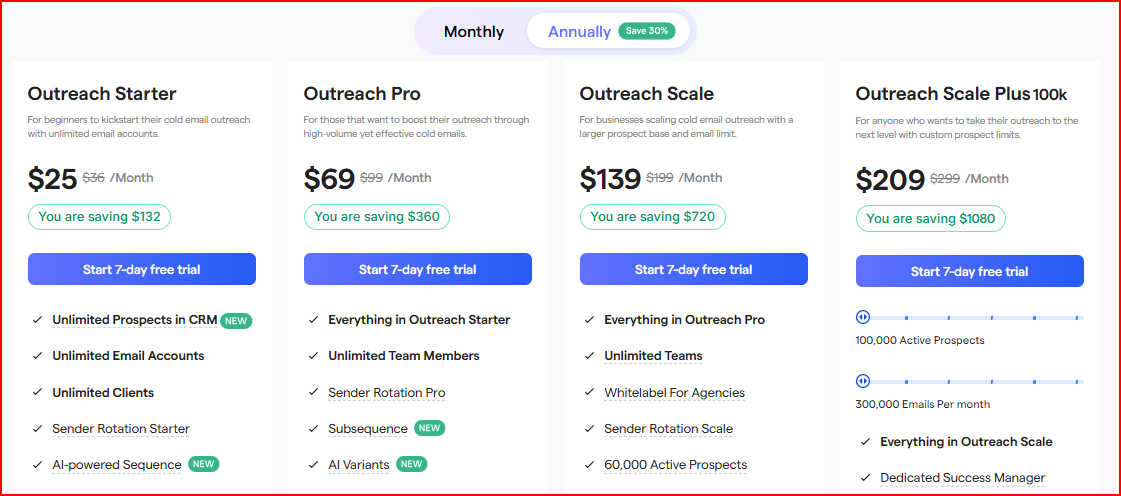
This image shows the Saleshandy pricing
Outreach Starter - $25/month
Send 6,000 emails per month with up to 2,000 active prospects
Includes unlimited email accounts, unlimited warm-up, and unified inbox
Outreach Pro - $69/month
Send 150,000 emails per month with up to 30,000 active prospects
Includes integrations, API access, and advanced sender rotation
Outreach Scale - $139/month
Send 240,000 emails per month with up to 60,000 active prospects
Includes whitelabel support and additional inbox placement tests
Outreach Scale Plus - $209/month
Send 300,000 emails per month with up to 100,000 active prospects
Includes a dedicated success manager and advanced campaign support
Pros
You can connect unlimited email accounts, so scaling cold email campaigns becomes easier.
The platform includes lead search and enrichment, which helps you find prospects without using another tool.
You can set up automated email sequences with follow-ups, so campaigns keep running without manual work.
Built-in tools like email warm-up, sender rotation, and inbox placement testing help support deliverability.
The platform also provides campaign reports and analytics, which makes it easier to see how your outreach is performing.
Cons
Larger outreach campaigns may require higher plans as sending limits increase.
Some features, like additional inbox placement tests or AI credits, may require add-ons.
Managing domains and infrastructure requires setup depending on your outreach configuration.
Personalized Outbound Strategy
Get The Right Outbound Strategy In Minutes
Enter your email to get a custom plan & stack recommendation for your
business
It's being carefully crafted by AI
Please check your mailbox in 5 minutes
Conclusion
Choosing the right email automation tool for outbound sales depends on how much of your outreach process you want to automate.
It also depends on how centralized you want your workflow to be.
Salesforge helps teams automate a larger part of outbound. It manages prospect research, email, and LinkedIn outreach, follow-ups, and AI-assisted workflows from one platform.
Smartlead is a good option for teams that want to scale cold email campaigns with unlimited mailboxes and built-in deliverability infrastructure.
Instantly is widely used for running cold email campaigns with a simple setup, inbox warm-up, and easy campaign management.
Lemlist focuses on multichannel outreach so you can reach prospects through email, LinkedIn, calls, and WhatsApp from one sequence.
Mailshake helps sales teams run email and LinkedIn campaigns while tracking engagement and replies.
Woodpecker focuses on reliable cold email outreach with follow-ups and deliverability monitoring.
Reply.io supports multichannel outreach and includes AI tools that assist with prospecting and campaign management.
QuickMail works well for teams that need to manage multiple sending accounts and run outreach campaigns at scale.
Snov.io combines lead generation, email verification, and outreach campaigns in a single platform.
Saleshandy helps with lead discovery, email outreach campaigns, and deliverability tools for cold email.
Each tool helps automate outbound sales in different ways.
If you want a platform that only sends cold emails, many of these tools can handle that.
But if your goal is to automate more of the outbound process, Salesforge is worth considering.
It brings prospecting, outreach, follow-ups, and reply management into one platform, which makes running and scaling outbound campaigns much easier.