Summarize this article
Table of contents
Get insights delivered straight into your inbox every week!

Lunatro.mx Review: Is It Worth It for Cold Email Infrastructure?

You find Lunatro.mx, which promises ready-to-use cold email infrastructure with hundreds of inboxes. Sounds simple, right?

But before you pay $199/month, you need to know what you’re actually getting, how it works, what’s included, and where it may not fit your setup.

Because infrastructure decisions show their impact later, not on day one.

I tested Lunatro.mx for this review to see how it actually works.

In this Lunatro.mx review, I’ll break it down in a clear and simple way so you can decide if it’s the right choice for your cold email infrastructure.

Table of contents

Key Takeaways - Lunatro.mx Review

  • Lunatro.mx gives you a ready-to-use cold email setup with domains, inboxes, and DNS already configured
  • You can start quickly, but the setup is fixed and you don’t control domains or infrastructure
  • Scaling depends on adding more $199 subscriptions
  • There is no clear monitoring or alert system for performance tracking
  • It works well if you want simplicity and don’t want to handle technical setup
  • Infraforge is the best alternative to Lunatro.mx if you want control, visibility, and a setup that can scale properly over time 

What is Lunatro.mx?

Lunatro.mx is a cold email infrastructure service built for running cold email campaigns.

Lunatro.mx - Email Infrastructure tool
This image shows the Lunatro.mx - Email Infrastructure tool

It sets up everything for you, domains, inboxes, and important settings like SPF, DKIM, and DMARC. You don’t need to do any technical work.

The infrastructure runs on Microsoft Azure and uses Outlook-based sending with custom SMTP servers. This setup is designed to support sending at scale.

In simple terms, it is made for cold email professionals who want a ready-to-use infrastructure without dealing with domain setup, inbox creation, or technical configuration.

How Did I Evaluate Lunatri.mx?

I didn’t just look at features.

I focused on:

  • How fast can I start sending

  • How scaling works after setup

  • What control I actually have over domains and inboxes

  • What visibility do I get when something goes wrong

Because in cold email, most issues show up after campaigns start, not during setup.

Key Features of Lunatro.mx

Here are the main features you get with Lunatro.mx, explained in a simple way.

Pre-built Domains and Inboxes

Lunatro.mx gives you domains and inboxes that are already created and ready to use. You don’t need to set them up yourself.

Pre-configured DNS Settings

It comes with SPF, DKIM, and DMARC already configured, so you don’t have to handle any technical setup.

Microsoft Azure Infrastructure

The system runs on Microsoft Azure and uses Outlook-based sending with custom SMTP servers.

Ready in 24 Hours

Your full setup is completed in about 24 hours, so you can start sending quickly.

High Sending Capacity

You can send around 30,000 to 32,000 emails per month once your setup is ready.

Tool Integrations

It works with tools like Smartlead, Instantly, and EmailBison, so you can use it with your existing setup.

Slack Support Access

You get access to a Slack channel where you can reach out for support when needed.

Lunatro.mx Pricing

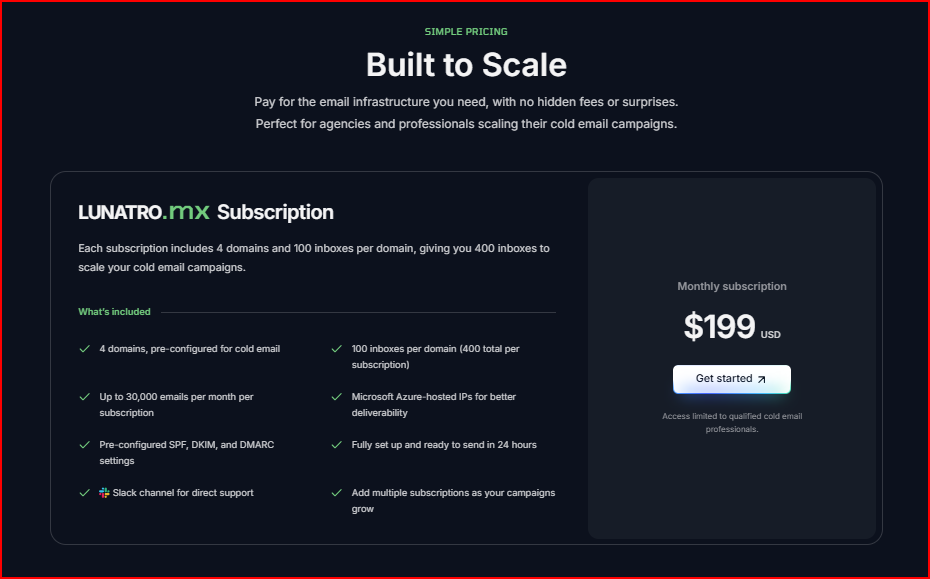
Lunatro.mx uses a simple monthly pricing model.

Lunatro.mx pricing
This image shows the Lunatro.mx pricing

You pay $199 per month for one subscription.

  • With one subscription, you get 4 domains, and each domain comes with 100 inboxes. This gives you a total of 400 inboxes.That comes down to ~$0.5 per inbox/month.
  • Once your setup is ready, you can send around 30,000 to 32,000 emails per month across these domains.

If you want to scale, you can add more subscriptions. Each new subscription gives you the same setup again.

How Lunatro.mx Works?

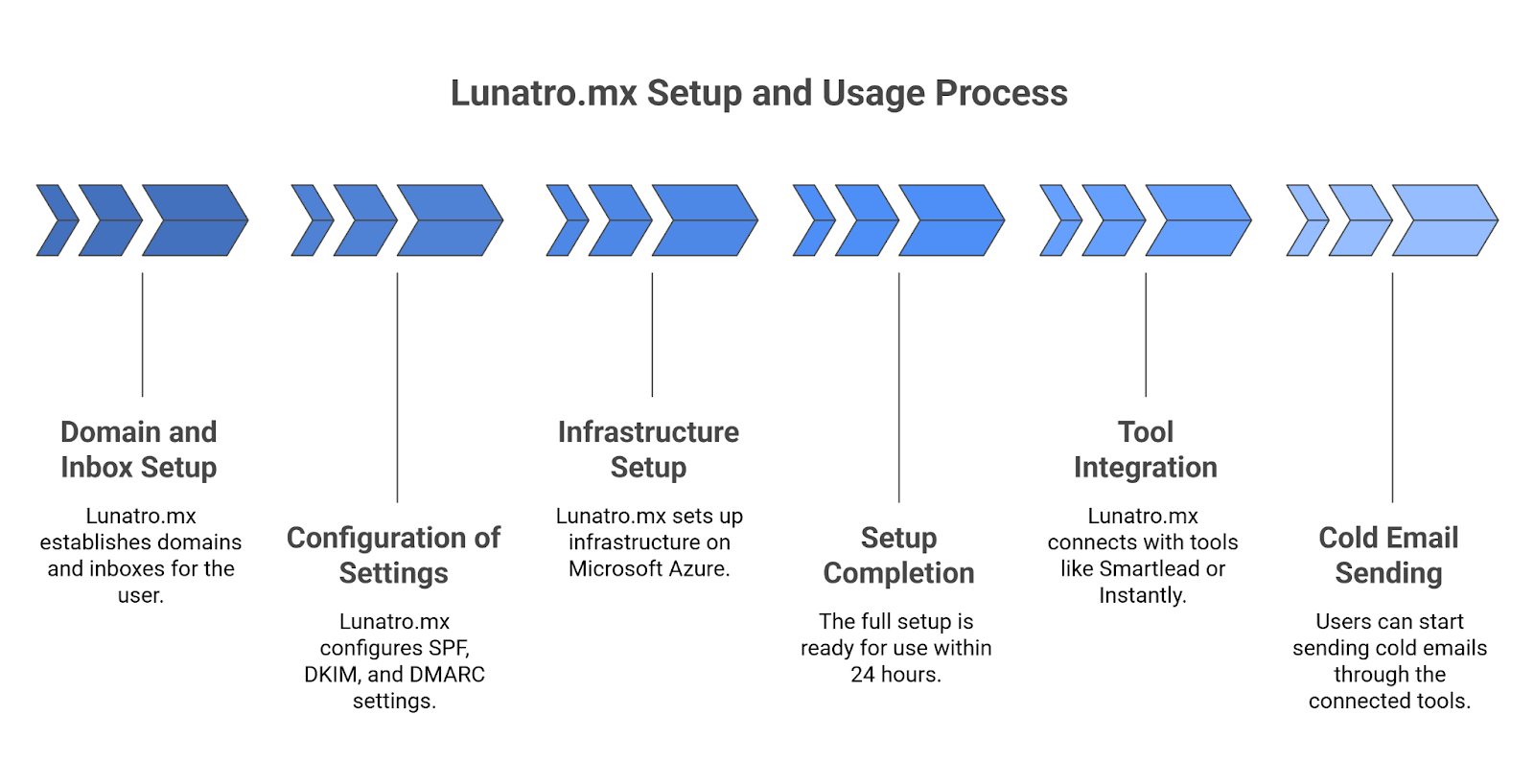
Here’s how Lunatro.mx works step by step:

Lunatro.mx setup process
This image shows the Lunatro.mx setup process
  • First, Lunatro.mx sets up the domains and creates the inboxes for you
  • Then, it configures all the required settings like SPF, DKIM, and DMARC
  • After that, the infrastructure is set up on Microsoft Azure using SMTP-based sending
  • Within about 24 hours, the full setup is ready to use
  • Next, you connect it with tools like Smartlead, Instantly, or EmailBison
  • Once connected, you can start sending cold emails

From my experience using it, the overall process feels simple because most of the setup is already done for you.

One limitation I felt is that you cannot use your own domains, as they are provided and managed by Lunatro.mx.

Pros of Lunatro.mx

Here are the pros I noticed while using Lunatro.mx:

  • The setup is ready in about 24 hours, so you don’t spend days setting things up
  • Domains, inboxes, and DNS are already configured, so you avoid the usual technical work
  • You can start running campaigns quickly instead of waiting for setup and configuration
  • Everything is handled in one place, so managing multiple inboxes feels more organized
  • It does not rely on complex authentication or reconnecting steps, so once set up, you can keep using it without interruptions

Limitations of Lunatro.mx

Here are the limitations I felt while using Lunatro.mx:

  • You cannot use your own domains, as everything is provided and managed by Lunatro.mx
  • You need to follow a warm-up period of around 10–15 days before increasing the sending volume
  • Access is limited to qualified cold email professionals
  • The setup is fixed, so you don’t control how domains or inboxes are configured
  • You need to add another subscription if you want to scale beyond the given setup
  • You depend fully on their setup, so you can’t change or customize how the infrastructure works
  • There is a monitoring or tracking setup, so you don’t get visibility into how your infrastructure is performing
  • There are no built-in alerts, so you won’t know early if something goes wrong with domains or sending

Who Should Use Lunatro.mx

When I used Lunatro.mx, it felt more suited for cases where you just want everything ready and don’t want to spend time setting things up.

  • Running cold email campaigns at scale and need a large number of inboxes ready quickly
  • Don’t want to deal with domain buying, inbox creation, or DNS setup
  • Want a setup that is already prepared and ready to use within about 24 hours
  • Using tools like Smartlead, Instantly, or EmailBison and need infrastructure that fits into that workflow
  • Okay with using domains that are provided and managed for you

Who Should Not Use Lunatro.mx

From my experience, it didn’t feel like the right fit when more control was needed

  • Want to use your own domains instead of managed ones
  • Want visibility into how your setup is performing, like monitoring or alerts
  • Prefer to customize or change parts of your setup instead of using a fixed structure
  • Planning to scale in a way where you want more control instead of adding fixed subscriptions 

If you need more control, visibility, or flexibility in how your infrastructure is set up and managed, it makes sense to look at alternatives like Infraforge.

Lunatro.mx Alternative: Infraforge (More Control & Flexibility)

Infraforge is a private cold email infrastructure tool that lets you create and manage your own domains, mailboxes, and sending setup on dedicated IPs. 

It is ready to use so that you can start quickly, and your sender reputation stays isolated instead of being shared with others.

Let's you create unlimited domains and mailboxes in minutes

You can create domains and mailboxes based on your sending needs, and the setup can be ready in just a few minutes.

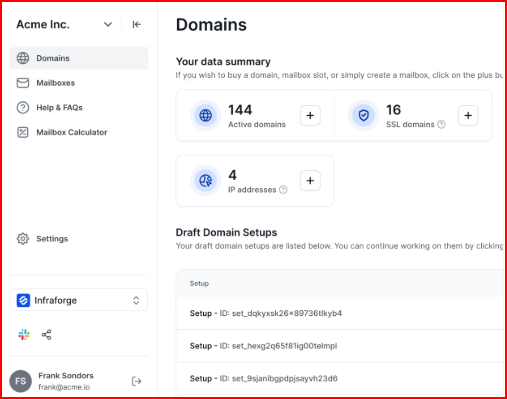
Provides automated DNS setup

Infraforge automatically configures SPF, DKIM, and DMARC for your domains, so you don’t have to do any technical setup.

Infraforge’s Domain and DNS setup
This image shows the Infraforge’s Domain and DNS setup

You can choose prewarmed domains to start sending right way

You can use pre-warmed domains and mailboxes, so you can start sending without waiting for a long warm-up period.

Provides real-time monitoring and alerts

It gives you real-time monitoring along with alerts, including visibility into DNS setup and blacklist checks, so you can track performance and catch issues early.

Supports safer scaling with extra controls

You get features like bulk DNS updates, SSL, and domain masking, which help manage and scale your infrastructure more safely across multiple domains.

Flexible and scalable pricing

Domains cost around $14 per year each, and mailbox slots start at about $4 per month (or around $3 per month when billed annually). 

You can choose how many domains and mailboxes you need, so the total cost depends on your setup.

Lunatro.mx vs Infraforge (Comparison)

Here’s a clear side-by-side comparison based on how both tools actually work:

Feature Lunatro.mx Infraforge
Infrastructure & Setup Approach Microsoft Azure + Outlook SMTP with a fixed, pre-built setup Private cold email infrastructure with dedicated IPs and full control to build your own setup
Domains Provided and managed (cannot use your own) Create and manage your own domains
Inboxes Fixed (400 inboxes per subscription) Flexible, create as many mailboxes as needed
Setup time Around 24 hours Ready in minutes
DNS setup Pre-configured Automated DNS setup for every domain
Sender reputation Shared within managed setup Isolated with dedicated IPs
Warm-up Recommended 10–15 days Pre-warmed domains and mailboxes available
Monitoring Not provided Real-time monitoring (DNS + blacklist checks)
Alerts Not provided Real-time alerts
Control Limited (fully managed setup) Full control over domains, mailboxes, IPs, and setup
Scaling Add another fixed subscription Add domains, mailboxes, and IPs anytime
Pricing $199/month (fixed bundle) Usage-based ($14/domain/year, ~$3–$4/mailbox/month)
Personalized Outbound Strategy

Get The Right Outbound Strategy In Minutes

Enter your email to get a custom plan & stack recommendation for your business

It's being carefully crafted by AI

Please check your mailbox in 5 minutes

Is Lunatro.mx Worth It?

Lunatro.mx works well for what it is built for, a ready-to-use cold email setup without handling technical work.

If you just want to get started quickly and avoid setting up domains, inboxes, or DNS, it does the job.

Everything is already prepared, and you can start sending once the setup is ready.

At the same time, the setup is fixed. 

You can’t use your own domains, and there’s limited control over how things are configured.

There’s also no clear visibility into monitoring or alerts.

So it really comes down to what you need.

If you need more control, Infraforge is a better option. 

  • You can create your own domains and mailboxes. 
  • You use dedicated IPs where your sender reputation is not shared, and scale based on your usage instead of fixed bundles.

More importantly, it gives you visibility. 

  • You get real-time monitoring
  • DNS checks 
  • and blacklist tracking 

so you can catch issues early instead of finding out after performance drops.

That makes a big difference when you’re running campaigns at scale.

Because problems like DNS errors or blacklist hits can directly affect deliverability if you don’t catch them early.

Start your Infraforge setup and scale your cold email infrastructure in minutes with deep control.