
When I needed SMTP mailboxes for sending emails, I didn’t want a long setup or unclear limits.
That’s why I decided to use Mailtrap.
Do you want to know how Mailtrap actually works for SMTP mailboxes in day-to-day use?
In this Mailtrap review, I share my experience using Mailtrap for SMTP mailboxes.
I focus on setup, SMTP sending, email limits, logs, and how the overall experience looks in 2026.
Read this full review to understand whether Mailtrap fits your SMTP needs.
Key Takeaways
Get Infraforge! Create and manage domains and inboxes at scale from just $3 to $4 per mailbox.
Mailtrap is a modern email delivery platform built for developer and product teams that need both email testing and email sending in one place.

Mailtrap offers two core products.
The Email Sandbox is used to test emails safely in development and staging environments without sending them to real inboxes.
The Email API and SMTP service is used to send transactional and promotional emails through SMTP or API.
For SMTP mailboxes, Mailtrap gives you SMTP access, domain-based sending, plan-based email limits, and dashboards to see what happens after emails are sent.
You can check email logs, track opens and clicks, and look at deliverability-related data.
Here’s how to set up SMTP mailboxes in Mailtrap, step by step.
You start by selecting the Email API/SMTP product.
This is used for sending real emails.
Mailtrap provides SMTP credentials that you can copy and use in your app or email service to connect to the SMTP relay.
Add your domain for sending emails.
The number of domains you can add depends on the plan you are on.
You can send emails using a standard SMTP connection or use the Email API.
Once emails start sending, you can view email logs, limits, and tracking details in the dashboard based on your plan.
Testing emails stay inside the Email Sandbox, while real emails are sent through SMTP.
Both are managed from the same platform.
For me, the setup felt clear and easy to follow, with everything needed available in one place.
Once SMTP is active, every email sent through Mailtrap follows a fixed and controlled flow.
I liked how clearly everything moved from our app to the dashboard; nothing felt confusing while sending.
But when I tested higher volumes, I hit the plan limits quickly and had to upgrade, which pushed me to add extra cost beyond my budget.
Mailtrap supports a wide range of integrations so teams can connect email sending and testing with the tools they already use.
Mailtrap integrates with many programming languages and frameworks, including Node.js, Python, PHP, Java, Ruby, .NET, C#, Laravel, Symfony, Ruby on Rails, Elixir, and Nodemailer.
These integrations allow developers to send emails from their applications using Mailtrap’s SMTP or API.
Mailtrap works with platforms such as Vercel, Heroku, Supabase, and Retool.
This helps teams send and test emails directly from their deployed apps and backend systems.
Mailtrap supports automation tools like Zapier, Make, and n8n.
These tools are used to build automated workflows around email sending without writing code.
Mailtrap integrates with tools like Stripo, Tabular, and EmailElement.
These are used to design emails and then send them through Mailtrap’s email infrastructure.
Mailtrap also supports tools such as VS Code, Cursor, Claude.io, Bolt AI, Lovable, V0, and Windsurf.
The Mailtrap MCP Server is used to capture and stream emails from different environments into Mailtrap.
Connecting Mailtrap to my tools was easy, and the API was simple to use.
But things like how long logs are stored and some advanced features still depend on the selected plan, which limits long-term flexibility.
Mailtrap pricing mainly changes how many emails you can send, how many domains you can add, and how long logs are kept.
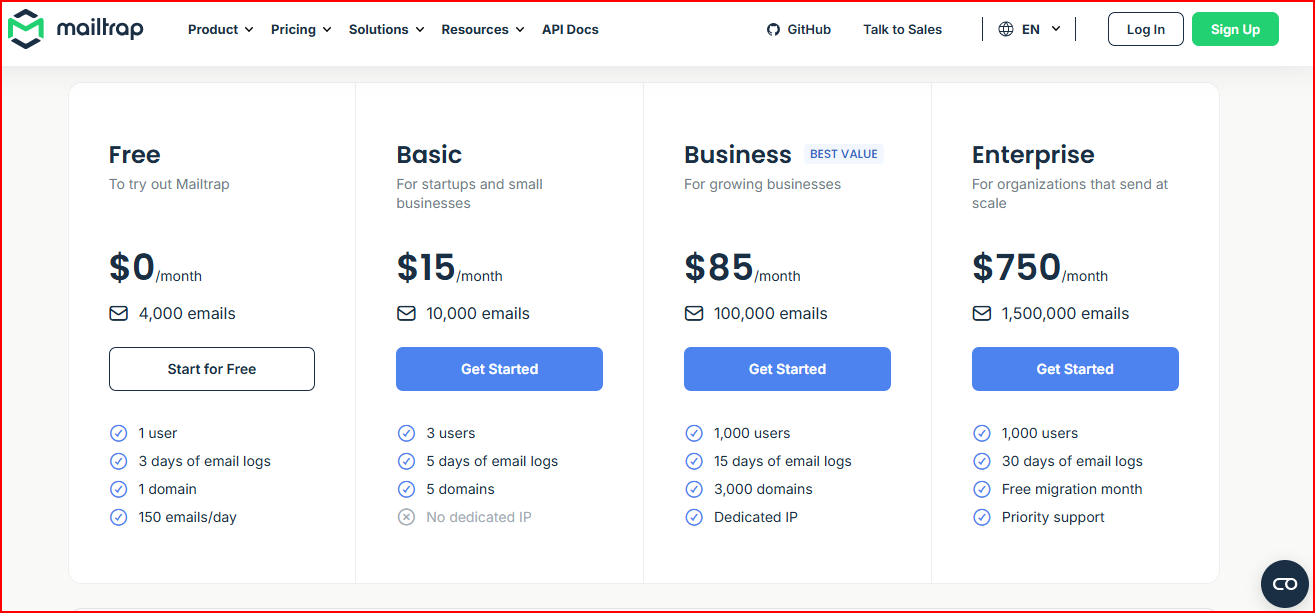
You can send up to 4,000 emails per month, with a 150 emails/day limit.
It includes 1 domain, 1 user, and 3 days of email logs.
This plan allows 10,000 emails per month, up to 5 domains, and 3 users. Email logs are stored for 5 days.
You can send up to 100,000 emails per month, add 3,000 domains, and have 1,000 users.
It includes a dedicated IP and 15 days of logs.
This plan supports up to 1,500,000 emails per month, with 30 days of email logs, priority support, and a free migration month.
For higher volumes, Mailtrap offers custom pricing.
This includes onboarding assistance, a deliverability manager, and unlimited user seats.
Based on my experience using Mailtrap for SMTP mailboxes, these are the main advantages I noticed.

While using Mailtrap, these are the areas that felt restrictive or less flexible.

Mailtrap works well for testing emails and sending them through SMTP. But in some setups, SMTP sending is only one part of the problem.
As usage grows, teams often need to manage multiple domains, many mailboxes, IPs, and the underlying email setup itself.
At that stage, the focus shifts from how emails are sent to how the email infrastructure is built and maintained.
That’s where an infrastructure-focused tool like Infraforge helps.
Infraforge is an email infrastructure platform designed to help teams set up and manage domains, mailboxes, and IPs when email infrastructure becomes the main requirement.
With Infraforge, you set up domains, mailboxes, and IPs in bulk.
It automatically handles the technical parts like SPF, DKIM, and DMARC.
It also supports pre-warmed domains and mailboxes and uses dedicated IPs.
All of this is managed from a single dashboard.
Infraforge does not send emails. You connect the infrastructure it creates to a sending tool (such as Salesforge or other outreach tools) and send emails from there.
So, Infraforge is an alternative to Mailtrap only when your need shifts from email testing and SMTP sending to building and scaling email infrastructure.
At the end of the day, the choice depends on how email fits into your work.
If email is something you just need to test, send, and keep under control, Mailtrap does that job well and keeps things simple.
But if email becomes something you actively work on every day, managing inboxes, domains, and outreach, then the focus shifts.
At that point, having a tool that helps with the setup behind the scenes starts to matter more.
That’s why teams often start with Mailtrap and later move toward an infrastructure-focused setup like Infraforge.
Not as a replacement for Mailtrap, but as a better match when the work around email starts to grow.
Use Infraforge. Build an email setup that scales with unlimited domains and inboxes.
