Aerosend works well if its setup matches how you run your cold email system.
But once you start scaling, things can feel restrictive.
You may need:
- More flexibility in how domains and mailboxes are created
- Better control over deliverability
- A setup that adapts to your sending volume, not fixed batches
That’s where many teams start looking for alternatives.
In this article, I tested 5 Aerosend alternatives that focus on giving you more control, flexibility, and scalability in your email infrastructure.
Here’s what you’ll get from this guide:
- Where Aerosend starts to feel limiting
- How each alternative performs in real setups
- Which tool fits your workflow (not just features)
If you're planning to scale cold outreach, this will help you avoid choosing the wrong infrastructure early.
5 Best Aerosend Alternatives (Quick Notes)
| Tool |
Infrastructure Type |
Control (Setup & Reputation) |
Deliverability |
Scalability |
Pricing Model |
| Infraforge |
Private infrastructure |
High (dedicated IP per mailbox) |
High (isolated, stable over time) |
Very High (unlimited domains & mailboxes) |
Per mailbox ($3–$4) + add-ons |
| Mailforge |
Distributed infrastructure |
Low–Medium (shared IP pool) |
Medium (shared reputation can vary) |
High (easy to scale inbox count) |
Per mailbox ($2–$3) |
| Mailpool |
Multi-provider infrastructure |
Medium–High (choose setup type) |
Medium–High (depends on provider used) |
Very High (flexible across providers) |
Per mailbox ($2.6–$4.3) |
| Mission Inbox |
Private infrastructure |
Very High (isolated servers + dedicated IPs) |
Very High (AI protection + full isolation) |
Very High (10K to millions of sends) |
Plan-based ($199–$599+) |
| Inframail |
Dedicated hosting infrastructure |
Medium (dedicated but simplified control) |
High (not shared, stable sending) |
Very High (unlimited inboxes) |
Flat pricing ($129–$327) |
How We Tested These Aerosend Alternatives
We didn’t just compare features from product pages.
Each tool was evaluated based on how it performs in a real cold outreach setup.
Here’s what we focused on:
- Setup flexibility → Can you create domains/mailboxes based on your exact needs or fixed batches?
- Deliverability control → Dedicated vs shared IPs, rotation, limits, monitoring
- Ease of setup → How quickly a non-technical user can get started
- Scalability → How well the system handles 50–500+ inbox setups
- Infrastructure control → Level of control over domains, IPs, and reputation
- Cost efficiency → Cost as you scale (not just starting price)
We also tested small and mid-scale setups (10–50 mailboxes) to understand how each tool behaves in real scenarios.
Why Look for Aerosend Alternatives
From what I’ve seen, Aerosend works best when your setup fits its structure.
But as your needs grow, some limitations start to show:
- Domains are created in batches, which reduces flexibility
- Infrastructure is tied to these batches, not your exact sending needs
- Scaling becomes dependent on fixed steps instead of real demand
- You still need a separate sending tool to run campaigns
- Adjusting your setup later can feel restrictive
Because of this, many teams move to tools that give more control and flexibility over how infrastructure is built and scaled.
1. Infraforge
Infraforge is a private cold email infrastructure platform that helps you set up and scale your own sending system with full control.
Instead of putting your mailboxes on shared infrastructure, it gives each one its own dedicated IP.
This keeps your sending reputation separate and gives you more control over how your emails perform.
You can create and manage a large number of domains and mailboxes from one place.
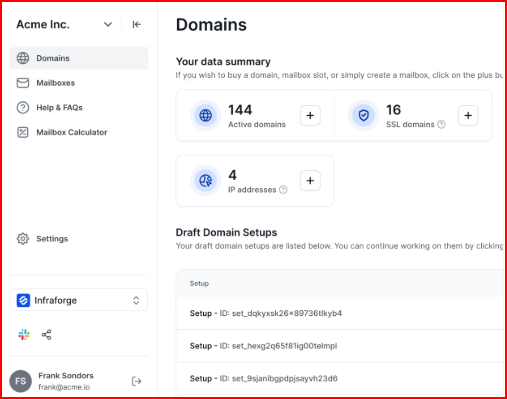
This image shows the Infraforge’s domains setupIt handles technical setup like SPF, DKIM, and DMARC automatically, so you don’t have to deal with it manually.
If you want to move faster, you can also start with pre-warmed domains and mailboxes instead of setting everything up from scratch.
As you scale, Infraforge supports you with automated warmup, sender rotation, smart sending limits, and real-time monitoring.
This helps keep your outreach stable and reduces risks as volume increases.
Key Features
- Each mailbox runs on its own dedicated IP, so your reputation stays isolated
- DNS setup like SPF, DKIM, and DMARC is handled automatically
- You can create unlimited domains and mailboxes as you scale
- Option to start with pre-warmed domains and inboxes for faster sending
- Built-in warmup and monitoring to maintain deliverability
- Make changes easily with bulk DNS updates and domain transfers
- Use multiple workspaces to organize different setups or clients
- Works with any sending tool and also offers API access
- Includes SSL, domain masking, and multi-IP setup
- Get real-time alerts if deliverability starts dropping
Pricing
Here’s how Infraforge pricing works:
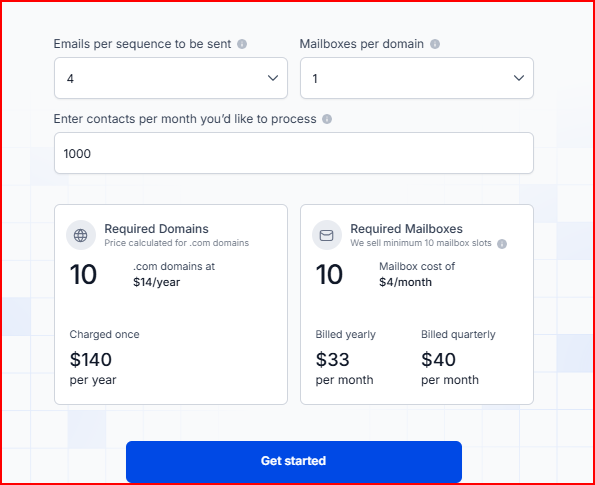
This image shows the Infraforge pricingMailbox Cost
- You pay mainly for mailboxes, starting at around $4 per mailbox/month (can go lower as you scale)
- Minimum: 10 mailbox slots
- Each mailbox includes DNS setup, hosting, maintenance, API access, and customer support
Domain Cost
- Domains are separate, around $14 per domain/year
Add-ons
- SSL & domain masking → $2/domain/month or $6/year
- Dedicated IPs → $99/IP/month
- Master inbox view → $7–$9/workspace/month
Pros
- You get full control over deliverability since each mailbox uses a dedicated IP.
- Your setup stays isolated, so other senders don’t affect your reputation
This image shows the Infraforge user satisfaction with its Dedicated IPs- You can scale to a large number of domains and inboxes without hitting shared limits
- Most of the technical work is handled, so you can launch and scale faster
- Built-in controls like monitoring and limits help keep inbox placement stable over time
Cons
- You need to buy at least 10 mailbox slots to get started
- Costs can grow quickly as you scale to many mailboxes
- You also need to purchase domains separately, adding to the total cost
2. Mailforge
Mailforge is a distributed cold email infrastructure platform that helps you create and manage domains and mailboxes using a shared IP setup.
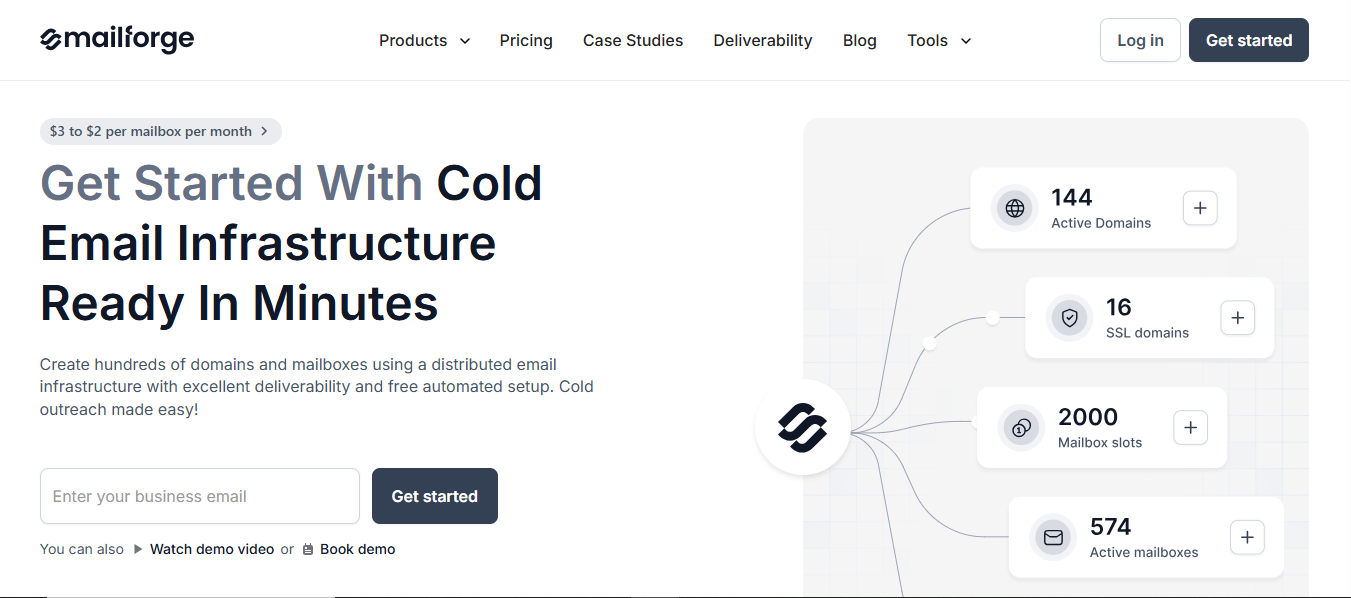
This image shows the Mailforge - Best affordable Email Infrastructure toolIt distributes your mailboxes across a shared IP pool, similar to how platforms like Gmail or Outlook work.
This makes setup simple and affordable, so you can start quickly without dealing with technical complexity.
You can create domains and mailboxes in minutes, and the platform guides you through how much setup you need based on your sending volume.
It’s built for both beginners and teams that want a faster way to scale outreach without spending too much time on infrastructure.
Key Features
- Uses a shared IP setup, so your mailboxes are distributed across a larger pool
- Handles SPF, DKIM, and DMARC setup automatically
- You can set up domains and mailboxes in minutes
- Helps you plan setup with a built-in infrastructure calculator
- Supports multiple workspaces to manage different setups
- Allows bulk DNS updates and domain transfers
- Works with any sending tool including Salesforge
- Offers SSL and domain masking as add-ons
- Designed for easy setup, even if you’re not technical
Pricing
Here’s how Mailforge pricing works:
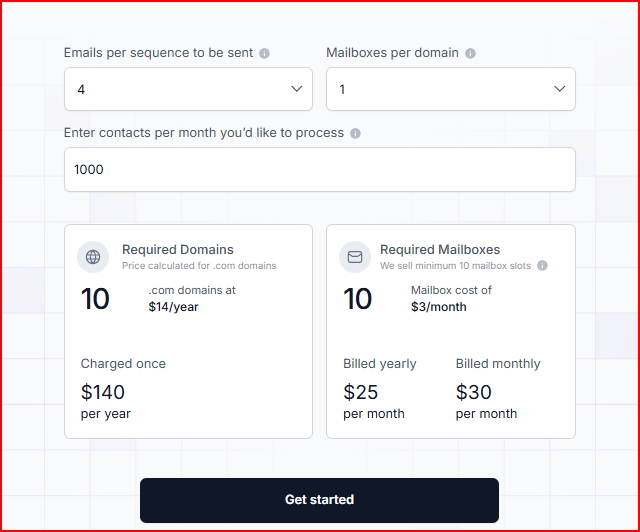
This image shows the Mailforge pricingMailbox Cost
- It starts at $3 per mailbox/month (yearly billing)
- Around $75/month if billed monthly
Domain Cost
- Around $14 per .com domain/year
What’s Included
- Every mailbox includes DNS setup, hosting, maintenance, customer support, and expert sessions
Add-ons
- SSL & domain masking → $2/domain/month or $6/year
- Mailbox slots system → you can create/delete mailboxes within your slots without extra cost
Pros
- Very easy and fast to set up, even if you’re not technical
- You can transfer domains easily from one platform to another.
“New domains and mailboxes are easy to set up, and nothing feels locked in. Switching tools doesn’t mean starting over.” - Colin Graham, Trustpilot
- More affordable compared to private infrastructure tools
- Let's you manage multiple domains and mailboxes in one place
Cons
- Uses a shared IP setup, so you have less control over deliverability
- Requires a minimum of 10 mailbox slots to start
- Some features, like SSL and domain masking, cost extra
3. Mailpool
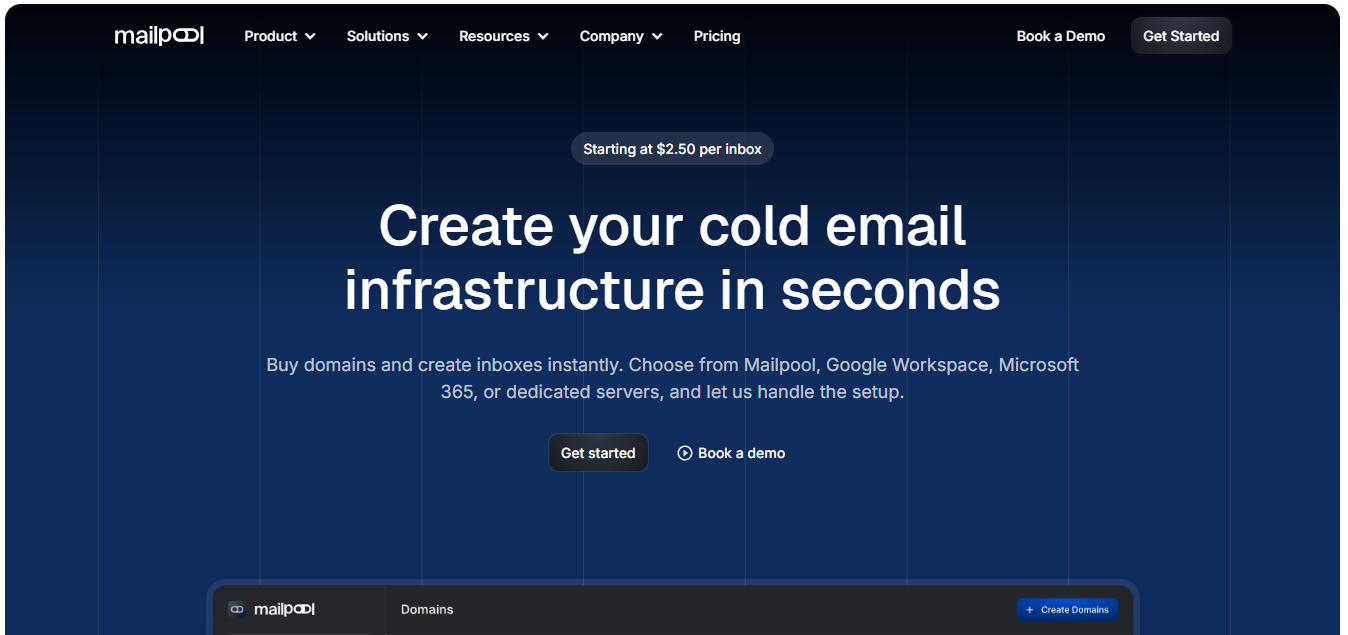
Mailpool is a cold email infrastructure platform that helps you create domains and inboxes quickly across different providers like Google and Outlook.
This image shows the Mailpool - Email infrastructure for Google and Outlook mailboxesIt focuses on making inbox creation fast and flexible.
You can buy domains, create inboxes, and set up your entire infrastructure in minutes without doing technical work yourself.
You can choose how you want your setup, shared IP, Google Workspace, Microsoft 365, or even dedicated infrastructure, all from one place.
It also handles things like DNS setup, deliverability optimization, and integrations, so you can focus more on sending and scaling.
Key Features
- Create domains and inboxes in minutes with automated setup
- Choose between shared IP, Google, Outlook, or dedicated infrastructure
- Automatic setup of SPF, DKIM, and DMARC
- Built-in AI domain generator for creating domains quickly
- Supports unlimited inbox rotation for scaling
- Includes IP rotation and deliverability optimization
- Monitors the domain and IP blacklists
- Works with 300+ integrations and API access
Pricing
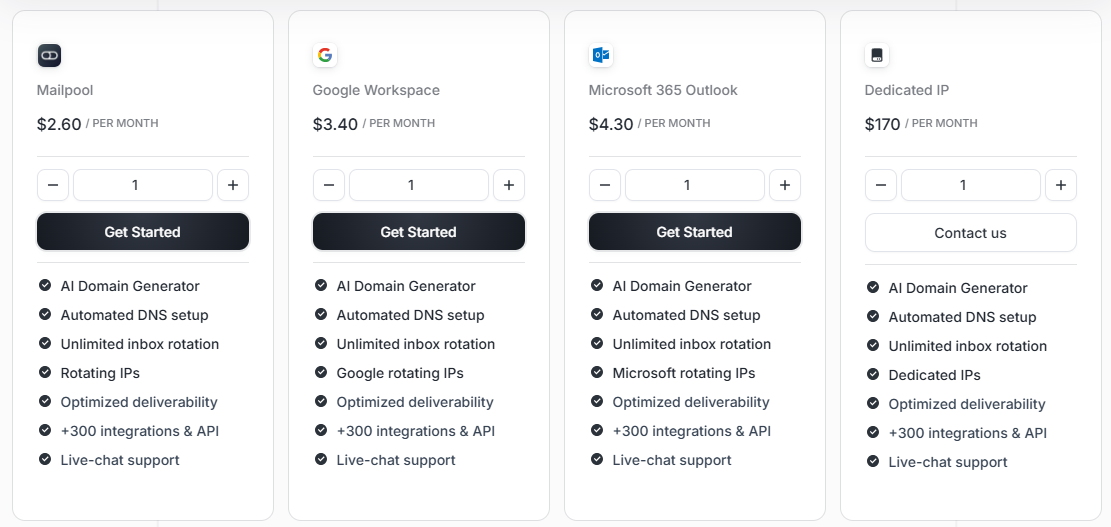
Here’s how Mailpool pricing works:
This image shows the Mailpool pricingMailbox Cost (based on provider)
- Mailpool (shared setup) → $2.60 per mailbox/month
- Google Workspace → $3.40 per mailbox/month
- Microsoft 365 → $4.30 per mailbox/month
Dedicated Setup
- Dedicated IP → $170/month
- Dedicated infrastructure → custom pricing (on demand)
- It includes DNS setup, inbox rotation, integrations, API access, and support
Pros
- Very fast setup, you can create domains and inboxes in minutes
- Gives you the flexibility to choose different providers and setups
- Built-in tools like inbox rotation and integrations help with scaling
- Works well if you want multiple options in one platform
Cons
- Too many options can feel confusing at the start
- Dedicated setup is expensive compared to shared plans
- Costs increase as you combine multiple providers
4. Mission Inbox
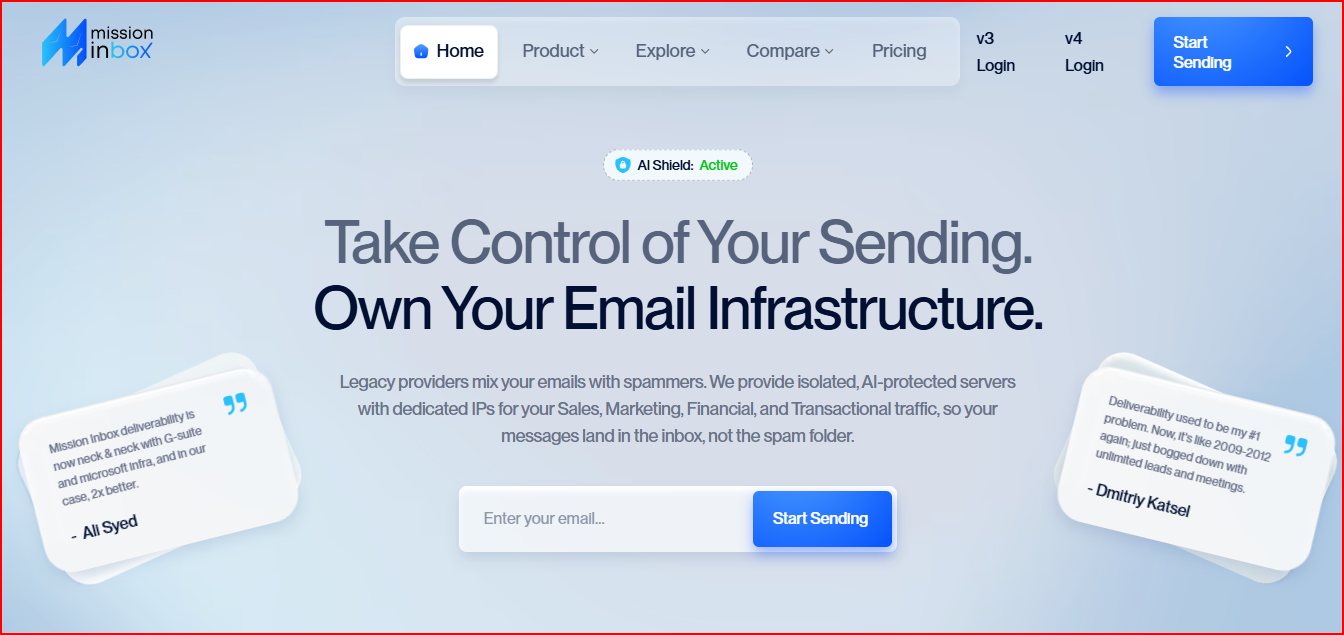
Mission Inbox is a private email infrastructure platform designed to help you send emails at scale using isolated servers and dedicated IPs.
This image shows the MissionInbox - Email Infrastructure for different trafficsInstead of mixing your emails with others, it gives you your own isolated setup where your sending reputation stays fully under your control.
It is built to handle different types of email traffic like sales, marketing, and transactional, without one affecting the other.
It also includes built-in protection that checks your emails before sending, so issues like spam triggers or bad setups can be caught early.
Along with that, it supports both mailbox-based sending and API-based sending, depending on how you want to run your outreach.
Key Features
- Uses dedicated IPs and isolated servers for each setup
- Separates traffic into different lanes (sales, marketing, transactional)
- Automatic setup of SPF, DKIM, and DMARC
- Built-in AI protection (MI Shield) to check emails before sending
- Supports both SMTP (mailboxes) and API sending
- Handles high sending volume, from thousands to millions of emails
- Includes real-time monitoring and deliverability insights
Pricing
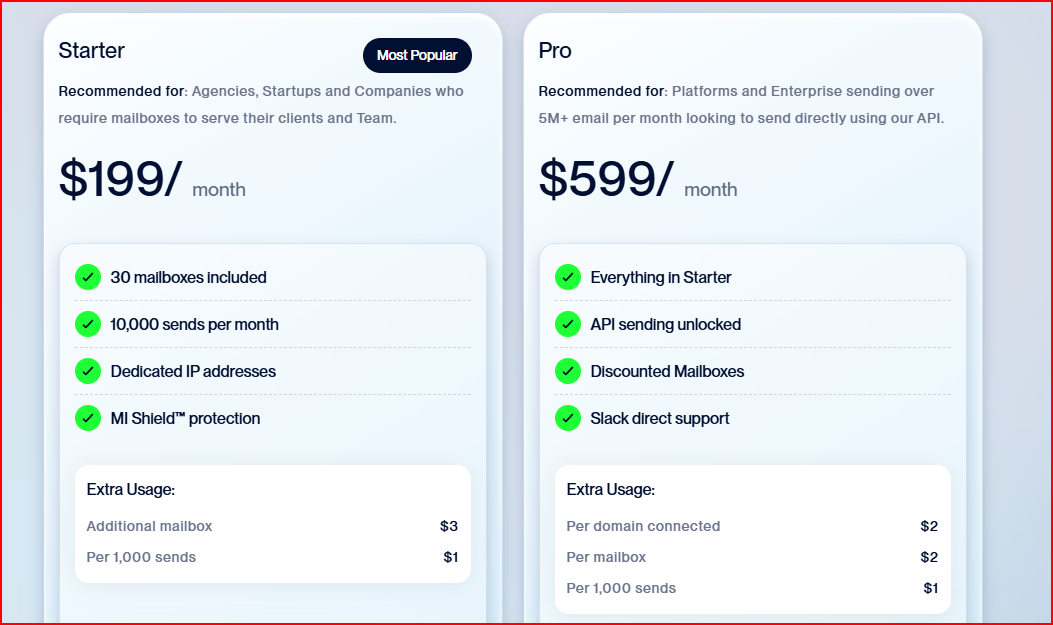
Here’s how Mission Inbox pricing works:
This image shows the Mission Inbox pricingStarter Plan – $199/month
- You get 30 mailboxes and 10,000 sends/month, along with dedicated IPs and built-in protection to get started
Pro Plan – $599/month
- This includes everything in Starter, plus API sending, better mailbox pricing, and direct support if you’re sending at a larger scale
Extra Costs
- You pay extra if you go beyond limits → $2–$3 per mailbox and $1 per 1,000 emails
- Some additional costs, like domains and premium credits, may also apply
- It includes infrastructure, DNS setup, dedicated IPs, and built-in deliverability protection
Pros
- Gives you full ownership of infrastructure and reputation
- It uses isolated servers, so different email types don’t affect each other
- Built-in AI protection helps prevent spam issues before sending
- Supports both mailbox and API-based sending
- Can handle very high sending volumes
Cons
- Starts at a higher base price ($199/month)
- Pricing increases with sending volume and extra usage
- May feel more advanced for smaller teams or beginners
- Requires understanding of email sending setup and usage limits
5. Inframail
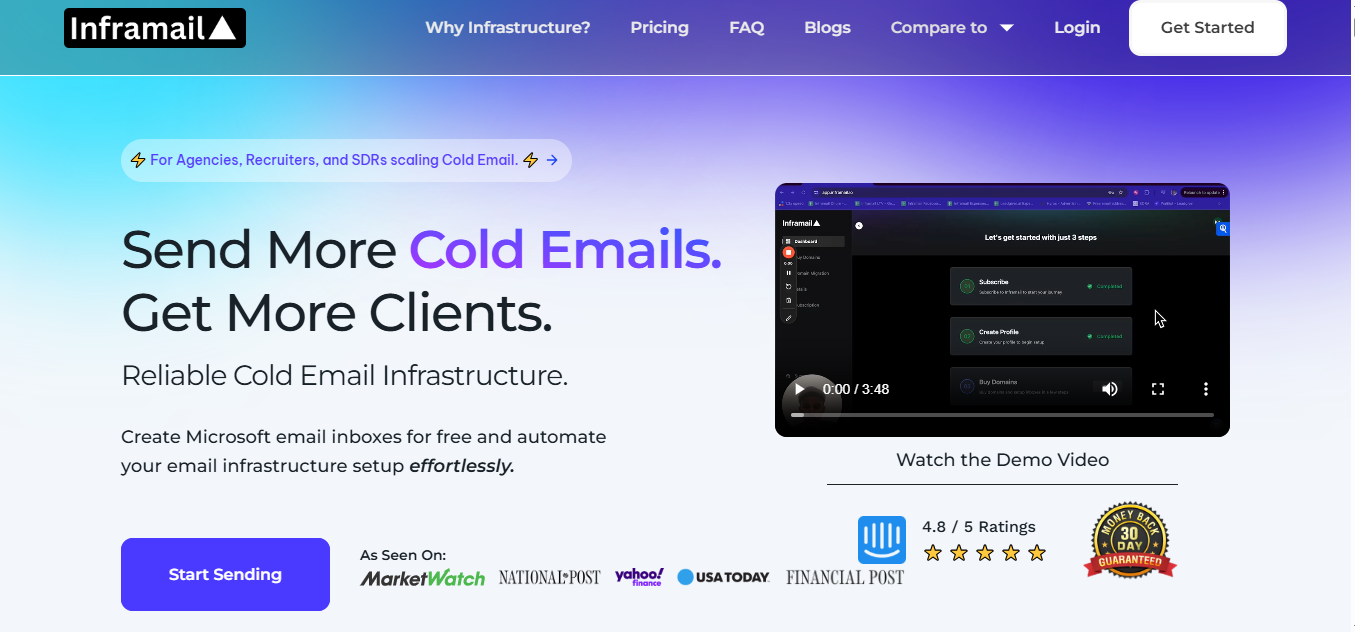
Inframail is a cold email infrastructure platform that helps you create and manage email inboxes quickly without dealing with manual setup.
This image shows the Inframail - Microsoft-backed Email InfrastructureIt is built to simplify the process of setting up domains and inboxes.
You can create multiple inboxes in seconds, and the platform handles things like SPF, DKIM, and DMARC automatically.
It runs on Microsoft-backed infrastructure with dedicated hosting, so your setup is not shared with others.
You can manage all your inboxes in one place and use them with tools like Instantly or Smartlead for sending campaigns.
The main focus is to remove the manual work and help you scale faster with a simple setup.
Key Features
- Create multiple inboxes in seconds with automated setup
- Automatic setup of SPF, DKIM, and DMARC
- Uses dedicated hosting for better control
- Supports unlimited inboxes under one plan
- Includes real-time deliverability monitoring
- Allows domain purchase and management inside the platform
- Works with sending tools like Instantly and Smartlead
- Includes features like custom tracking and domain redirects
Pricing
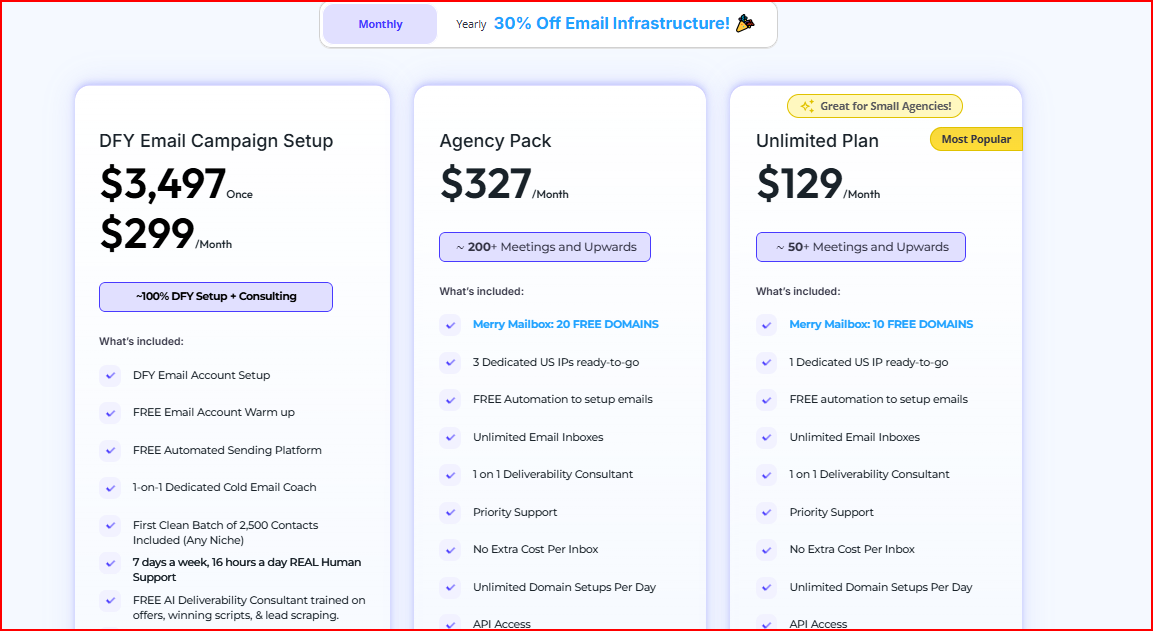
Here’s how Inframail pricing works:
This image shows the Inframail pricingUnlimited Plan – $129/month
- You can send around 80,000 emails/month (per workday)
- Comes with 1 dedicated IP and unlimited inboxes
- Includes 10 free domains
Agency Plan – $327/month
- Supports up to 300,000 emails/month (per workday)
- Includes 3 dedicated IPs and unlimited inboxes
- Comes with 20 free domains
DFY Setup Plan – $499/month (+ one-time $3,497)
- Includes full done-for-you setup and campaign support
- Covers setup, contacts, automation, and support
Pros
- You get unlimited inboxes under one flat plan, so your cost doesn’t increase per inbox as you scale
- There’s no extra cost for sending emails, you can scale volume without paying per email
- Includes dedicated IPs already bundled in plans, so you don’t need to buy them separately
Cons
- Domains are not included; you need to buy them separately
- You need an external tool for a warm-up
- Requires a warm-up before sending campaigns
Personalized Outbound Strategy
Get The Right Outbound Strategy In Minutes
Enter your email to get a custom plan & stack recommendation for your
business
It's being carefully crafted by AI
Please check your mailbox in 5 minutes

Conclusion
Each Aerosend alternative solves a different part of the problem.
The right choice depends on how you want to run your infrastructure.
- Infraforge fits best if you want full control, dedicated IPs, and long-term stability
- Mailforge works well if you want a simpler and more affordable setup
- Mailpool makes sense if you want flexibility across different providers
- Mission Inbox is better suited for high-volume teams that need advanced infrastructure and protection
- Inframail is useful if you prefer predictable pricing with unlimited inbox scaling
There is no single “best” option for everyone.
If you're just starting, simplicity matters more.
But if you're planning to scale outbound seriously, choosing infrastructure with better control early will save you from deliverability issues later.
Get started with Infraforge and scale your cold email infrastructure without limits, starting at $3 per mailbox per month.