
If you’re considering the AgentMail API, you’re probably trying to solve one clear problem: letting AI agents handle email without relying on human inbox tools.
That usually means moving beyond simple “send email” functionality. Agents need to create inboxes, read replies, stay inside threads, and manage conversation history, all through code, without manual steps.
But before integrating it, it’s important to understand what it actually provides, how setup works, what pricing looks like, and where its model makes sense.
In this guide, I’ll break down how the AgentMail API works, what you’re really setting up, and what to consider before using it in your agent system.
Try Infraforge. Set up and control email infrastructure for humans and AI agents.
AgentMail is an email infrastructure that gives AI agents their own inboxes and lets them handle email through an API.
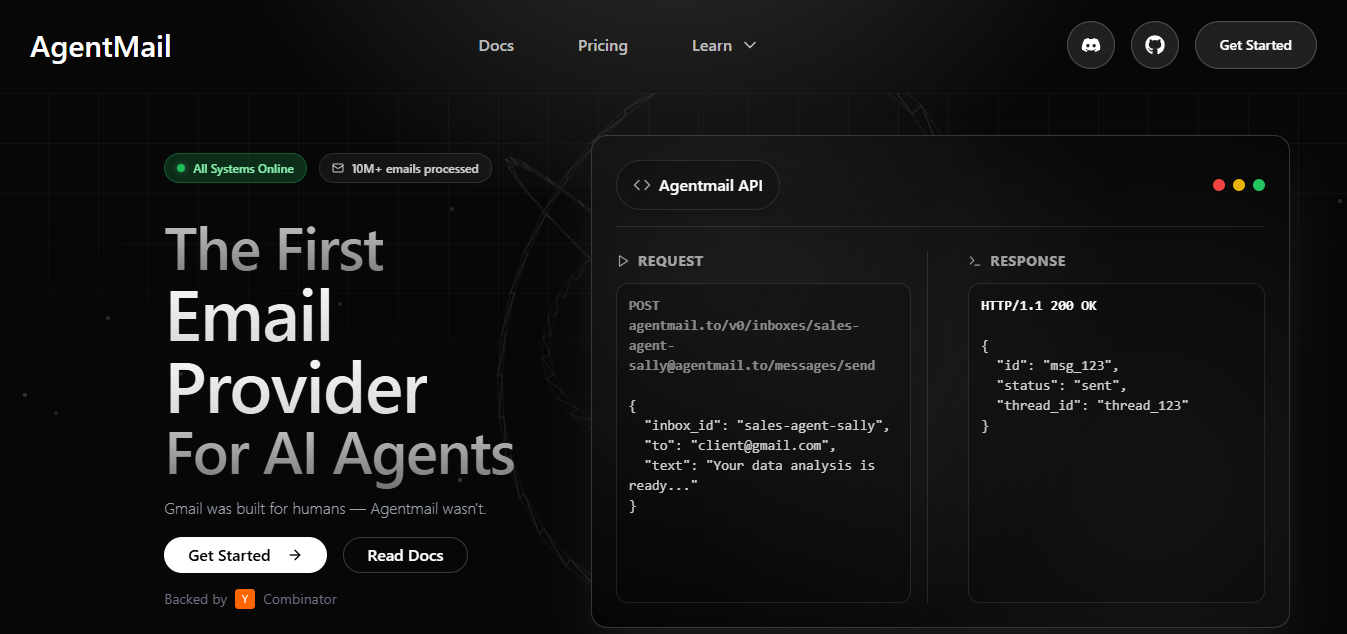
You create inboxes with code, one per agent. Each inbox becomes the email identity that the agent uses to send and receive messages.
When an email comes in, the agent can read it, understand it, and reply back through the API.
There is no UI involved and no human action needed at any point.
There is also no login flow to manage. No OAuth. No MFA.
Email access works the same way the rest of your agent system works, fully programmatic.
You can set up the AgentMail API in a few simple steps.
Follow the steps below to create your first inbox and send your first email.
Once logged in, you can manage API keys and inboxes from the console.
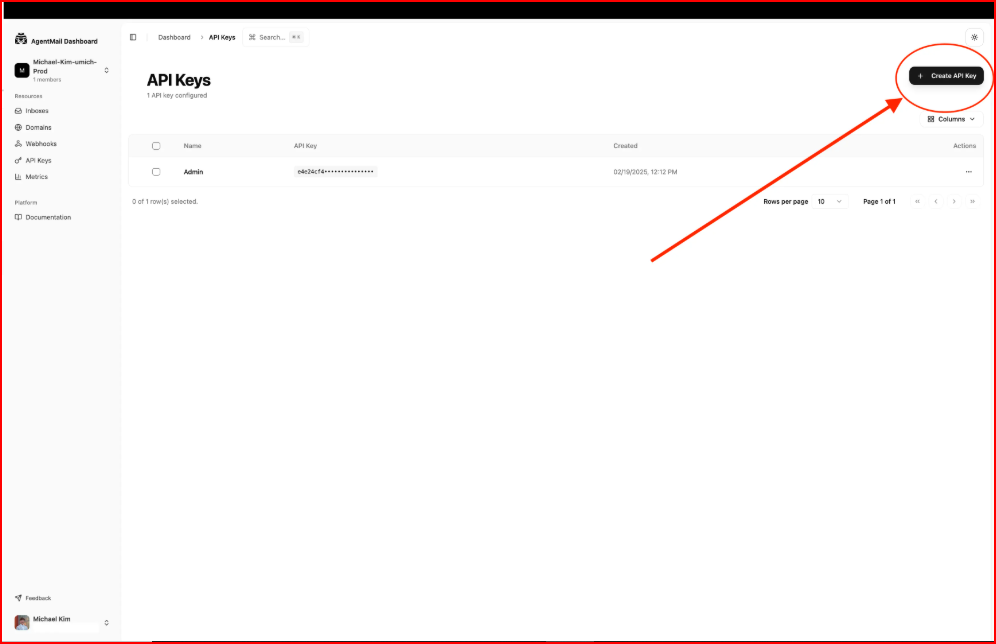
This key is used to authenticate all API requests.
If you're using Python,
Run the following command: pip install agentmail python-dotenv


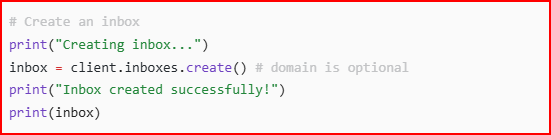
The inbox becomes the email identity for your agent.
If no domain is provided, AgentMail uses the default @agentmail.to domain.
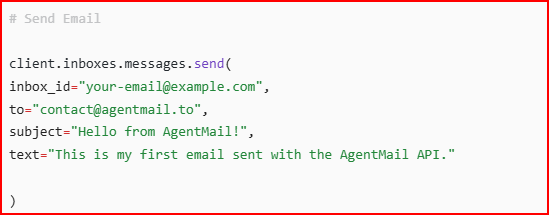
The email is sent from the agent’s inbox.
If successful, the inbox details will appear and the email will be sent.
Your AgentMail API setup is now complete.
Your agent can send emails using the inbox you just created.
AgentMail offers pricing based on how many inboxes you run and how much email your agents send.
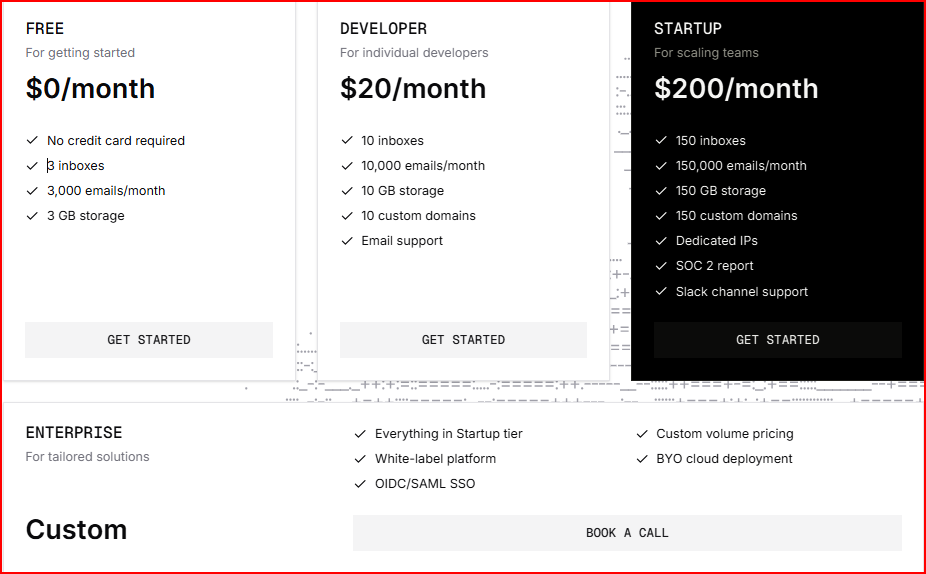
This plan is for trying AgentMail without any commitment.
You get 3 inboxes, 3,000 emails per month, and 3 GB storage.
This plan fits individual developers building real agent workflows.
It includes 10 inboxes, 10,000 emails per month, 10 GB storage, and 10 custom domains, with email support.
This plan is meant for teams running agents at scale.
You get 150 inboxes, 150,000 emails per month, 150 GB storage, 150 custom domains, plus dedicated IPs and Slack support.
This plan is for large or complex setups.
It includes custom volume limits, white-labeling, BYO cloud deployment, and OIDC/SAML SSO, along with everything in the Startup plan.
Once AgentMail is set up, you do not need to build or manage the email system yourself.
These core parts are already handled.
AgentMail creates inboxes for your agents.
Each inbox works like a real email address that can send and receive emails.
You do not set up mail servers or manage inbox configuration.
AgentMail handles sending and receiving emails.
When your agent sends an email through the API, AgentMail delivers it.
Replies come back to the same inbox automatically.
AgentMail keeps emails grouped into threads.
Replies stay connected to the original conversation, so agents always see the full context.
Agents can create drafts before sending emails.
This allows messages to be prepared first and sent later when needed.
AgentMail supports labels for messages and threads.
Agents can use labels like unreplied and replied to manage work without building custom tracking logic.
AgentMail extracts attachments from emails and exposes them through the API.
Agents do not need to parse raw email files.
Email operations run inside AgentMail’s infrastructure pods.
This helps keep delivery reliable without you managing servers or queues.
AgentMail handles SPF, DKIM, and DMARC.
These are required for email authentication and help emails reach inboxes properly.
Emails are delivered through a fault-tolerant, global infrastructure.
You do not need to manage retries or delivery failures.
Each agent's inbox has its own identity.
There is no human login, OAuth, or MFA involved.
Emails and conversation history are stored long term.
Agents can access past messages whenever needed.
AgentMail takes care of how email works and stays reliable.
You focus on what your agents should do with emails.
Best Email APIs for Cold Outreach
In real agentic systems, email usually works as a trigger.
Something comes in, the agent reacts, and something goes out. AgentMail fits right into this flow.
A good example is an auto-reply agent.
Someone sends an email. That email lands in an AgentMail inbox.
AgentMail then lets your system know that a new message has arrived.
The agent reads the email details, like who sent it and what the message says.
Based on that, the agent decides what to do next.
If the agent needs to reply, it sends the response using AgentMail.
The reply stays in the same email thread, so the conversation stays connected.
In this setup:
Because AgentMail is API-first, this entire loop runs through code.
There is no inbox screen and no manual step in between.
AgentMail provides SDKs for Python and Node.js, which makes it easy to build this flow without dealing with raw email formats.
This also works well with agent frameworks like LangChain, LlamaIndex, and CrewAI.
The framework helps the agent think and decide, and AgentMail is used only when email needs to be handled.
Email API Integration for Sales Teams
AgentMail is a good choice when email is something your agents actively work with, not something humans manage.
In these cases, AgentMail fits naturally because it treats email as part of the agent system, not as a separate tool.
In these cases, an agent-focused email layer can feel unnecessary, and teams usually look for infrastructure-level solutions instead.
Infraforge is a private email infrastructure platform that lets you create, manage, and scale domains, mailboxes, IPs, and deliverability in one place.
Infraforge handles DNS setup, SPF, DKIM, DMARC, mailbox creation, warmup, and monitoring.
You do not manage mail servers or technical email setup yourself.
Once this infrastructure is ready, emails can be sent in two ways:
This makes Infraforge flexible. The same domains and mailboxes can be used by people today and by AI agents tomorrow.
The infrastructure stays the same, while the sender email logic changes.
AI agents can trigger emails, run sequences, or automate outreach by calling Infraforge through its API or through compatible sending tools.
Humans can use the same setup for manual outreach. Both operate on top of the same email system.
When people compare Infraforge and AgentMail, they’re usually trying to answer a few simple questions.
This table breaks it down in a practical way.
Infraforge keeps your email infrastructure strong and consistent, no matter whether emails are sent by people or AI agents.
AgentMail works well when email is handled entirely by AI agents and managed through an API.
It fits systems where agents own inboxes and operate on their own.
However, once human teams also need to send emails, or when domains, IPs, and deliverability require closer control, email starts functioning less like an agent feature and more like shared infrastructure.
In those cases, an infrastructure-focused setup becomes more relevant. Infraforge follows that approach by managing domains, mailboxes, DNS, IPs, and deliverability in one place, while supporting both human teams and AI agents on the same system.
Try Infraforge! Get Cold email optimized infrastructure that works for both human teams and AI agents.
