
Personalized Outbound Strategy
Get The Right Outbound Strategy In Minutes
Enter your email to get a custom plan & stack recommendation for your business
It's being carefully crafted by AI
Please check your mailbox in 5 minutes

The Infraforge API lets you manage cold email infrastructure from your GTM system instead of clicking through a dashboard every time you launch a new market, client, or sender pool.
The short answer: use the Infraforge API when your CRM, RevOps form, n8n flow, Make scenario, backend service, or AI agent needs to create workspaces, check domains, buy or transfer domains, generate mailboxes, export approved senders, and write status back to the CRM.
If you only need a few inboxes once, use the Infraforge dashboard. If your team repeats the same setup every week, use the API.
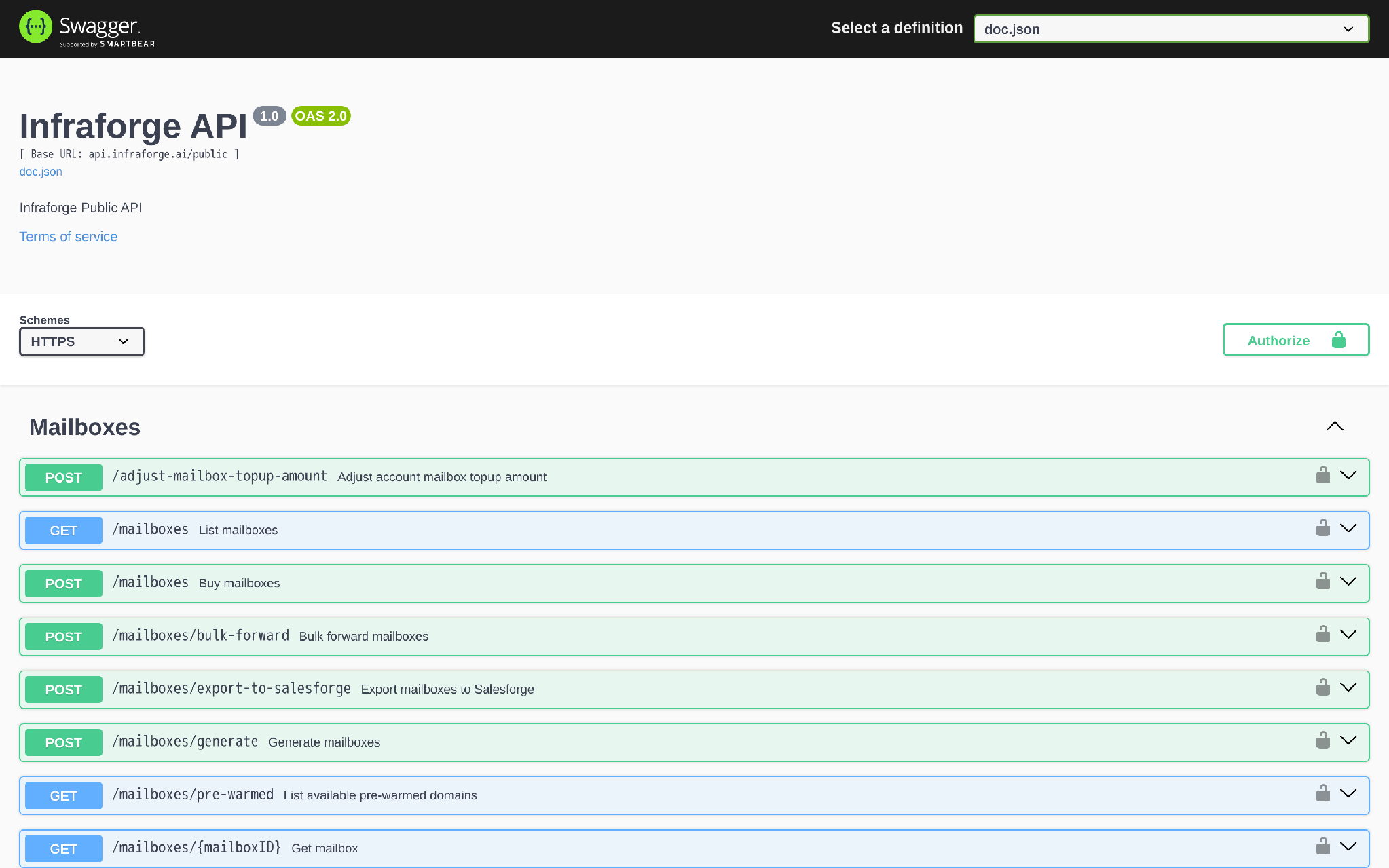
The production REST base URL is:
https://api.infraforge.ai/publicThe public Swagger defines API key authentication through the Authorization header:
Authorization: $INFRAFORGE_API_KEYFor write requests, send JSON:
Content-Type: application/jsonYou generate the Infraforge API key inside the Infraforge app: log in at app.infraforge.ai, go to Settings, then API, then generate an API key. Store it in your secret manager or orchestration platform. Do not paste it into CRM notes, Slack, spreadsheets, or public logs.
My default GTM workflow is:
The examples below are Swagger-verified request patterns from the public Infraforge API spec. I would still test them in a staging workspace before connecting them to live purchasing.
The Infraforge API is not a sending API. It does not send campaign emails.
It manages the infrastructure layer that your sending platform uses.
That is the focus of this guide.
I am not trying to turn this into a broad Forge Stack explainer. For a GTM builder, the job is to move from an approved request to launch-ready infrastructure without losing control of spend, sender reputation, or CRM visibility.
Do this prep before writing code.
You need:
The most common mistake is starting with code before the operating model is clear.
Decide who approves domain purchases. Decide who owns failed provisioning. Decide what status means “safe to export.” Then automate.
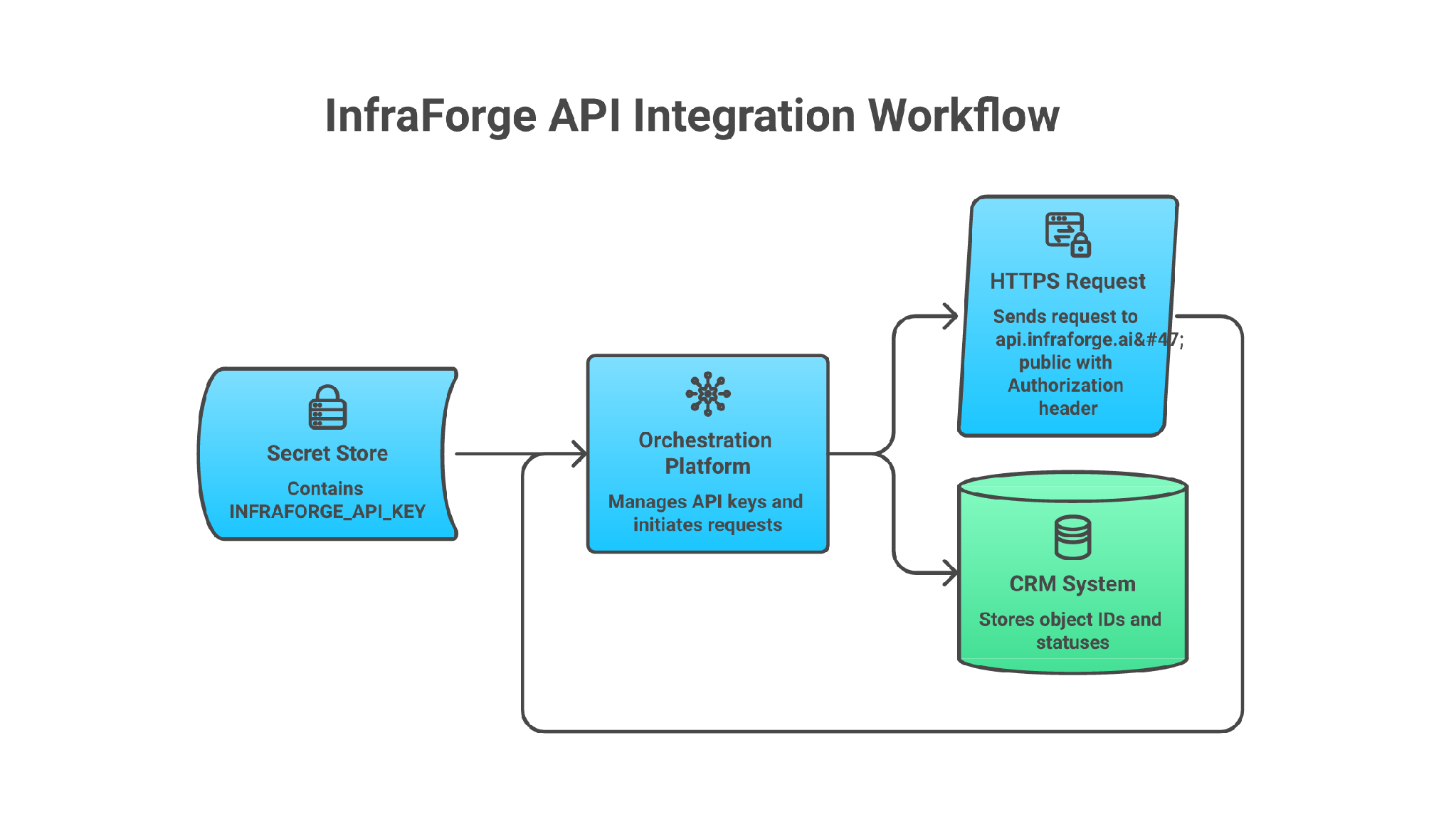
The REST Swagger uses this API-key scheme:
export INFRAFORGE_BASE_URL="https://api.infraforge.ai/public"
export INFRAFORGE_API_KEY="your_infraforge_api_key"

curl -fsS "$INFRAFORGE_BASE_URL/workspaces" \
  -H "Authorization: $INFRAFORGE_API_KEY" \
  -H "Accept: application/json"
A successful response is an array of workspaces:
[
  {
    "id": "wks_70my6ggvn5csfw3o27ojq",
    "name": "My Main Workspace",
    "slug": "my-main-workspace",
    "ip": "123.45.67.89",
    "mailserver": "nexus.thecyberspacelink.com",
    "createdAt": "2021-08-01T00:00:00Z",
    "updatedAt": "2021-08-01T00:00:00Z"
  }
]
Failure condition:
{
  "message": "Bad Request",
  "data": {}
}
The public spec lists 400 error responses for most endpoints. It does not publish a full authentication-error table, but your integration should still treat missing, expired, or wrong keys as stop-the-workflow failures.
One important distinction: the Forge MCP setup uses product-specific headers such as X-Infraforge-Key. That is for the MCP server path. The public Infraforge REST Swagger uses Authorization.
This is the section I would build from if I were connecting Infraforge to a GTM stack.
Each step has the request, the response shape to store, and the failure condition to handle.
Request:
There is no public REST endpoint in the Swagger for creating API keys. Generate the key in the app instead: log in to Infraforge, open Settings, open API, then generate an API key.
Response to store:
INFRAFORGE_API_KEY=your_generated_keyFailure condition:
If the Settings > API option is not visible, the account may not have API access enabled. Stop and ask an admin to enable access. Do not share a teammate’s key.
For n8n, store it as a credential or environment variable. For a backend service, use your normal secret manager. For CI, use encrypted environment secrets.
Request pattern:
INFRAFORGE_BASE_URL=https://api.infraforge.ai/public
INFRAFORGE_API_KEY=
Response to store:
Store a secret reference, not the key itself, against the workflow configuration.
Failure condition:
If the API key appears in a workflow execution log, CRM note, or Slack alert, rotate it and fix logging before continuing.
Use the production base URL from the public Swagger:
https://api.infraforge.ai/publicRequest pattern:
curl -fsS "$INFRAFORGE_BASE_URL/workspaces" \
  -H "Authorization: $INFRAFORGE_API_KEY" \
  -H "Accept: application/json"
Response to store:
Store the HTTP status, request timestamp, and whether the connection test passed.
Failure condition:
If DNS, TLS, timeout, or 401-style authentication failures happen, do not retry writes. Fix connectivity or credentials first.
Use GET /workspaces as the first test because it does not buy anything.
Request:
curl -fsS "$INFRAFORGE_BASE_URL/workspaces" \
  -H "Authorization: $INFRAFORGE_API_KEY" \
  -H "Accept: application/json"
Successful response shape:
[
  {
    "id": "wks_70my6ggvn5csfw3o27ojq",
    "name": "My Main Workspace",
    "slug": "my-main-workspace"
  }
]
Failure condition:
A 400 body follows the shared error schema:
{
  "message": "error message",
  "data": {}
} Use a workspace to separate clients, regions, brands, or outbound pods.
Request:
curl -fsS -X POST "$INFRAFORGE_BASE_URL/workspaces" \
  -H "Authorization: $INFRAFORGE_API_KEY" \
  -H "Content-Type: application/json" \
  -H "Accept: application/json" \
  -d '{
    "name": "germany-saas-outbound",
    "attachUniqueIp": false
  }'
Successful response shape:
{
  "id": "wks_70my6ggvn5csfw3o27ojq",
  "accountId": "acc_2cet0p4tov4isv3v1ncyy",
  "name": "My Main Workspace",
  "slug": "my-main-workspace",
  "createdAt": "2021-08-01T00:00:00Z",
  "updatedAt": "2021-08-01T00:00:00Z"
}
Store id as infraforge_workspace_id in the CRM or ops database.
Failure condition:
If the workspace name is missing, the request fails validation. If a workspace may already exist, list workspaces first and match by your CRM campaign ID or naming convention. The public spec does not document an idempotency key, so your system needs its own dedupe check.
Check domains before purchase. Do not let the workflow buy whatever an SDR typed into a form.
Request:
curl -fsS -X POST "$INFRAFORGE_BASE_URL/check-domain-availability-bulk" \
  -H "Authorization: $INFRAFORGE_API_KEY" \
  -H "Content-Type: application/json" \
  -H "Accept: application/json" \
  -d '{
    "domains": ["example-one.com", "example-two.com"]
  }'
Successful response shape:
[
  {
    "domain": "example-one.com",
    "available": true,
    "price": 12,
    "minCreationPeriodMonths": 12
  }
]
Failure condition:
The bulk endpoint accepts 1 to 100 domains. More than 100 domains should be split into batches. Reject domains that are unavailable, too close to protected trademarks, too similar to the primary domain, or not approved by the campaign owner.
Use POST /domains to buy domains and attach them to a workspace.
Request:
curl -fsS -X POST "$INFRAFORGE_BASE_URL/domains" \
  -H "Authorization: $INFRAFORGE_API_KEY" \
  -H "Content-Type: application/json" \
  -H "Accept: application/json" \
  -d '{
    "workspaceId": "wks_70my6ggvn5csfw3o27ojq",
    "domains": ["example-one.com"],
    "contactDetails": {
      "firstName": "Jon",
      "lastName": "Doe",
      "organization": "Infraforge",
      "jobTitle": "CEO",
      "email": "[email protected]",
      "phone": "+370.68883107",
      "address1": "123 Main St",
      "city": "San Francisco",
      "province": "CA",
      "postalCode": "94105",
      "country": "US",
      "dmarcEmail": "[email protected]",
      "forwardToDomain": "example.com"
    }
  }'
Successful response shape:
{
  "domains": [
    {
      "id": "dom_9xh7elemavnvew01itfxc",
      "workspaceId": "wks_70my6ggvn5csfw3o27ojq",
      "sld": "example-one",
      "tld": "com",
      "status": "pending",
      "forwardingStatus": "pending",
      "ssl": false,
      "masking": false
    }
  ],
  "setup": {
    "id": "set_0d8l2a3u3c3wcn6suq6nn",
    "status": "processing"
  },
  "invoice": {
    "id": "invoice-id",
    "total": 2852,
    "amountPaid": 2852
  }
}
Failure condition:
This endpoint can charge the account. Put manager approval before this step. Store the invoice ID, domain IDs, and setup ID. If status is pending or setup is processing, do not assume the domain is ready.
If you already own the domains, use the transfer endpoints instead of buying new ones. The public spec includes domain transfer and nameserver-info operations, so keep transfer as a separate branch in your workflow.
Use POST /mailboxes/generate when you want Infraforge to generate mailbox variants from names and domains.
Request:
curl -fsS -X POST "$INFRAFORGE_BASE_URL/mailboxes/generate" \
  -H "Authorization: $INFRAFORGE_API_KEY" \
  -H "Content-Type: application/json" \
  -H "Accept: application/json" \
  -d '{
    "domains": ["example-one.com"],
    "count": 2,
    "type": "predefined",
    "forwardingEmail": "[email protected]",
    "predefinedNames": [
      {
        "firstName": "Mia",
        "lastName": "Stone",
        "signature": "Best, Mia"
      },
      {
        "firstName": "Noah",
        "lastName": "Reed",
        "signature": "Best, Noah"
      }
    ]
  }'
Successful response shape:
{
  "domains": {
    "example-one.com": [
      {
        "username": "mia",
        "firstName": "Mia",
        "lastName": "Stone",
        "forwardingEmail": "[email protected]",
        "signature": "Best, Mia"
      }
    ]
  }
}
Failure condition:
The request requires count, domains, and type. Valid name types are predefined, female, male, and combo. If you use predefined, provide at least one first-name and last-name object.
Generating variants is not the same as buying live mailbox slots. Use POST /mailboxes when you need to buy mailbox accounts for the workspace.
The API exposes status fields on domains, setups, and mailboxes. Use them.
Domain statuses include:
draft, active, pending, failed, expiredMailbox statuses include:
draft, active, pending, processing, failedSetup statuses include:
draft, processing, completed, deletedPoll domains:
curl -fsS "$INFRAFORGE_BASE_URL/domains?search=example-one.com" \
  -H "Authorization: $INFRAFORGE_API_KEY" \
  -H "Accept: application/json"
Poll mailboxes:
curl -fsS "$INFRAFORGE_BASE_URL/mailboxes?workspace_id=wks_70my6ggvn5csfw3o27ojq" \
  -H "Authorization: $INFRAFORGE_API_KEY" \
  -H "Accept: application/json"
Successful mailbox response shape:
[
  {
    "id": "mbx_1duj5a6534j37kzook2l9",
    "workspaceId": "wks_70my6ggvn5csfw3o27ojq",
    "email": "[email protected]",
    "domain": "example.com",
    "firstName": "Jon",
    "lastName": "Doe",
    "status": "active",
    "forwardingEmail": "[email protected]"
  }
]
Failure condition:
Do not export mailboxes while status is pending or processing. Stop on failed and write the failure back to the CRM with the object ID. Use bounded polling, such as every 5 minutes for 60 minutes, then escalate to a human owner.
The public Swagger does not publish webhook endpoints for Infraforge REST. Build polling unless the product team gives you a private webhook contract.
For Salesforge, use the dedicated endpoint POST /mailboxes/export-to-salesforge.
Request:
curl -fsS -X POST "$INFRAFORGE_BASE_URL/mailboxes/export-to-salesforge" \
  -H "Authorization: $INFRAFORGE_API_KEY" \
  -H "Content-Type: application/json" \
  -H "Accept: application/json" \
  -d '{
    "fromWorkspaceId": "wks_70my6ggvn5csfw3o27ojq",
    "toWorkspaceId": "salesforge_workspace_id",
    "toWarmforgeWorkspaceId": "warmforge_workspace_id",
    "tagName": "germany-saas-outbound",
    "warmupActivated": true,
    "includedIds": ["mbx_1duj5a6534j37kzook2l9"]
  }'
Successful response shape:
[
  {
    "id": "mbx_1duj5a6534j37kzook2l9",
    "email": "[email protected]",
    "firstName": "Jon",
    "lastName": "Doe",
    "status": "active"
  }
]
Failure condition:
A 409 conflict can return mailbox addresses that could not be imported:
{
  "message": "conflict message",
  "data": {
    "addresses": ["[email protected]"]
  }
}
Treat conflicts as a data problem, not a retry problem. Write the conflicting addresses back to the CRM and ask the owner whether to skip, rename, or manually resolve.
For CSV export, use POST /workspaces/{workspaceID}/mailboxes/export. Supported export types in the public spec include sf, sl, inst, first_quadrant, luna, reply_io, mailivery, woodpecker, superagi, pipelime, and masterinbox.
Infraforge is not your source of truth for GTM ownership. Your CRM or ops database should know what happened.
For HubSpot, I would store these fields on a custom object such as Outbound Infrastructure Request:
Failure condition:
If CRM writeback fails, pause the workflow. Infrastructure created without CRM status is how teams lose track of spend, ownership, and launch readiness.
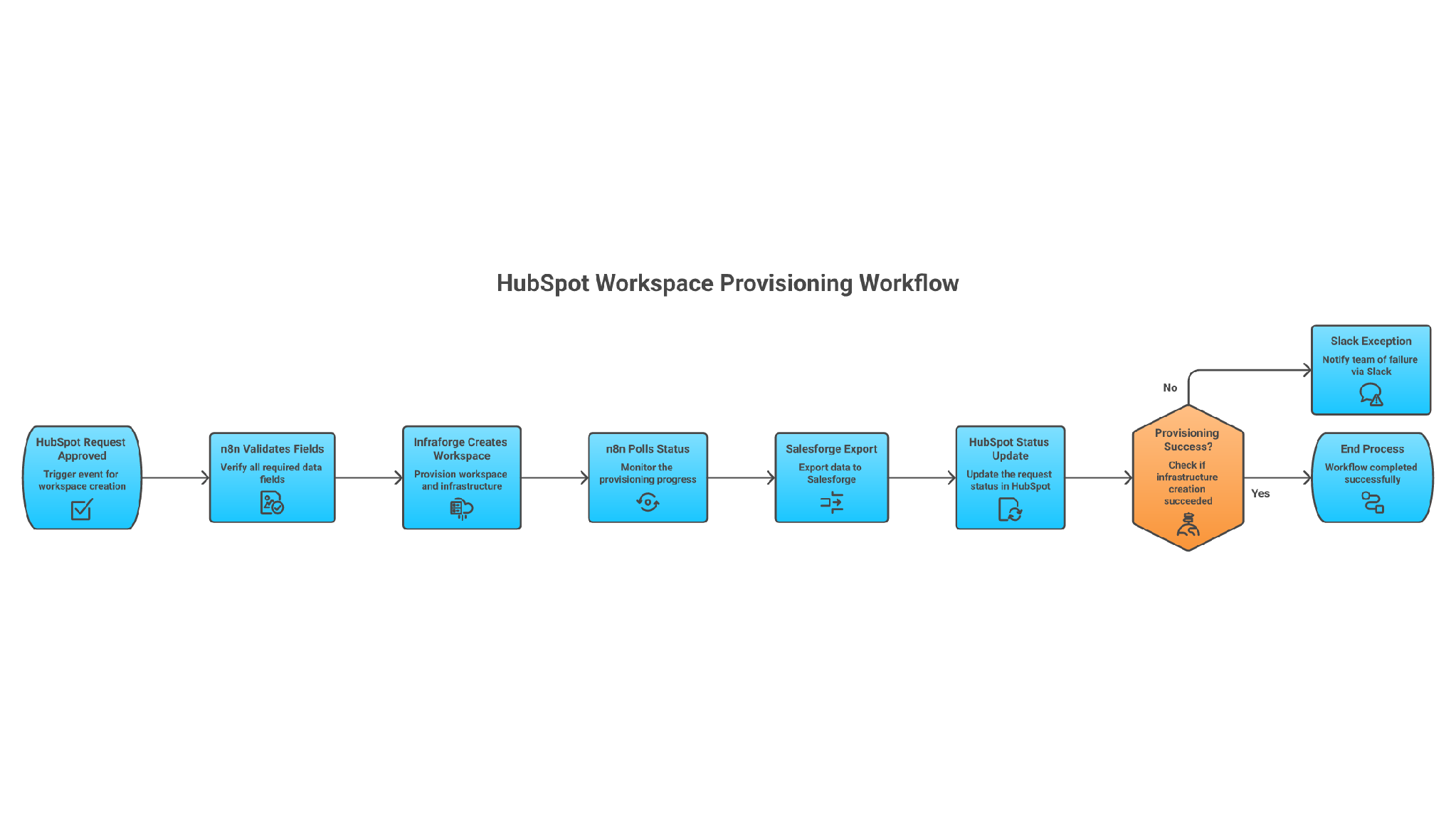
Here is the simplest useful version.
HubSpot creates a custom object record called Outbound Infrastructure Request.
Required fields:
n8n watches for records where budget_approved = true and provisioning_status = approved.
The n8n flow should run like this:
I would send Slack alerts only for exceptions: failed payment, unavailable domains, provisioning timeout, mailbox conflict, or missing Salesforge workspace ID.
Do not send Slack alerts for every successful step. That creates noise and people stop reading the alerts.
This is where most GTM automations fail.
They work once in a demo, then break when a card fails, a domain is unavailable, a mailbox is still processing, or the CRM sends the same event twice.
Use this operating table:
A sane retry policy:
For pre-warmed mailbox inventory, use pagination like this:
curl -fsS "$INFRAFORGE_BASE_URL/mailboxes/pre-warmed?limit=100&offset=0" \
  -H "Authorization: $INFRAFORGE_API_KEY" \
  -H "Accept: application/json"
The pagination object includes:
{
  "limit": 100,
  "offset": 0,
  "total": 250
}
Keep the product roles clean.
That is enough for this article.
The longer Forge Stack story belongs in category pages and product comparisons. Here, the API workflow is the point.
API access makes infrastructure repeatable. It also makes mistakes repeatable.
I would add these guardrails before letting the workflow run beyond a small pilot:
Do not let sales reps own this layer. Reps should request capacity. RevOps or a GTM engineer should control provisioning.
Pricing checked on July, 2026.
The important buying detail is the slot model.
Mailbox slots are capacity. If you buy 10 slots and use 5 mailboxes, you still pay for 10 slots. That is fine when you plan capacity properly. It is wasteful when your automation buys before the GTM plan is approved.
Also remember the wider cost boundary: Salesforge, Infraforge, Warmforge standalone use, Leadsforge, and Agent Frank are separate subscriptions when used separately. Do not sell yourself a fake all-in number.
Use the dashboard if this is your first cold email infrastructure setup, your volume is small, or nobody owns the API workflow.
The API is worth it when the work repeats:
Mailforge may be a more suitable starting point when shared infrastructure better matches your sending maturity and operational requirements. It does not remove the need for clean targeting, controlled volume, and low complaint rates.
Primeforge may be the cleaner choice when you specifically need Google Workspace or Microsoft 365 mailboxes for ESP matching.
Infraforge is the right API layer when private infrastructure, dedicated control, and repeatable GTM provisioning matter.
Enter your email to get a custom plan & stack recommendation for your business
Please check your mailbox in 5 minutes

The best Infraforge API workflow is not “automate every endpoint.”
The best workflow is controlled and boring: approved CRM request in, Infraforge workspace created, domains checked, purchases approved, mailboxes generated, statuses polled, approved senders exported to Salesforge, and the CRM updated.
That gives your GTM team a system they can trust.
If your team is still creating domains and mailboxes by hand every time outbound expands, Infraforge helps you turn that work into an infrastructure workflow. Start with one market or one client, prove the status loop, then scale it.