InboxAlly often comes up when people talk about fixing inbox placement and improving email deliverability, especially when usual best practices don’t seem to work.
Choosing an email deliverability tool usually starts with research.
You read about features, check pricing, and then look for real user feedback to see if it actually matches what’s promised.
To make that part easier, I went through 50+ InboxAlly user reviews and noted down the points that matter most before buying.
In this article, I will share what users commonly like, what they raise concerns about, how pricing is discussed, and which use cases InboxAlly is usually mentioned for, all in one place, to help you decide with confidence.
Key Takeaways
InboxAlly is an email deliverability tool that focuses on improving inbox placement through engagement, without changing existing email tools or setup.
Reviews highlight strengths like ease of use, engagement-based warmup, and visibility into inbox performance, especially for teams focused on deliverability signals.
At the same time, InboxAlly has a limited scope. It does not manage domains, mailboxes, or IPs, and reporting or integrations may feel limited as sending volume grows.
Infraforge is best InboxAlly alternative used to manage domains, mailboxes, dedicated IPs, and automated DNS setup with unlimited scaling support.
This activity shows inbox providers that the emails are being read.
Step 4: Inbox providers learn from this engagement
Email providers like Gmail and Yahoo Mail use these engagement signals to better understand your domain and sending behavior.
Step 5: Inbox placement improves over time and you can track
As inbox providers observe this engagement, they better recognize your emails as wanted.
You can track inbox placement, movement out of spam, and overall progress inside the dashboard.
InboxAlly Key Features
InboxAlly focuses on inbox placement and gives users visibility and control around how their emails are treated.
Some of the main features include:
Inbox placement support InboxAlly is built to help inbox providers recognize emails as important and wanted, using engagement instead of platform changes.
Real-time engagement tracking You can see your emails being opened and engaged with in real time.
Spam to inbox progress tracking InboxAlly lets you track movement out of spam and monitor inbox placement over time.
Broadcast visibility You can view all the broadcasts you’ve sent and track how they are performing.
Sender profile management InboxAlly allows multiple sender profiles, which can be used to support different domains or IPs based on your plan.
Works with any email sending service You don’t need to change your current sending platform to use InboxAlly.
No access to email accounts or DNS required InboxAlly does not require access to your email accounts or domain DNS records.
Sending and timing controls You can set your own sending schedule, timezone, and opening time window.
Reporting and dashboards InboxAlly provides reports that help you follow deliverability progress and engagement activity.
InboxAlly Pricing
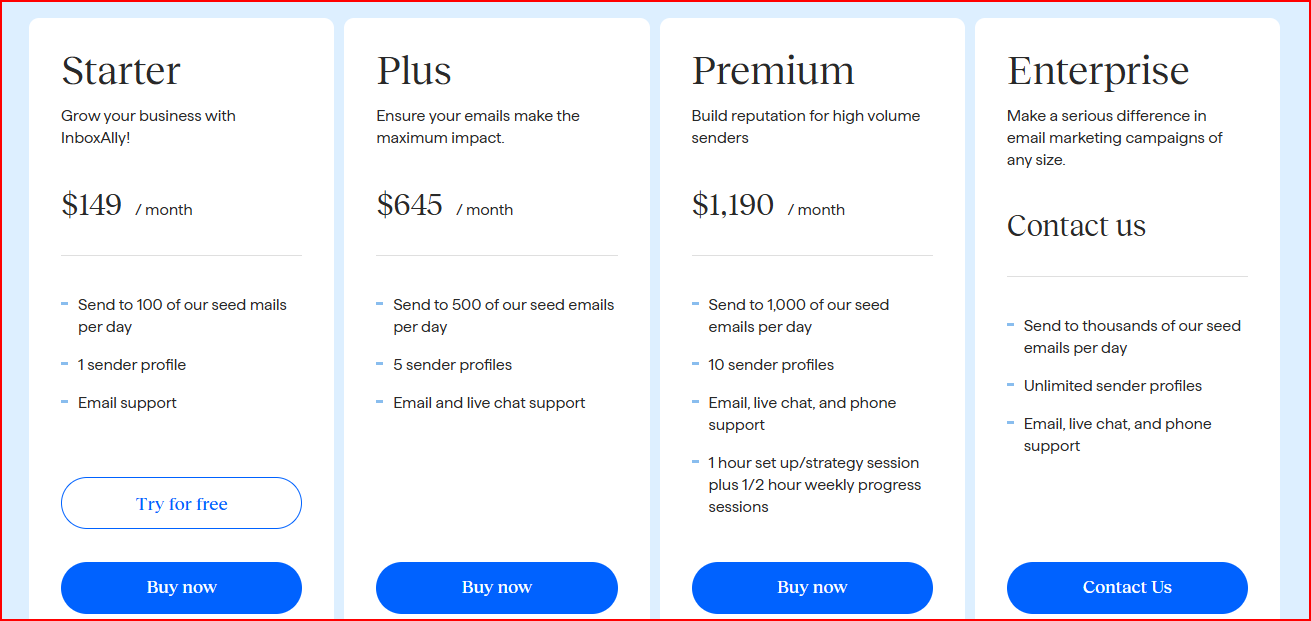
InboxAlly offers four main plans, and the right one mainly depends on how many emails you send each day and how many sender profiles you need.
This image shows the InboxAlly pricing
Starter Plan - $149/month
This plan is for smaller setups that want to improve inbox placement at a steady pace.
It lets you send to 100 seed inboxes per day and use one sender profile, with email support included.
Plus Plan - $645/month
This plan works better if you’re sending more emails and managing multiple senders.
You can send to 500 seed inboxes per day, use up to five sender profiles, and get email and live chat support.
Premium Plan - $1,190/month
This plan is meant for high-volume sending where closer guidance is helpful.
It includes 1,000 seed emails per day, ten sender profiles, and direct support with setup and weekly progress sessions.
Enterprise Plan - Custom pricing
This plan is built for very large sending needs and flexible setups.
It offers unlimited sender profiles, very high daily seed volume, and full support with customizable reporting.
What Users Liked About InboxAlly
Across the InboxAlly reviews I analyzed, a few positive themes came up again and again.
Here’s what most of users liked:
Easy navigation that keeps email testing, performance data, and list management in one place, with API support that reduces manual work through automation.
This image shows the InboxAlly user feedback about its easy navigation
Quick setup combined with detailed deliverability reports, email verification features, and dedicated support for questions and strategy help.
This image shows the InboxAlly user praising its easy setup
Multi-domain visibility, making it easier to monitor domain health, follow performance trends, and maintain inbox placement over time.
This image shows the Inboxally user review about its monitoring
Realistic engagement, including opens, clicks, replies, and movement out of spam folders using real email content, with control over warmup pace and engagement levels.
This image shows the Inboxally user review on its engagement
Automated warm-up, a clear progress-tracking dashboard, and a responsive support team that helps keep daily operations smooth.
This image shows the Inboxally user complimenting its auto warmup feature
What Users Disliked About InboxAlly
Across the InboxAlly reviews I analyzed, these concerns came up.
A learning curve at the start, especially for multi-domain or high-volume setups, which can make early usage feel complex.
This image shows the InboxAlly user feedback about its learning curve
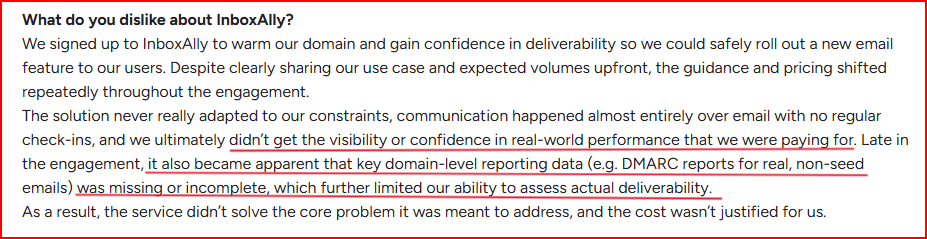
Reporting limitations, especially around domain-level data for real (non-seed) emails, which reduced visibility into actual deliverability performance.
This image shows the InboxAlly user complaining about its limited visibility of deliverablility
Requires technical understanding, particularly around DNS records, SMTP configurations, and warmup strategies, which can be challenging for less technical users.
This image shows the InboxAlly user review about its technical setup
Limited tool integrations, basic reporting, and pricing that may feel high for smaller teams.
This image shows the InboxAlly talking about its limited integration and basic reporting
Who InboxAlly Is Best For
After all this analysis, I came to the idea that InboxAlly is usually a fit for users who are focused mainly on improving email deliverability and inbox placement.
Teams or individuals sending emails at consistent or higher volumes who want to support inbox placement over time.
Mailing list owners who are struggling with inbox placement even after following basic best practices.
Cold outreach teams that want more confidence in deliverability before scaling sending.
Agencies and deliverability experts managing multiple domains or sender profiles for clients.
Email service providers looking to support customer retention by helping maintain inbox placement and open rates.
When InboxAlly May Not Be the Right Fit
I noticed InboxAlly does not suit every setup, especially depending on experience level, budget, and expectations around reporting and integrations.
Teams that are very early-stage or sending at low volume may find the setup and cost harder to justify.
Users who want a plug-and-play tool with no learning curve may find the initial setup and concepts harder to follow.
Teams that rely heavily on deep integrations or API-based automation may feel limited.
Users who need very detailed domain-level reporting for real (non-seed) emails may find the available visibility insufficient.
Smaller teams with tight budgets may find the pricing harder to fit, especially when comparing alternatives.
Infraforge: Best InboxAlly Alternative for Scaling Cold Outreach with Better Deliverability
Infraforge is a private cold email infrastructure tool built to create, manage, and scale domains, mailboxes, and dedicated IPs for cold outreach.
It handles DNS authentication automatically (SPF, DKIM, DMARC), and provides pre-warmed domains and mailboxes for faster sending.
Infraforge works with Salesforge and other sending tools.