Azure SMTP looks appealing at first because it offers built-in SMTP support through Azure Communication Services for sending emails.
It provides a structured way to send emails, with security checks, sender authentication support, and centralized control.
If you already use Azure, this can feel like a familiar and reliable place to start.
But cold email is not the same as a regular application email.
Before sending anything, it’s important to understand how Azure SMTP actually works, what kind of setup it requires, and how much control and flexibility it gives you for outbound outreach.
In this guide, we’ll walk through Azure SMTP in simple terms, break down what’s involved, and help you decide whether it truly fits your cold email use case or if another approach makes more sense
Key Takeaways
Get Infraforge to set up SMTP, domains, and mailboxes automatically and start sending your cold emails in minutes.
In cold email, “good” or “bad” is not subjective. It shows up in how easily you can send, scale, and stay deliverable over time.
A setup is considered “good” for cold email when:
A setup is considered “bad” for cold email when:
In practice, “good” cold email infrastructure reduces setup effort as volume increases.
“Bad” infrastructure makes scaling riskier and harder the more you send.
Azure SMTP is designed for sending emails from applications and internal systems, not inbox-based outreach.
It provides a centralized, authenticated SMTP service where email sending is controlled at the application level.
Emails are sent on behalf of Microsoft Entra applications, with permissions managed through roles and credentials rather than individual mailboxes.
This model suits transactional and system emails such as notifications, alerts, and account messages.
Azure SMTP assumes stable domains and predictable sending patterns.
It prioritizes security, identity control, and compliance over flexibility, rotation, or outreach-specific workflows.
As a result, Azure SMTP fits environments where email is a controlled system function rather than a scalable outbound channel.
Here’s how email sending works in Azure SMTP, step by step:
First, an application connects to Azure’s SMTP endpoint (smtp.azurecomm.net) using TLS.
The connection is authenticated with an SMTP username that maps to a Microsoft Entra application and a password that is the app’s client secret.
Emails are then sent using either an Azure-managed domain or a verified custom domain.
Azure enforces sender authentication and will not process messages from unverified domains.
Before delivery, outgoing messages pass through Azure’s built-in security, hygiene, and abuse-detection checks.
Emails that violate these rules may be delayed, modified, or blocked.
Once everything is verified, Azure SMTP sends the email to the mail servers and records delivery status for tracking.
The application gives the email to Azure, Azure checks it, and the email is sent through Azure’s SMTP system.
Before Azure SMTP can send emails, a few things need to be set up.
Here’s the full SMTP setup you need:
Before anything else:
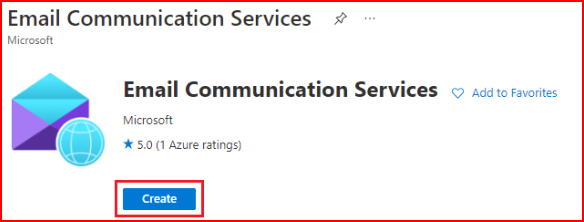
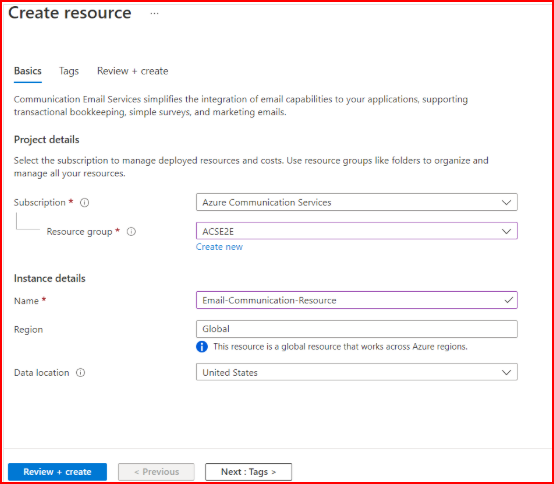
This is the base Azure uses for sending emails.
Azure needs to know which domain emails will come from.
You can use:
If you use your own domain:
Azure does not allow random systems to send emails.
So you create an application in Microsoft Entra.
So, that approval is handled by Microsoft Entra.
You must:
This step tells Azure the app is allowed to send emails.
Now Azure needs a login name for SMTP.
You:
This username is used to identify the sender during SMTP login.
SMTP also needs a password.
For Azure SMTP:
This secret proves the app’s identity.
Finally, add these details to the application SMTP settings:
After this, Azure recognizes the app and allows it to send emails.
Might be helpful for you: Common SMTP Errors and Fixes
Azure SMTP applies basic security and hygiene checks to outgoing emails as part of its normal sending process.
Azure SMTP applies mandatory security and hygiene controls to all outbound email.
These checks are built into the service and run automatically on every message.
Outgoing emails are scanned for malware, unsafe attachments, and suspicious content before delivery.
These protections are part of Azure’s standard email pipeline and cannot be disabled or customized.
Azure evaluates message content and embedded URLs to detect phishing, fraud, or policy violations.
Emails that trigger these checks may be blocked or filtered before reaching recipients.
Azure SMTP checks outgoing emails for signs of abuse or misuse.
It looks for unusual sending patterns or activity that may seem unsafe.
To do this, Azure uses built-in transport rules that run automatically. If an email triggers these rules, it may be blocked or restricted before it reaches the recipient.
All outbound emails follow internal rules and policies set by Azure.
These rules control how emails are processed and delivered.
They are managed entirely by Azure and apply the same way to all senders, with no custom rules for individual teams or campaigns.
Senders do not have control over these checks.
You cannot change how strict the rules are, skip certain checks, or override a decision made by the system.
Emails must meet Azure’s security and hygiene standards in order to be sent.
Top SMTP Security Practices for Cold Emailing
After emails are sent through Azure SMTP, Azure provides basic visibility into what happens next.

Infraforge is a cold email infrastructure that includes SMTP sending and is built specifically for outreach.
It gives you SMTP, domains, mailboxes, DNS setup, warmup, and deliverability tools.
Infraforge lets you set up domains and mailboxes quickly, without going through long technical steps.
DNS records like SPF, DKIM, DMARC, and tracking are handled automatically when you add a domain.
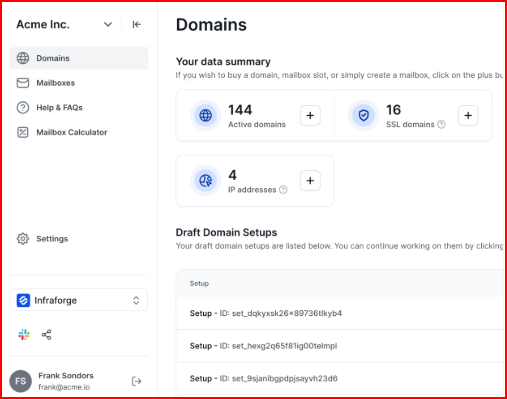
It also supports pre-warmed domains and mailboxes, which helps teams start sending sooner.
On top of that, Infraforge is designed to handle sender rotation, smart sending limits, and ongoing deliverability monitoring.
Another important part is flexibility.
Infraforge works with any sending software that supports SMTP, so you’re not locked into a single tool or workflow.
You can plug it into your existing setup and focus on outreach.
When you look at Azure SMTP, it is mainly focused on sending emails from applications.
It helps teams send emails in a secure and controlled way, with authentication, domain checks, and built-in security handled inside Azure.
This works well if sending emails from apps or B2C systems is the main goal.
But when a cold email is involved, you require more than just sending.
You also need to manage domains, mailboxes, warmup, rotation, and ongoing deliverability, and Azure SMTP keeps its scope limited to the sending layer.
Infraforge gives SMTP sending, including domain and mailbox setup, automated DNS, warmup, sender rotation, and deliverability monitoring.
This keeps infrastructure and deliverability connected instead of being handled as separate pieces.
Get started with Infraforge and set up your domains, mailboxes, SMTP, and deliverability in one place

